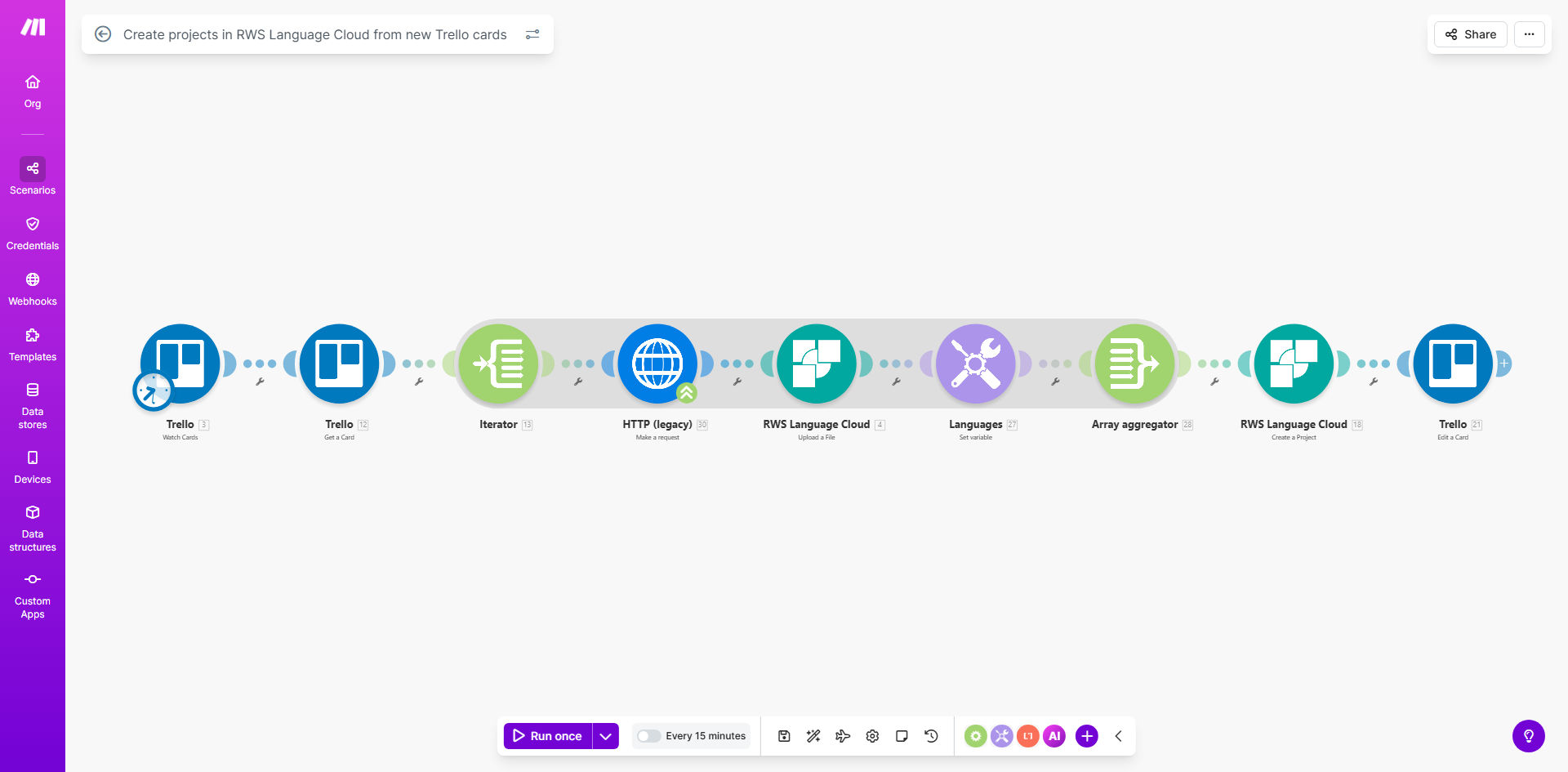
What This Workflow Does
Managing translation projects often involves a chaotic back-and-forth: files are attached to emails or Slack messages, project managers manually upload them to a translation platform, and tracking status requires constant checking across different systems. This disjointed process leads to delays, misplaced files, and a lack of visibility, ultimately slowing down global content delivery and increasing operational costs.
This automation solves that by creating a seamless bridge between your project management tool (Trello) and your professional translation platform (RWS Language Cloud). It transforms Trello from a simple to-do list into a powerful command center for your localization efforts. Every time a new card with an attachment is added to a designated list (like "To Do"), the workflow springs into action, automatically creating a corresponding project in RWS Language Cloud, uploading the file, and updating the Trello card to reflect the new status. This eliminates manual data entry, reduces errors, and gives your entire team real-time visibility into the translation pipeline.
How It Works
The workflow operates on a scheduled trigger, ensuring your translation queue is always processed efficiently without manual intervention.
Step 1: Monitor the Trello Board
The scenario is set to periodically check a specific Trello board and list (e.g., "To Do") for any new cards. It filters for cards that contain attachments, which are presumed to be the files needing translation.
Step 2: Process Card Attachments
For each new card found, the workflow retrieves the attached file. It prepares the file and relevant metadata (like the card name for project reference) to be sent to RWS Language Cloud.
Pro tip: Use consistent naming conventions in your Trello card titles (e.g., "[ES] Website Homepage Copy") to automatically populate project names and details in RWS, making finished projects easier to identify.
Step 3: Create Project in RWS Language Cloud
The core action: the workflow uses the RWS Language Cloud API to create a new translation project. It uploads the file from Trello and sets up the project based on your predefined settings in RWS, such as target language, workflow, and due date.
Step 4: Update Trello & Move Card
Once the project is successfully created in RWS, the automation provides feedback to Trello. It can update the card description with the new RWS project ID or link, and then automatically move the card to a new list, such as "In Translation." This visual update signals to your team that the request has been received and is being processed.
Who This Is For
This automation is a game-changer for marketing teams, global support departments, software companies, and any business that regularly localizes content. It's perfect for:
- Marketing & Content Teams: Managing the translation of blog posts, social media content, ad copy, and website updates.
- Product & Software Companies: Handling localization of UI strings, help documentation, and release notes.
- Global Operations: Coordinating the translation of internal communications, training materials, and legal documents across regions.
- Agencies: Streamlining translation workflows for multiple clients, using Trello boards to keep each client's requests organized and separate.
What You'll Need
- A Make.com account (free tier available).
- A Trello account with a board set up for translation requests. You'll need your Trello API Key and Token.
- An RWS Language Cloud account with API access enabled. You'll need your RWS API credentials.
- A clear Trello board structure with at least two lists: a source list (e.g., "To Do") and a destination list (e.g., "In Translation").
Quick Setup Guide
You can have this automation running in under 30 minutes.
- Get the Template: Click "Get This Workflow" to open the template in your Make.com account.
- Connect Trello: In the first module, authorize Make.com to access your Trello account and select the specific Board and "To Do" list you want to monitor.
- Connect RWS Language Cloud: In the RWS module, input your API credentials from your RWS Language Cloud account to establish the connection.
- Map Your Data: Ensure the file attachment from the Trello card is correctly mapped to the "Create a project" action in RWS. You can customize the project name using the Trello card title.
- Set the Schedule: Configure how often the scenario should run (e.g., every 15 minutes, hourly) based on your request volume.
- Test & Activate: Run a single cycle manually by adding a test card with an attachment to your Trello "To Do" list. Verify that a project is created in RWS and the card moves. Then, turn the scenario on.
Key Benefits
Cut project initiation time from 15+ minutes to under 60 seconds. By removing manual uploads and data entry, your team can process translation requests almost instantly, accelerating your time-to-market for global content.
Eliminate costly errors from manual file handling. The automation guarantees that the correct file from the correct card is sent to the translation platform, removing the risk of human error in file selection or project setup.
Gain full visibility and accountability. With Trello cards automatically moving through lists like "To Do" → "In Translation" → "Review," every stakeholder has a real-time, visual dashboard of the entire localization pipeline's status.
Scale your localization efforts without scaling overhead. As your business grows and translation volume increases, this automated system handles the additional load seamlessly, preventing administrative bottlenecks and allowing your team to focus on strategic work.
Improve vendor management and cost tracking. By having every request originate from a standardized Trello card, you create an audit trail that simplifies tracking project volume, turnaround times, and costs associated with your RWS Language Cloud usage.