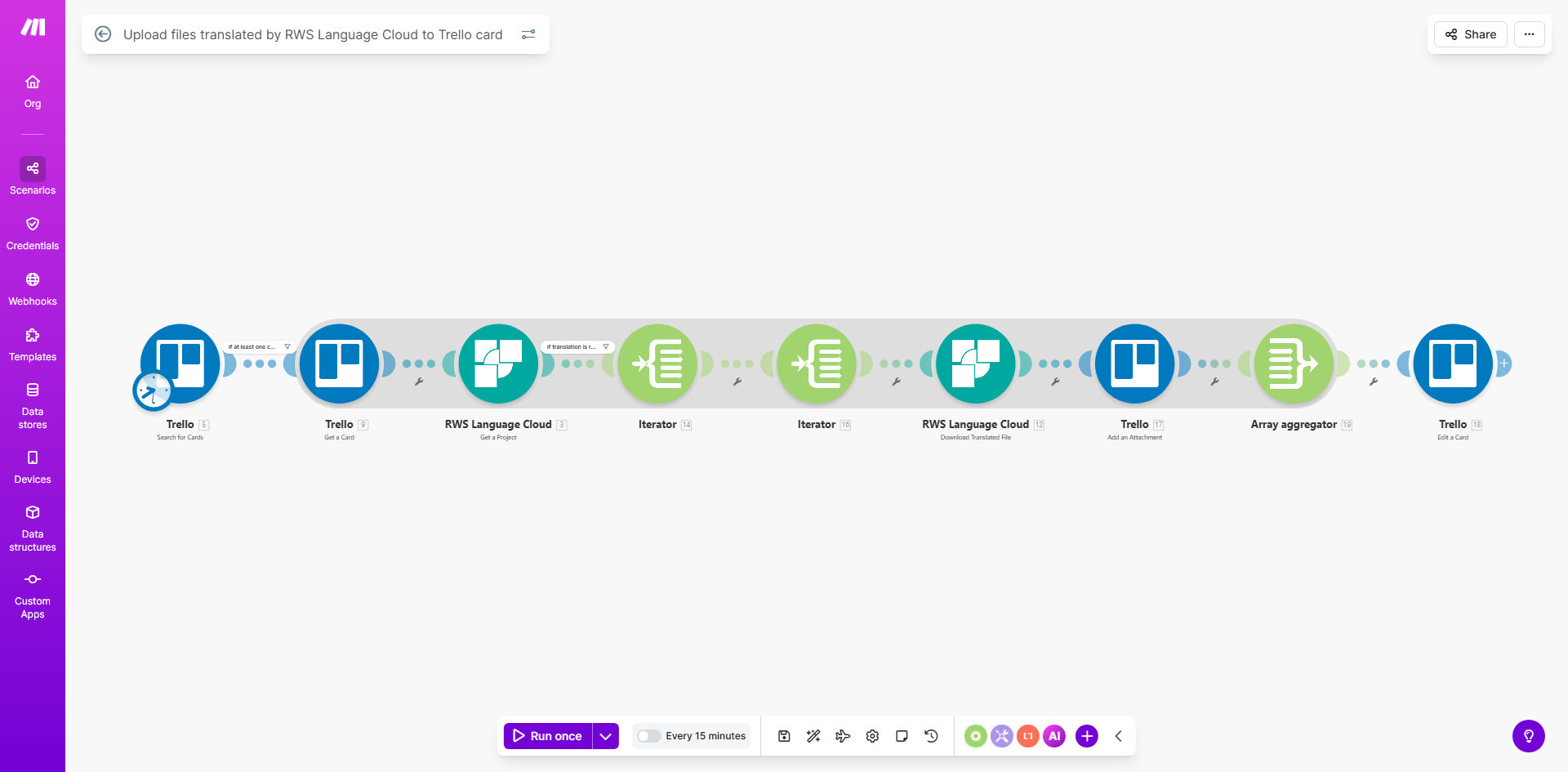
What This Workflow Does
Managing translation projects often involves a frustrating game of "check and chase." Project managers create a task in Trello, send files to RWS Language Cloud for translation, and then must manually log back in every few hours to see if the files are ready. Once they are, the manager downloads the files and manually uploads them back to the Trello card, updating its status. This process is repetitive, error-prone, and steals valuable time from strategic work.
This Make.com automation solves that by creating a seamless bridge between RWS Language Cloud and Trello. It acts as a diligent assistant that checks the translation status of every project in your "Translation in Progress" Trello list. When a translation is marked as complete in RWS, the workflow automatically retrieves the final files and attaches them directly to the corresponding Trello card. It then moves the card to a "Translation Complete" or "Review" list, signaling the next step to your team. The entire process runs silently in the background every 15 minutes, ensuring no project gets stuck waiting for a manual update.
How It Works
The workflow operates on a scheduled trigger, creating a continuous loop of monitoring and action that keeps your translation pipeline flowing.
Step 1: Monitor Trello for Active Translation Cards
The automation starts by connecting to your Trello board and pulling all cards from a specific list, such as "Awaiting Translation." It reads each card's description to find the unique RWS Language Cloud Project ID that you've stored there when the project was created.
Step 2: Check Translation Status in RWS Language Cloud
For each card, Make.com uses the found Project ID to query the RWS Language Cloud API. It checks the project's status, looking specifically for a "ready" or "completed" signal that indicates the translated files are finalized and available for download.
Pro tip: Ensure your Trello card description consistently includes the RWS Project ID in a clear, parsable format (e.g., "RWS Project ID: ABC-12345"). This is the crucial link the automation needs to work.
Step 3: Retrieve and Attach Translated Files
If the RWS project status is "ready," the workflow proceeds to retrieve the translated document files from RWS Language Cloud. It then uploads these files as attachments directly to the original Trello card. This creates a permanent, accessible record of the final deliverable right where the task is tracked.
Step 4: Move Card and Update Workflow
Finally, the automation moves the Trello card from the "Awaiting Translation" list to a designated next-step list, such as "Ready for Review" or "Complete." This visual update instantly informs your team that the translation phase is finished and the files are attached, ready for the next action.
Who This Is For
This automation is a game-changer for any team or business that regularly commissions translations and uses Trello for project tracking. It's ideal for marketing teams localizing campaign materials, software companies translating UI strings, e-commerce businesses managing multilingual product descriptions, and enterprise localization departments. Freelance translators or small agencies managing client projects through Trello can also use this to automate delivery to their clients, creating a professional, hands-off experience.
What You'll Need
- A Make.com account (free or paid plan).
- A Trello account with a board set up for translation project management.
- An RWS Language Cloud account with API access enabled.
- API credentials (keys/tokens) for both Trello and RWS Language Cloud, ready to connect in Make.com.
- A consistent process where the RWS Project ID is added to the description of the corresponding Trello card when a translation job is created.
Quick Setup Guide
You can have this automation running in under 15 minutes by following these steps.
- Get the Template: Click "Get This Workflow" to copy the template to your Make.com account.
- Connect Your Apps: In the Make.com scenario editor, establish connections to your Trello and RWS Language Cloud accounts using your API credentials.
- Configure Trello Module: Point the first module to your specific Trello board and the list that holds cards waiting for translation (e.g., "In Translation").
- Configure RWS Module: Ensure the RWS module is set to check the project status using the ID pulled from the Trello card description.
- Set the Schedule: The template is preset to run every 15 minutes. You can adjust this interval (e.g., every hour) in the schedule module based on your project urgency.
- Test and Activate: Turn on the scenario and test it with a Trello card that has a completed RWS project. Watch as the file is attached and the card moves automatically.
Key Benefits
Eliminate Manual Monitoring and Save 5+ Hours Per Week: No more logging into RWS repeatedly to check statuses. The automation does this for you around the clock, freeing project managers for higher-value tasks like quality assurance and stakeholder communication.
Accelerate Project Velocity by Reducing Handoff Delays: Translations are delivered to the task card the moment they are ready, shaving hours or even days off project timelines. The automatic card movement provides instant visual progress updates for the entire team.
Ensure Accuracy and Version Control: By automatically attaching the final files from RWS directly to Trello, you eliminate the risk of someone downloading, renaming, or emailing an incorrect file version. The source-of-truth document is always linked to the task.
Create a Transparent and Auditable Process: Every step—from card creation to file attachment—is logged within the automation and visible on Trello. This creates a clear audit trail for project timelines and deliverables, which is invaluable for client reporting and internal reviews.
Scale Your Translation Operations Effortlessly: The system doesn't care if you have one translation card or one hundred. It processes each one with the same efficiency, allowing you to handle increased volume without adding administrative overhead or hiring more coordinators.