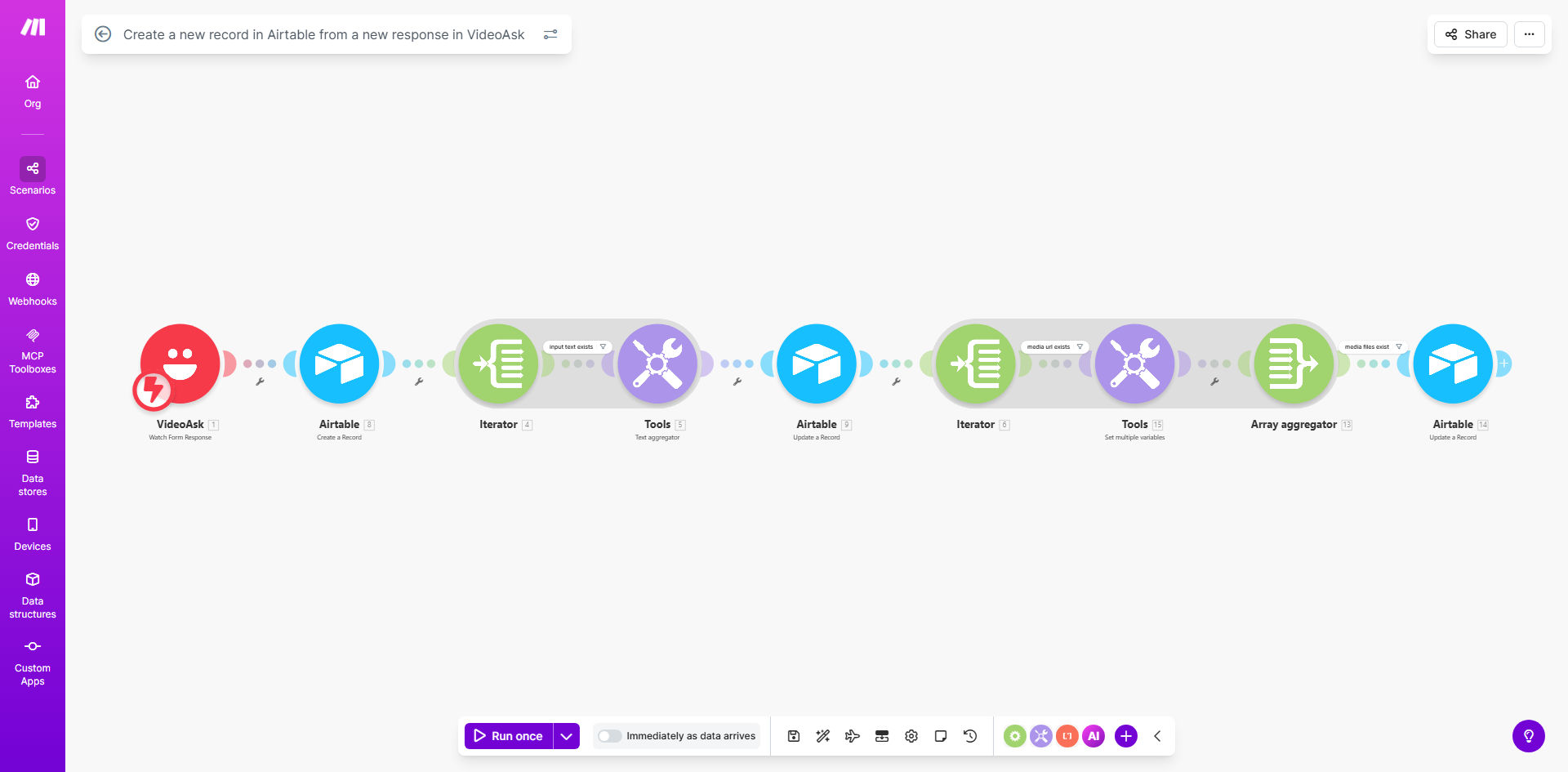
What This Workflow Does
Manually copying information from video interviews, screening calls, or interactive forms into a spreadsheet is a tedious and error-prone task. It creates data silos, delays follow-ups, and means valuable context from video responses is often lost. This automation solves that by creating a seamless bridge between VideoAsk, a powerful interactive video platform, and Airtable, a flexible database.
Every time a candidate, lead, or customer completes your VideoAsk, this workflow triggers instantly. It captures all submitted data—including text answers, uploaded video files, and audio responses—and creates a comprehensive, searchable record in your designated Airtable base. This transforms a manual administrative chore into a fully automated data pipeline, ensuring your team has immediate, organized access to rich prospect information.
How It Works
The workflow acts as an intelligent data router, listening for new submissions and formatting them perfectly for your database.
Step 1: Trigger on New VideoAsk Response
The automation is initiated the moment a new response is submitted in your connected VideoAsk account. Make.com detects this new event instantly, pulling in the entire response payload.
Step 2: Parse and Structure Response Data
The workflow intelligently processes the incoming data. It separates text answers from media files (video/audio), handling different question types and formatting the information into a clean, structured dataset ready for Airtable.
Pro tip: Use this step to filter or score responses. You can add a simple module to check for keywords in answers (like "urgent" or "budget approved") and add a "Priority" flag to the record before it reaches Airtable.
Step 3: Create a Rich Record in Airtable
The processed data is then sent to your specified Airtable base and table. The workflow maps each VideoAsk question to a corresponding Airtable field, creating a new record. Crucially, it also uploads and attaches any video or audio files, storing them as clickable links within the record.
Who This Is For
This automation is a game-changer for any professional or team that relies on video interactions to gather information. Recruiters and HR teams can automate candidate screening, instantly populating their talent pipeline with video interviews. Coaches, consultants, and service providers can streamline client intake forms, capturing needs and preferences directly into their project management base. Marketers and sales teams can qualify leads from interactive video ads or surveys, ensuring hot prospects are logged and followed up on immediately.
What You'll Need
- A Make.com account (free tier available).
- An active VideoAsk account with a form or interview you want to connect.
- An Airtable account with a base and table ready to receive the data. Ensure you have created the necessary text and attachment fields to match your VideoAsk questions.
- (Optional) A basic understanding of your data flow—know which VideoAsk questions you want to capture and where they should go in Airtable.
Quick Setup Guide
- Clone the Template: Click "Get This Workflow" to copy the template into your Make.com account.
- Connect Your Apps: In the Make.com scenario editor, authorize the connections to your VideoAsk and Airtable accounts.
- Configure the Trigger: Select the specific VideoAsk form or interview you want to monitor for new responses.
- Map Your Data: In the Airtable module, select your target base and table, then map the data from VideoAsk to the correct Airtable fields. The template provides a clear structure to follow.
- Test & Activate: Use the "Run once" feature to test the workflow with a real past response. Verify the record appears correctly in Airtable, then turn the scenario "ON" to automate all future responses.
Key Benefits
Eliminate 2–5 hours of manual data entry per week. Free your team from the repetitive task of transcribing video responses and copying information between platforms, allowing them to focus on high-value activities like engaging with leads or candidates.
Achieve 100% data capture accuracy. Automated syncing removes human error from the equation. Every single response, including nuanced video answers, is captured exactly as submitted and stored reliably in your central database.
Speed up lead response time from days to minutes. With new prospect data appearing instantly in Airtable, your sales team can be notified and initiate contact while the interaction is still fresh, significantly increasing conversion rates.
Build a searchable video library of interactions. All video and audio responses are permanently archived within Airtable, creating a valuable asset for reviewing candidate performances, auditing client needs, or training your team.
Unlock advanced workflows with centralized data. Once data is in Airtable, you can easily connect it to other tools for automated email follow-ups, CRM updates, dashboard reporting, and team notifications, creating a powerful ecosystem around your VideoAsk interactions.