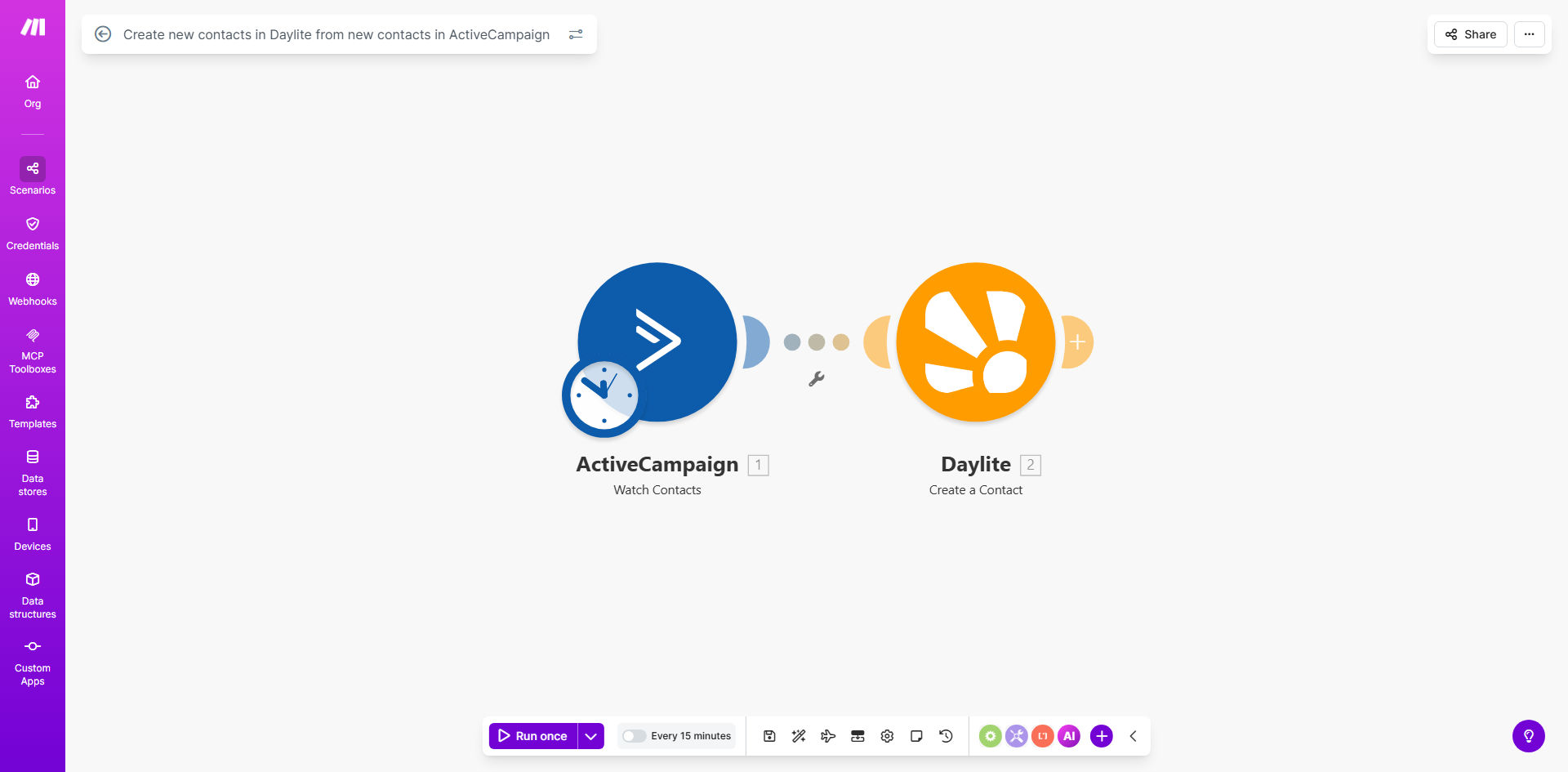
What This Workflow Does
For businesses using ActiveCampaign for email marketing and Daylite for CRM and sales management, a critical gap often exists: new leads and subscribers in ActiveCampaign don't automatically appear in the sales team's Daylite workspace. This forces salespeople to manually check for new contacts, copy-paste information, and risk missing timely follow-ups. This disconnect slows down sales cycles and creates data silos between marketing and sales departments.
This Make.com automation solves that problem by acting as a real-time bridge. It automatically detects when a new contact is added to your ActiveCampaign account, retrieves their details (like name, email, company, and custom fields), and instantly creates a corresponding contact record in Daylite. The workflow is scheduled to run every 15 minutes, ensuring your sales team has access to fresh leads almost as soon as they come in, without anyone lifting a finger.
Pro tip: Use this sync to pass ActiveCampaign tags (like "Webinar Attendee" or "Trial User") to Daylite. This allows your sales team to immediately understand a lead's context and tailor their outreach, dramatically increasing conversion rates.
How It Works
The automation follows a simple but powerful sequence to keep your contact databases perfectly synchronized.
Step 1: Scheduled Trigger
The workflow is initiated by a Schedule module set to run every 15 minutes. This acts as a regular "check-in" with your ActiveCampaign account to see if anything new has arrived since the last run.
Step 2: Fetch New Contacts from ActiveCampaign
Make.com connects to your ActiveCampaign account via API and searches for contacts created after the last successful run. It retrieves all relevant data for each new contact.
Step 3: Map and Transform Data
The contact information from ActiveCampaign is mapped to the corresponding field structure in Daylite. This step ensures that first names, last names, email addresses, phone numbers, and custom field data are correctly formatted for the next step.
Step 4: Create Contact in Daylite
Finally, Make.com uses the Daylite API to create a new contact record for each fetched lead. The contact is instantly available in your Daylite database, complete with all the synced information, ready for your sales team to engage.
Who This Is For
This automation is ideal for small to medium-sized businesses, agencies, and consultants who rely on ActiveCampaign for lead generation and nurturing but use Daylite for managing sales pipelines, projects, and client relationships. It's particularly valuable for sales managers tired of manual lead handoff, marketing teams wanting to prove ROI by tracking leads into the CRM, and solopreneurs who need their tools to work together seamlessly to save precious time.
What You'll Need
- A Make.com account (free tier available).
- An ActiveCampaign account with contacts and API access enabled.
- A Daylite account with administrator permissions to generate API credentials.
- The API keys or connection details for both ActiveCampaign and Daylite ready for configuration in Make.com.
Quick Setup Guide
You can have this automation running in under 10 minutes by following these steps.
- Get the Template: Click the "Get This Workflow" button above to copy the template to your Make.com account.
- Connect ActiveCampaign: In the first module, create a connection to your ActiveCampaign account using your API URL and Key (found in Settings > Developer).
- Connect Daylite: In the module that creates the contact, establish a connection to Daylite using your Account ID and Private Key (generated in Daylite's Preferences > Advanced).
- Adjust the Schedule (Optional): The default schedule is every 15 minutes. You can change this interval in the Schedule module to hourly, daily, or any other frequency that suits your lead volume.
- Turn it On: Activate the scenario. It will immediately begin checking for new contacts and syncing them to Daylite.
Key Benefits
Eliminate 2–5 hours of manual data entry per week. Your team will never have to manually transfer contact information from your marketing platform to your CRM again, freeing them for higher-value tasks like selling and customer service.
Shorten your sales cycle by ensuring instant lead follow-up. When a new lead subscribes, your sales team can see them in Daylite within minutes, not days, allowing for timely and effective outreach that significantly increases the chance of conversion.
Achieve 100% data accuracy and eliminate duplicate records. Automated syncing removes the risk of typos, missed fields, or forgotten imports that plague manual processes, ensuring your CRM data is clean and reliable.
Create a unified customer view across marketing and sales. Break down departmental silos by having a single source of truth for contact information. Sales can see a lead's marketing engagement, and marketing can track leads into the sales pipeline.
Scale your lead management process effortlessly. Whether you get 10 new leads a day or 100, the automation handles them all with the same speed and reliability, allowing your business to grow without adding administrative overhead.