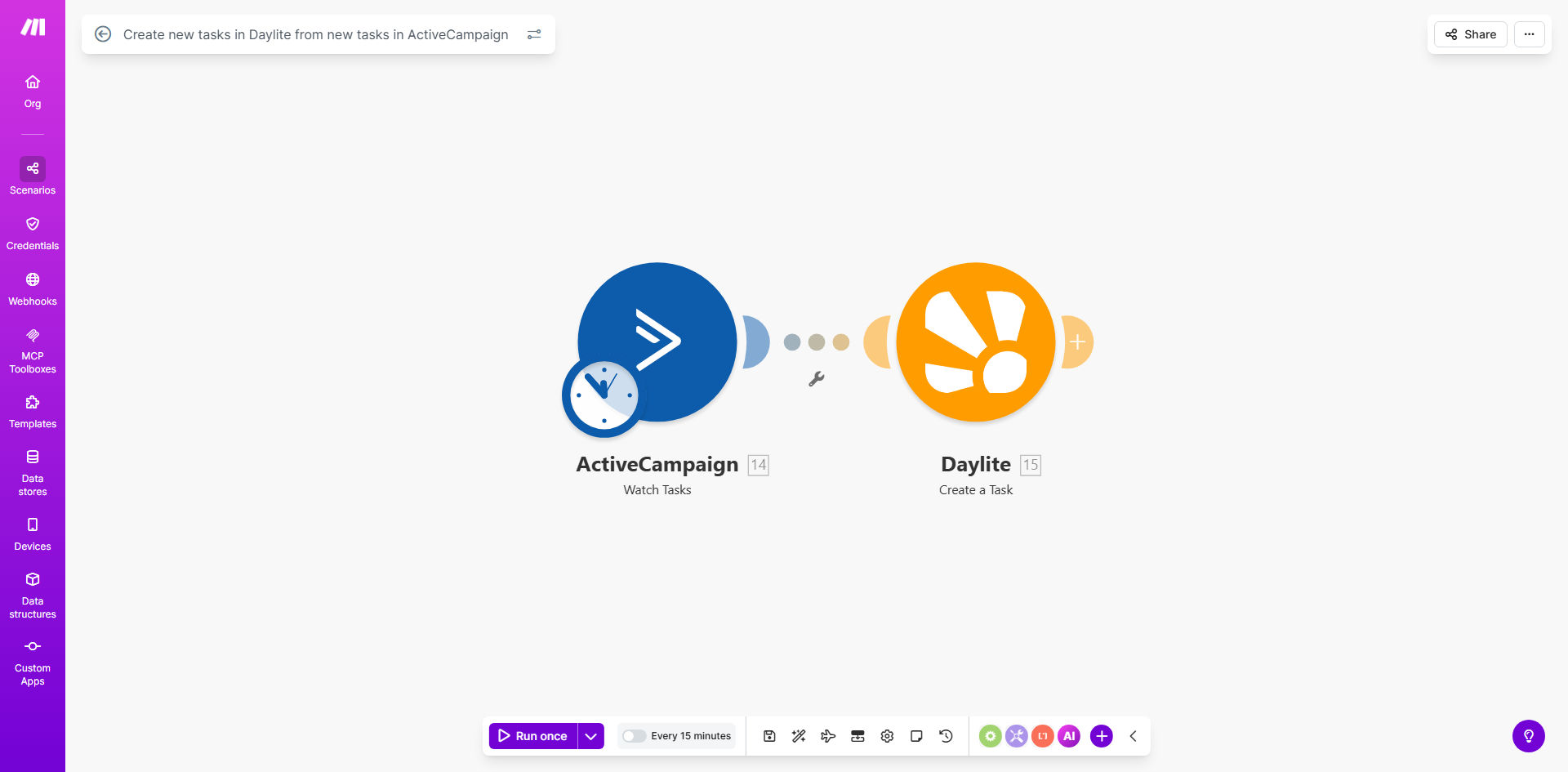
What This Workflow Does
For businesses using ActiveCampaign for marketing automation and Daylite for CRM and project management, a critical gap often exists between marketing actions and sales follow-up. When a lead scores highly, completes a form, or triggers a marketing automation, a task is created in ActiveCampaign. However, if that task isn't immediately visible to the sales team in their primary workspace (Daylite), it leads to delayed responses, missed opportunities, and frustrating manual work copying information between systems.
This automation template solves that problem by creating a live, one-way sync from ActiveCampaign to Daylite. It periodically checks for new tasks in ActiveCampaign and uses the retrieved details—like title, description, due date, and associated contact—to automatically create a corresponding task in Daylite. This bridges the marketing-to-sales handoff, ensuring every lead action gets timely attention without anyone having to switch apps or manually transcribe data.
Pro tip: Use this automation not just for lead follow-ups, but also for internal marketing tasks like "Review campaign performance" or "Update email sequence," ensuring cross-departmental accountability within Daylite.
How It Works
The workflow runs on a schedule you control, acting as a reliable bridge between your two essential business platforms.
Step 1: Scheduled Trigger & Fetch New Tasks
The automation is initiated by a Schedule module set to run at your chosen interval (e.g., every 15 minutes). It then connects to your ActiveCampaign account and searches for tasks created since the last check. This ensures no new actionable item is missed.
Step 2: Process and Map Task Data
For each new task found, the workflow extracts key information. This includes the task title, detailed notes, priority level, due date, and crucially, the linked contact record. The data is formatted and prepared to match the field requirements in Daylite.
Step 3: Create the Task in Daylite
The workflow then authenticates with your Daylite account and creates a new task. It populates the Daylite task fields with the mapped data from ActiveCampaign, assigning it to the appropriate user or team and linking it to the correct contact or company record in Daylite for full context.
Pro tip: Add a Router module after fetching tasks to filter out low-priority or internal marketing tasks, ensuring only sales-critical actions are pushed to Daylite and keeping your sales team focused.
Who This Is For
This automation is ideal for sales-driven organizations that use ActiveCampaign for lead nurturing and Daylite as their core sales and client management hub.
Marketing Agencies: To ensure campaign follow-ups for clients are instantly turned into tasks for account managers.
B2B Sales Teams: Where lead scoring and webinar sign-ups in ActiveCampaign must trigger immediate sales outreach logged in Daylite.
Small Business Owners: Who wear multiple hats and need a unified task list in Daylite without manually checking ActiveCampaign.
Consultants & Coaches: To automatically convert new inquiry form submissions or booked discovery calls into client onboarding tasks.
What You'll Need
- A Make.com account (free or paid plan).
- An ActiveCampaign account with API access enabled.
- A Daylite account with administrator permissions to generate API credentials.
- The API keys or OAuth credentials for both ActiveCampaign and Daylite ready for connection in Make.com.
- A clear understanding of which ActiveCampaign task types or pipelines should trigger the sync.
Quick Setup Guide
You can have this automation running in under 20 minutes.
- Clone the Template: Click "Get This Workflow" to copy the template into your Make.com account.
- Connect Your Apps: In the Make.com scenario editor, update the connections for both the ActiveCampaign and Daylite modules with your own API credentials.
- Configure the Trigger: Set the Schedule module to your desired frequency (start with every 15 minutes for testing).
- Map the Fields (Optional): Review the data mapping between the ActiveCampaign "Get a Task" module and the Daylite "Create a Task" module. Adjust field mappings if your custom fields differ.
- Test & Activate: Run a single test cycle to create a task in ActiveCampaign and verify it appears correctly in Daylite. Once confirmed, turn the scenario ON.
Key Benefits
Eliminate 2+ hours of manual data entry per week per salesperson. By removing the need to copy-paste task details between systems, your team reclaims valuable time for actual selling and customer conversations.
Reduce lead response time from hours to minutes. Automated task creation means sales reps are notified instantly in their primary workflow tool (Daylite), allowing them to act while the lead is hottest, significantly improving conversion rates.
Ensure 100% follow-up on marketing-generated leads. The system acts as an infallible bridge, guaranteeing that no task created by marketing automation is ever missed or forgotten by the sales team.
Improve data accuracy and context for sales. Tasks in Daylite arrive pre-populated with all relevant context from ActiveCampaign, giving sales reps the full story behind the follow-up action without switching tabs.
Scale your sales process without adding overhead. As lead volume grows, this automation handles the increased task load seamlessly, preventing operational bottlenecks and allowing your team to scale efficiently.