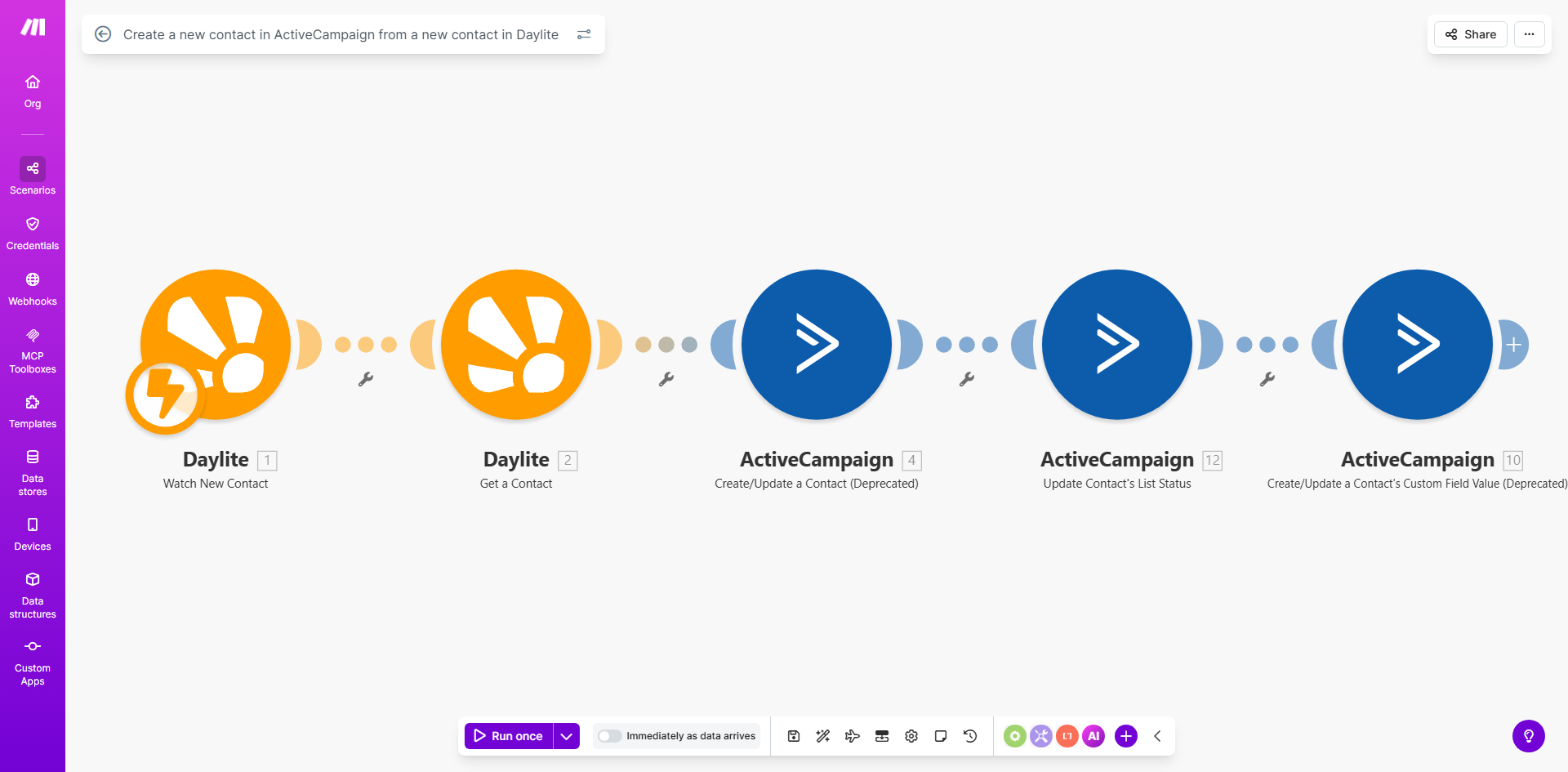
What This Workflow Does
For businesses using Daylite for sales pipeline management and ActiveCampaign for marketing automation, a major operational bottleneck is manually transferring new contact information between the two systems. Sales teams add promising leads to Daylite, but marketing can't engage them until someone copies the data over—a process prone to delays, errors, and missed opportunities.
This automated workflow solves that problem completely. It acts as a real-time bridge between your CRMs. Every time a salesperson creates a new contact in Daylite, this Make.com scenario instantly and accurately creates a corresponding contact in ActiveCampaign. Beyond just basic details, it ensures the contact is added to the correct marketing list (like "New Leads" or "Sales Qualified") and even passes along the unique Daylite Contact ID into a custom field in ActiveCampaign. This creates a permanent, searchable link between the contact record in both platforms.
The result is a seamless, synchronized system where marketing can begin nurturing a lead the moment sales identifies them, dramatically improving conversion rates and team alignment while saving hours of administrative work each week.
How It Works
The automation follows a clean, reliable sequence to ensure data integrity and useful outcomes.
Step 1: Trigger on New Daylite Contact
The workflow is initiated the instant a new contact is created within your Daylite account. Make.com watches for this event using the Daylite module's "Watch Contacts" trigger, capturing the full contact data payload.
Step 2: Map and Prepare Contact Data
The captured data—name, email, phone, company, and any custom fields—is then mapped to the corresponding fields in ActiveCampaign. You can customize this mapping to include only the data you need, ensuring a clean transfer.
Pro tip: Use this step to also assign a default "Lead Source" value in ActiveCampaign, like "Daylite Sales," to track where these high-quality contacts originated.
Step 3: Create Contact in ActiveCampaign
Make.com uses the ActiveCampaign module to create a new contact with the mapped data. The action is configured to add the contact to one or more specific lists you define, immediately enrolling them in relevant email sequences or tagging them for sales follow-up.
Step 4: Link Records with Custom Field
A critical final step is updating the newly created ActiveCampaign contact with a custom field value—the original Daylite Contact ID. This creates a two-way reference, allowing anyone to quickly find the linked record in the other system, which is invaluable for support and detailed reporting.
Who This Is For
This automation is ideal for sales-driven organizations that rely on separate tools for pipeline management and marketing execution. It's perfect for:
- Sales Teams using Daylite: Who need every new lead to instantly enter the marketing funnel in ActiveCampaign.
- Marketing Teams using ActiveCampaign: Who want a steady stream of sales-qualified leads to nurture without manual import.
- Small Business Owners: Wearing both sales and marketing hats, who need their tools to work together automatically to save precious time.
- Agencies: Managing clients who use Daylite for project/client management and ActiveCampaign for campaigns.
If you're tired of exporting CSV files, copying data, or missing the window to engage a hot lead, this workflow is for you.
What You'll Need
To implement this automation, ensure you have the following set up and ready:
- A paid Make.com account with available operations.
- An active Daylite account with API access enabled.
- An active ActiveCampaign account with API credentials.
- Administrator access or the necessary permissions in both Daylite and ActiveCampaign to create API connections.
- A clear understanding of which ActiveCampaign list you want new contacts added to.
- (Optional) A custom field created in ActiveCampaign to store the Daylite Contact ID.
Quick Setup Guide
Follow these steps to configure the template for your business:
- Clone the Template: Click "Get This Workflow" to copy the scenario to your Make.com account.
- Connect Your Apps: In the Make.com scenario, update the Daylite and ActiveCampaign modules with your own API credentials. Test the connections.
- Configure the List: In the "Create a contact" ActiveCampaign module, specify the exact list ID or name where new contacts should be added.
- Map Your Fields: Review the data mapping between Daylite and ActiveCampaign. Adjust field mappings to match your custom field names in both systems.
- Set the Custom Field: Ensure the "Update contact" module is correctly pointed to the custom field you created in ActiveCampaign for the Daylite ID.
- Test with a Dummy Contact: Run the scenario once manually by creating a test contact in Daylite. Verify it appears correctly in the designated ActiveCampaign list with the ID field populated.
- Activate: Turn on the scenario's scheduler. It will now run automatically for every new Daylite contact.
Key Benefits
Eliminate 100% of manual data entry between your sales and marketing CRMs. This workflow removes a tedious, error-prone task from your team's plate, freeing them for higher-value activities like closing deals and crafting campaigns.
Accelerate lead response time from hours/days to seconds. The moment a lead enters your sales CRM, they become available for automated welcome emails, segmentation, and scoring in your marketing platform, significantly increasing engagement likelihood.
Maintain perfect data consistency and a linked record system. Automated mapping ensures fields are transferred correctly every time, and storing the Daylite ID in ActiveCampaign provides a foolproof way to reference the original sales record, improving cross-team collaboration.
Scale your processes without adding administrative overhead. Whether you add 10 or 1000 new contacts per month, the workflow handles it instantly and reliably, allowing your business to grow without proportional increases in manual data management.
Improve sales and marketing alignment with a shared, real-time contact database. Both teams work from the same updated information, reducing confusion and enabling coordinated outreach strategies based on a complete view of the customer journey.