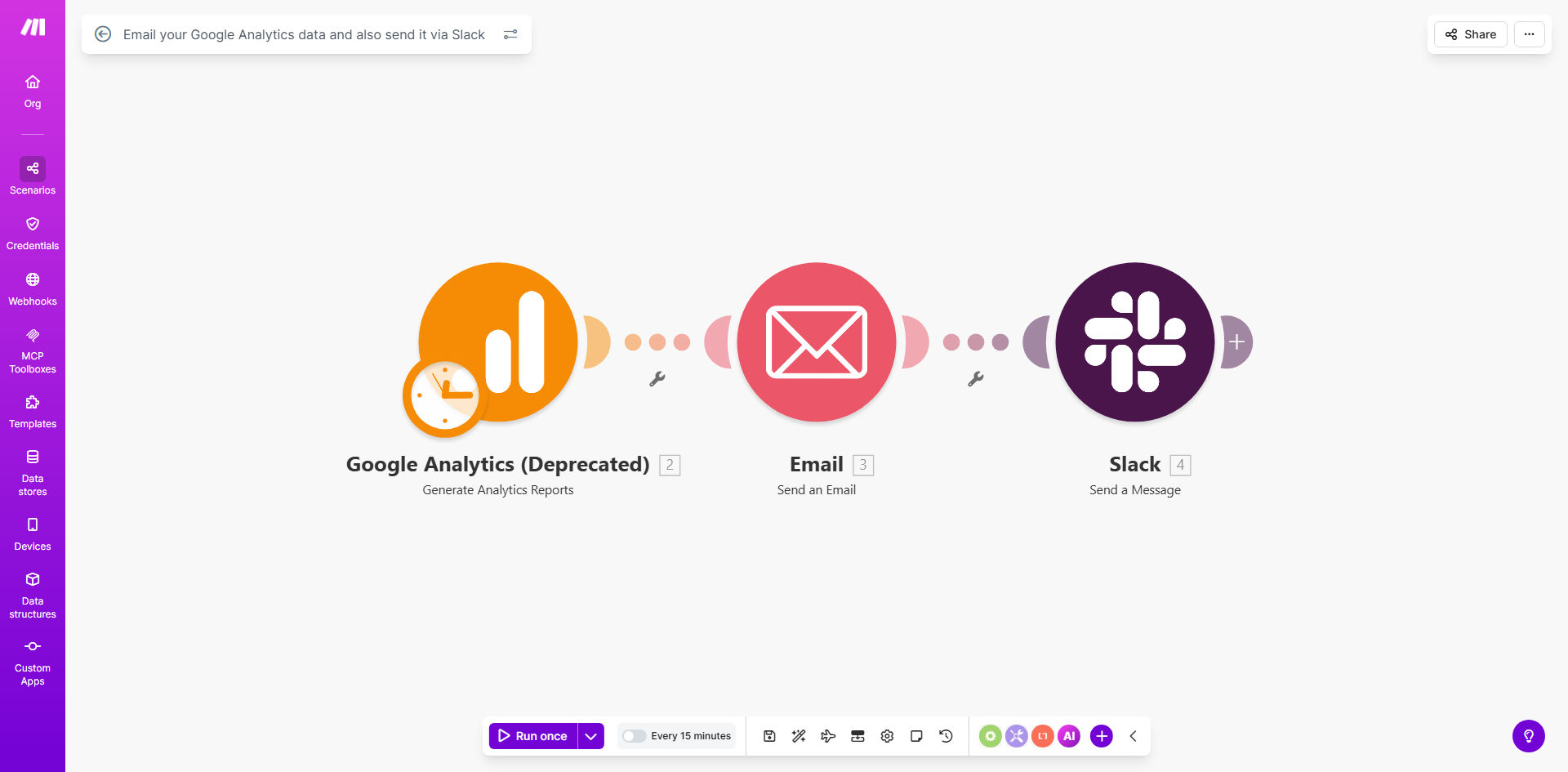
What This Workflow Does
For marketing teams, founders, and agencies, manually checking Google Analytics and creating reports is a repetitive, time-consuming task that often gets delayed. Vital performance data sits unused, and team members remain in the dark about what’s working. This creates a gap between data collection and data-driven action.
This automated workflow solves that by acting as your personal data assistant. It connects directly to your Google Analytics 4 (GA4) property, extracts key metrics like users, sessions, conversions, and revenue, and then packages this information into a clean, readable format. Finally, it delivers this report through two channels: as a formal email to stakeholders and as an instant message in a designated Slack channel. You set the schedule once—daily, weekly, or monthly—and the reports flow automatically, ensuring everyone is informed, aligned, and ready to act on insights.
How It Works
The automation follows a logical, reliable sequence to transform raw data into distributed insights.
Step 1: Scheduled Trigger & Data Fetch
The workflow is initiated on a schedule you define (e.g., every Monday at 9 AM). It then authenticates with your Google Analytics account via a secure connection and executes an API call to retrieve the specified metrics and dimensions for your chosen date range.
Step 2: Data Processing & Formatting
The raw data from GA4 is processed within Make.com. This step involves organizing the numbers, calculating percentages (like conversion rate), and structuring the information into a clear narrative. The data is prepared for both an HTML email body and a plain-text summary for Slack.
Pro tip: Use this step to filter out noise. Focus the report on 5-7 key performance indicators (KPIs) that directly relate to your business goals, making the report instantly valuable.
Step 3: Dual-Channel Distribution
The workflow branches to deliver the report two ways. First, it uses an email module (like Gmail or SMTP) to send a formatted HTML email to your pre-defined list of recipients. Second, it sends a condensed version of the report to a specific Slack channel or user via a webhook, enabling immediate team discussion.
Who This Is For
This template is ideal for any business or team that relies on website or app data to make decisions. It's perfect for digital marketing agencies reporting to clients, SaaS founders who need to track growth metrics, e-commerce managers monitoring sales performance, and in-house marketing teams that need to keep leadership and cross-functional partners updated. If you're spending more than 30 minutes a week copying numbers from GA4 into a slide or email, this automation is for you.
What You'll Need
- A Make.com account (free tier available).
- A Google Analytics 4 (GA4) property with data.
- Editor-level access to the GA4 property to set up the API connection.
- A Slack workspace where you have permission to create an incoming webhook.
- An email service (like Gmail or an SMTP server) configured in Make.com for sending.
Quick Setup Guide
You can have this automation running in under 20 minutes.
- Clone the Template: Click "Get This Workflow" to copy the template into your Make.com account.
- Connect Google Analytics: In the first module, authorize Make.com to access your GA4 data by logging into your Google account and selecting the correct property.
- Configure the Slack Webhook: In your Slack workspace, create a new incoming webhook for the desired channel and paste the unique URL into the Slack module in the workflow.
- Set Up Email: Connect your email service (e.g., Gmail) and specify the "To" addresses, subject line, and sender name.
- Customize the Data Pull: Adjust the GA4 module to request the specific metrics (e.g., activeUsers, conversions, totalRevenue) and date range (e.g., last 7 days) relevant to your reports.
- Set the Schedule: Configure the schedule module to run at your preferred interval (weekly is a great start).
- Test & Activate: Run a single test cycle to ensure the email and Slack message arrive correctly, then turn the scenario on.
Key Benefits
Save 2-4 hours of manual work every week. Eliminate the tedious process of logging into GA4, screenshotting charts, compiling data into a document, and sending emails. This time can be reinvested in analysis and strategy.
Ensure consistent and timely reporting. Reports are delivered like clockwork, eliminating human forgetfulness or delays. Your team and clients will come to rely on receiving their key data at the same time each period.
Improve data accessibility and team alignment. By pushing insights directly into Slack, you foster a culture of transparency and immediate reaction. Team members can ask questions and make decisions based on the same, fresh data.
Reduce human error in data reporting. Manual copy-pasting is prone to mistakes. An automated pipeline pulls numbers directly from the source, guaranteeing accuracy in every report you send.
Scale reporting effortlessly. Need to add another client, stakeholder, or Slack channel? Simply update the recipient list in the workflow. The automation scales to deliver to 1 or 100 people with zero extra effort.