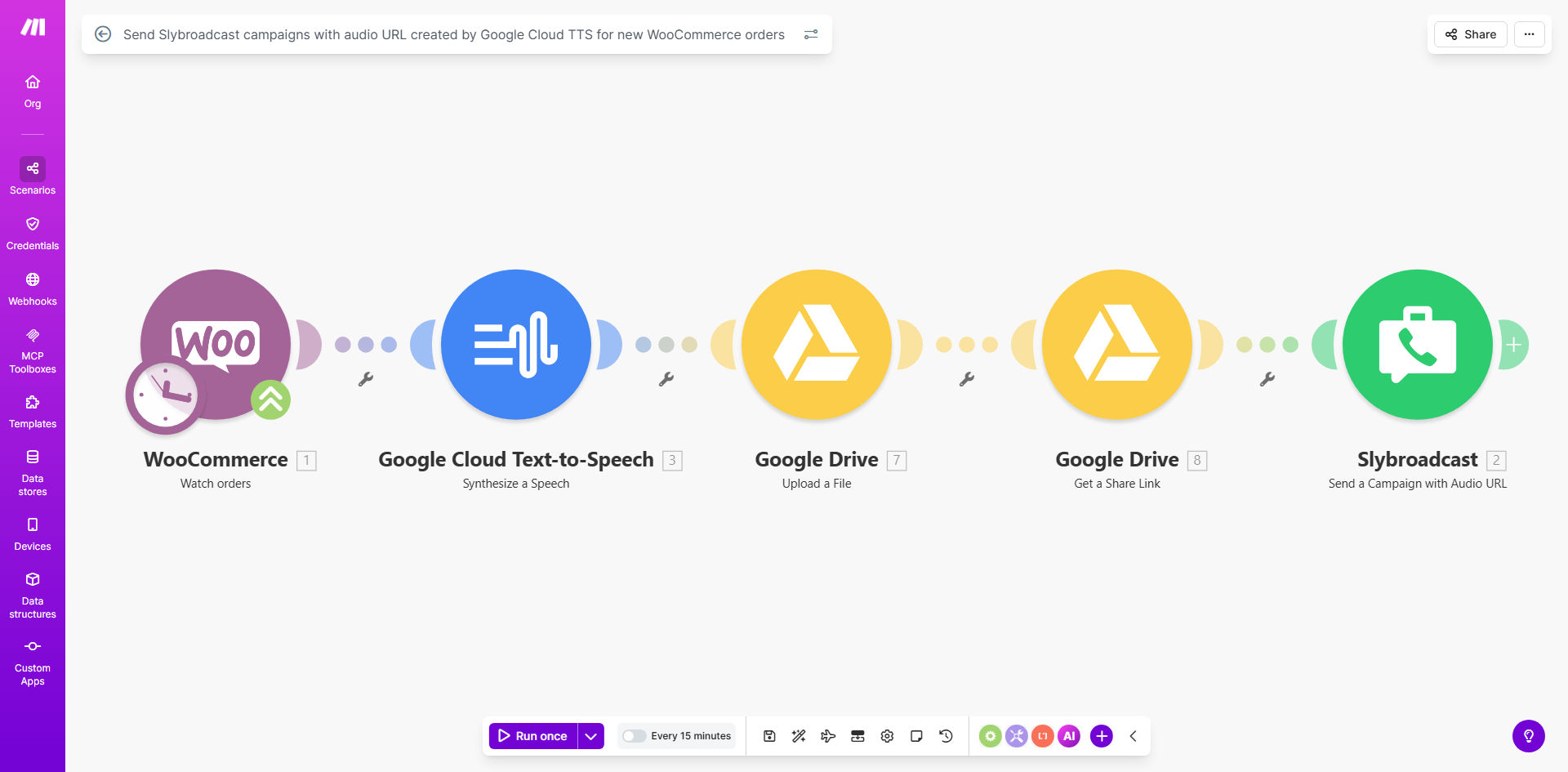
What This Workflow Does
For e-commerce businesses, timely and personal post-purchase communication is crucial for customer satisfaction and retention. However, manually calling or even texting every customer about their order status is impossible to scale. This automation solves that by creating a fully hands-off system that transforms new WooCommerce orders into professional voice call campaigns.
Whenever a new order is placed, the workflow instantly extracts key details like the order number, customer name, and items purchased. It uses Google Cloud's advanced Text-to-Speech technology to convert this information into a clear, natural-sounding audio file. This file is then uploaded to your Google Drive, a shareable link is generated, and finally, the audio is sent as a campaign to your designated list of phone numbers—typically your customers—via Slybroadcast, a platform for mass voice messaging.
Pro tip: This isn't just for order confirmations. Use it for shipping updates, delivery delays, or post-purchase feedback requests to create a standout customer experience that reduces support tickets and builds loyalty.
How It Works
The automation runs on a scheduled trigger, ensuring no new order is missed. Here’s the step-by-step process:
Step 1: Monitor for New WooCommerce Orders
The Make.com scenario is set to check your WooCommerce store at regular intervals (e.g., every 15 minutes). When a new order is detected, it captures the relevant data fields you specify, such as billing name, order total, and product names.
Step 2: Synthesize Speech with Google Cloud TTS
The captured text data is sent to Google Cloud Text-to-Speech. You can customize the voice (gender, accent, language) and speaking rate to match your brand's tone. The API returns a high-quality MP3 audio file of the spoken order summary.
Step 3: Upload & Share via Google Drive
The generated audio file is automatically uploaded to a specific folder in your Google Drive. The workflow then creates a shareable link for the file, ensuring it's accessible for the next step.
Step 4: Launch the Slybroadcast Campaign
Using the audio URL from Google Drive, the workflow triggers Slybroadcast to send a voice call campaign. You define the recipient list (which can be dynamically pulled from the order data) and schedule the call. The customer receives a phone call playing the personalized audio message about their order.
Who This Is For
This workflow is ideal for WooCommerce store owners, marketing managers, and customer success teams who want to:
- E-commerce brands seeking a competitive edge with ultra-personalized post-purchase communication.
- Businesses with high-value or time-sensitive orders (like food delivery, florists, service appointments) where immediate confirmation is critical.
- Marketing agencies managing client stores who want to implement advanced, automated customer engagement tactics.
- Companies struggling with high volume where manual follow-up is no longer feasible.
What You'll Need
- A WooCommerce store with API access enabled (WooCommerce REST API keys).
- A Make.com account (formerly Integromat) to host and run the automation scenario.
- A Google Cloud Platform account with the Text-to-Speech API enabled and service account credentials.
- A Google Drive account for storing the generated audio files.
- A Slybroadcast account with an active plan to send voice call campaigns.
Quick Setup Guide
Follow these steps to configure the template for your store:
- Clone the Template: Use the "Get This Workflow" button to copy the scenario into your Make.com account.
- Connect WooCommerce: In the first module, add your WooCommerce store URL and API keys to establish the connection.
- Configure Google Cloud TTS: Add your Google Cloud service account JSON key to the Text-to-Speech module. Customize the voice and input text template (e.g., "Hello [Customer Name], your order #[Order Number] for [Product] is confirmed.").
- Set Up Google Drive: Connect your Google Drive account and specify the target folder ID where audio files should be saved.
- Connect Slybroadcast: Add your Slybroadcast API credentials. Map the phone number field from the WooCommerce order data and paste the Google Drive audio URL mapping.
- Test & Activate: Run a single execution with a test order to verify the flow. Once confirmed, activate the schedule to run automatically.
Key Benefits
Boost customer engagement rates by 3-5x. Voice calls have dramatically higher open and retention rates compared to email or SMS, ensuring your important messages are actually heard.
Eliminate hours of manual work each week. This automation completely removes the need for staff to manually call, record messages, or manage notification lists, saving 5-10+ hours weekly.
Enhance brand perception with personal touch. A custom-synthesized voice message feels premium and attentive, directly increasing customer satisfaction and loyalty scores.
Reduce "where's my order?" support tickets. Proactive, automated voice updates keep customers informed, potentially cutting related support inquiries by up to 40%.
Scale communication effortlessly during peaks. Whether you have 10 or 1,000 orders daily, the system handles the volume instantly without any additional cost or effort.