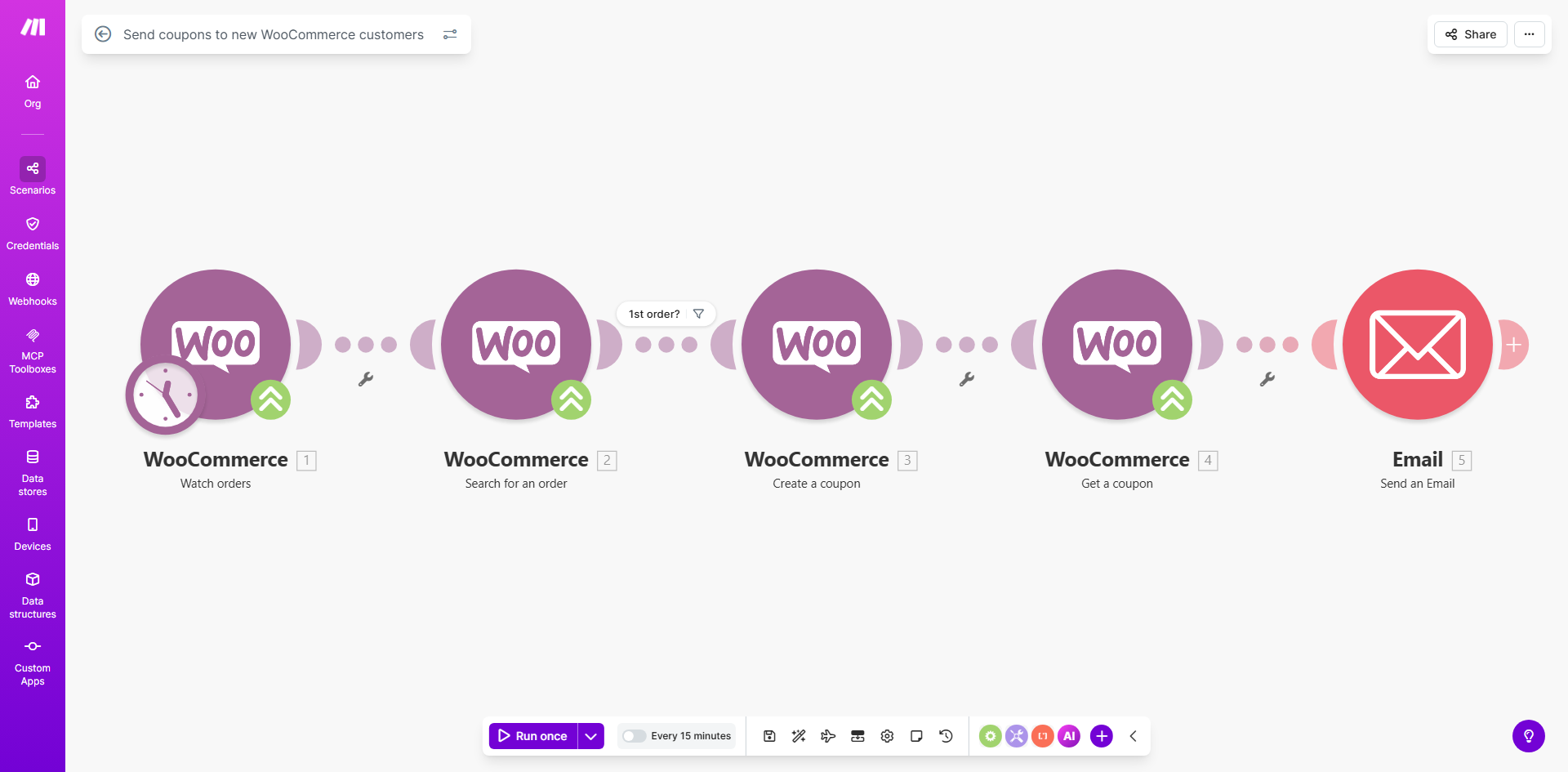
What This Workflow Does
Acquiring a new customer is expensive, but many e-commerce stores miss the golden opportunity to secure that second, crucial purchase. This automation solves that by instantly rewarding a customer's first order with a personalized discount coupon for their next shop. It transforms a transactional relationship into the beginning of a loyal customer journey.
The workflow listens for new "Order Completed" events in your WooCommerce store. It then automatically generates a unique coupon code—with your specified discount, expiration date, and usage rules—and emails it directly to the customer. This hands-free system ensures every new buyer feels valued and is incentivized to return, boosting your customer lifetime value (LTV) without any manual effort from your team.
How It Works
The automation acts as a silent, efficient marketing assistant, working in the background from the moment an order is placed.
Step 1: Trigger on New Order Completion
The Make.com scenario is triggered whenever a new order status in WooCommerce changes to "Completed" (or a status you define). It captures all the customer's details, including their email address and order ID.
Step 2: Create a Dynamic Coupon Code
Using WooCommerce's API, the scenario creates a new coupon. You can customize the coupon's value (percentage or fixed amount), set an expiration date (e.g., valid for 30 days), and define usage limits. The code can be unique per customer, often using their order ID or name for personalization.
Step 3: Send the Personalized Email
Finally, the system sends a beautifully formatted email to the customer. This email thanks them for their first purchase and presents their exclusive coupon code, with clear instructions on how to use it. The entire process happens within minutes of their order being finalized.
Pro tip: For even greater impact, modify the workflow to only send coupons for orders above a certain value. This targets your most valuable new customers first and improves your return on investment.
Who This Is For
This automation is ideal for any WooCommerce store owner, marketing manager, or operations lead who wants to systemize customer retention. It's perfect for growing DTC brands, niche product shops, subscription box businesses, and anyone who understands that repeat purchases are the backbone of sustainable e-commerce growth. If you're manually sending "thank you" emails or forgetting to follow up with new buyers, this workflow will save you time and increase revenue.
What You'll Need
- A live WooCommerce store with administrative access.
- A Make.com account (free tier available).
- Your WooCommerce API keys (Consumer Key and Consumer Secret) to connect Make.com to your store.
- A basic email service (like your WooCommerce mail server, or an integrated service like Gmail/SMTP2GO for sending).
- A decided coupon offer (e.g., "10% off next order" or "$5 off").
Quick Setup Guide
You can have this automation running in under 30 minutes.
- Clone the Template: Click "Get This Workflow" to open the pre-built template in your Make.com account.
- Connect WooCommerce: In the first module, add your WooCommerce store URL and API credentials to establish the connection.
- Configure the Trigger: Set the scenario to watch for the "Order Updated" event and filter it to only run when the status is "Completed".
- Set Coupon Parameters: In the "Create a Coupon" module, define your discount amount, type, expiry date, and any usage restrictions.
- Customize the Email: Edit the email content module with your brand's voice, logo, and a compelling message that delivers the coupon code.
- Test & Activate: Run a test with a recent order to ensure the coupon is created and emailed correctly, then turn the scenario on.
Key Benefits
Increase Repeat Purchase Rate by 20-30%: A timely, personalized coupon is one of the most effective tools to drive a second sale, directly increasing customer lifetime value.
Eliminate Manual Admin Work: Automating this process saves 2-5 hours per week that would be spent manually creating codes and sending emails, allowing you to focus on strategy.
Ensure 100% Consistency: No new customer ever slips through the cracks. Every first-time buyer receives the same high-quality welcome experience, strengthening your brand reputation.
Gain Valuable Customer Insights: By tracking which coupons are redeemed, you gain direct data on what offers resonate best with your audience, informing future marketing campaigns.
Scale Your Retention Efforts Effortlessly: As your store grows and processes hundreds of orders, this automation scales with you, maintaining personalization at any volume without added cost.