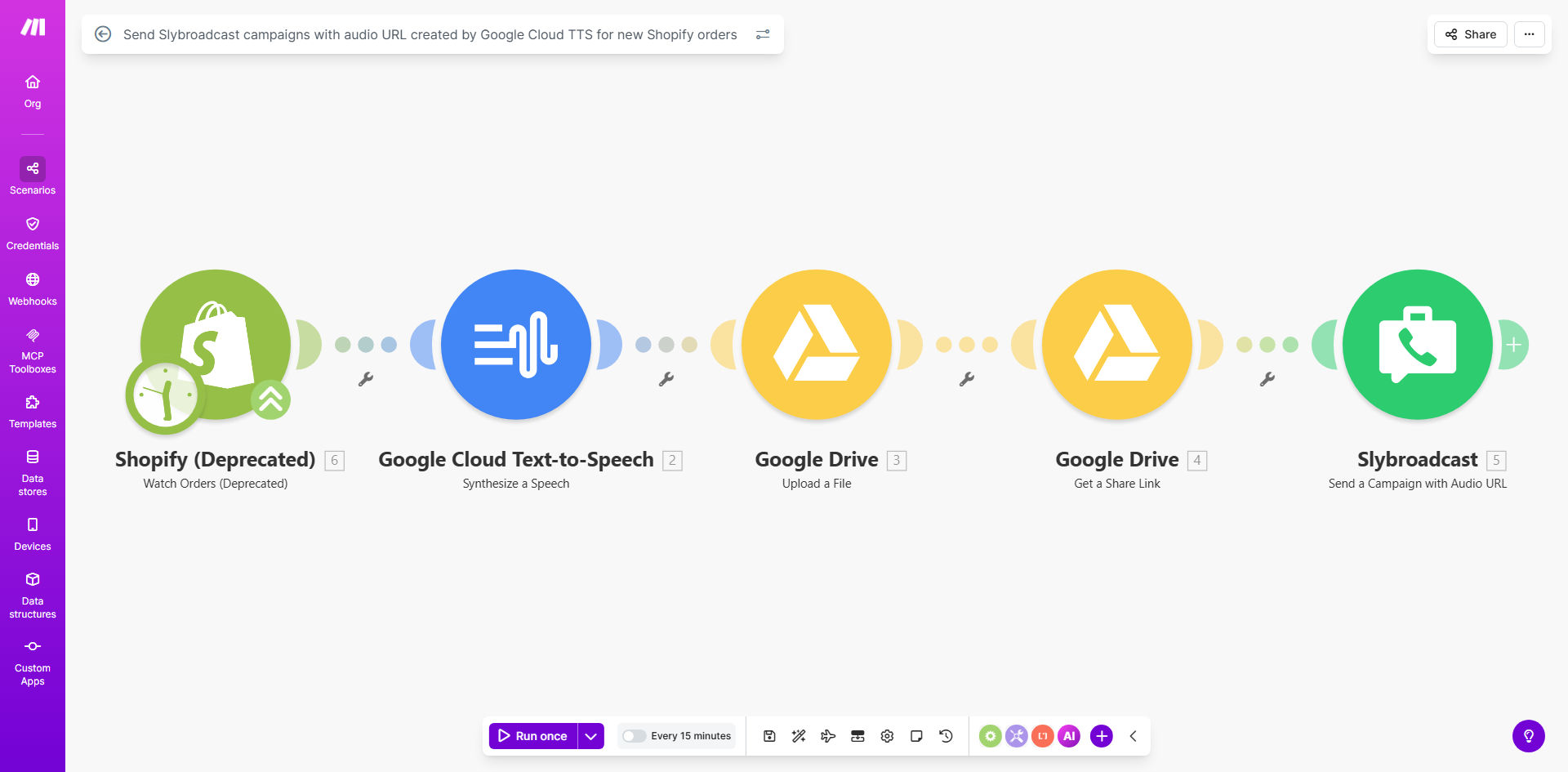
What This Workflow Does
In today's competitive e-commerce landscape, generic text notifications often get ignored. This automation solves that by transforming every new Shopify order into a personalized voice message delivered directly to your customer's phone via SMS. It captures key order details—like the customer's name, order number, and items purchased—converts them into natural-sounding speech using Google's AI, and dispatches them as an engaging audio campaign through Slybroadcast.
The business value is profound: you replace silent, impersonal updates with a branded audio experience that builds stronger customer relationships. This system works 24/7, ensuring timely communication that can increase customer satisfaction, reduce support tickets asking "where's my order?", and open new avenues for promotional outreach. It turns a routine transactional alert into a memorable touchpoint.
How It Works
The workflow is a seamless, multi-step process that connects your storefront to your customer's pocket.
Step 1: Monitor New Shopify Orders
The automation starts by watching your Shopify store at regular intervals. The moment a new order is placed, it triggers the workflow and captures the specific data points you want to announce, such as the customer's first name, order total, and product names.
Step 2: Synthesize Speech with Google Cloud TTS
The extracted text data is sent to Google Cloud Text-to-Speech. This AI service generates a high-quality, natural-sounding audio file (.mp3 or .wav) from the text. You can choose the voice, language, and speaking rate to match your brand's personality.
Step 3: Upload & Share via Google Drive
The newly created audio file is automatically uploaded to a designated folder in your Google Drive. The workflow then generates a shareable link to the file, ensuring the audio is accessible for the SMS campaign.
Step 4: Launch the Slybroadcast Campaign
Finally, the workflow sends the audio file link, along with any accompanying text, to Slybroadcast. Slybroadcast then delivers it as a voice message SMS campaign to your predefined list of phone numbers—typically the customer who just placed the order.
Pro tip: Use this for post-purchase sequences. Follow up the order confirmation voice message with a shipping update message a day later to keep customers informed and delighted.
Who This Is For
This automation is ideal for Shopify store owners, marketing managers, and customer success teams who want to stand out. It's perfect for:
- E-commerce brands selling physical products who want to improve post-purchase communication.
- Service-based businesses using Shopify for appointments or bookings that require reminder notifications.
- Marketing agencies managing client stores and seeking innovative engagement tools.
- Businesses with a high volume of orders where personal, manual follow-up is impossible.
What You'll Need
To use this template, ensure you have the following accounts and access set up:
- A Make.com account (free or paid plan).
- A Shopify store with admin API access to fetch order data.
- A Google Cloud Platform account with the Text-to-Speech API enabled and credentials (service account key).
- A Google Drive account where audio files will be stored.
- A Slybroadcast account with an active plan for sending voice SMS campaigns.
Quick Setup Guide
Get your voice message campaign live in under 30 minutes.
- Clone the Template: Click "Get This Workflow" and duplicate the scenario into your Make.com account.
- Connect Shopify: In the first module, authorize Make.com to access your Shopify store and select the order trigger events.
- Configure Google TTS: Add your Google Cloud service account JSON key to the Text-to-Speech module. Set your preferred voice and language settings.
- Set Up Google Drive: Authorize Google Drive and specify the folder ID where audio files should be saved.
- Link Slybroadcast: Enter your Slybroadcast API credentials in the final module. Define your target phone number list or map it from the Shopify customer data.
- Test & Activate: Run a test with a recent order. Once you confirm the audio is generated and sent correctly, turn the scenario on.
Key Benefits
Boost engagement rates by 3–5x. Voice messages have dramatically higher open and listen rates compared to standard text SMS, ensuring your important updates are actually heard.
Save 15+ hours per month on manual communication. Eliminate the tedious process of manually notifying each customer. The automation handles everything from data processing to campaign dispatch in seconds.
Enhance brand perception with personalized touch. A custom audio message feels premium and thoughtful, differentiating your brand from competitors who rely on generic, automated emails.
Reduce customer service inquiries. Proactive, clear audio updates about order status answer customer questions before they ask, deflecting common "where is my order?" support tickets.
Create scalable, consistent messaging. Ensure every customer receives the same high-quality announcement, regardless of order volume or time of day, maintaining your brand voice perfectly.