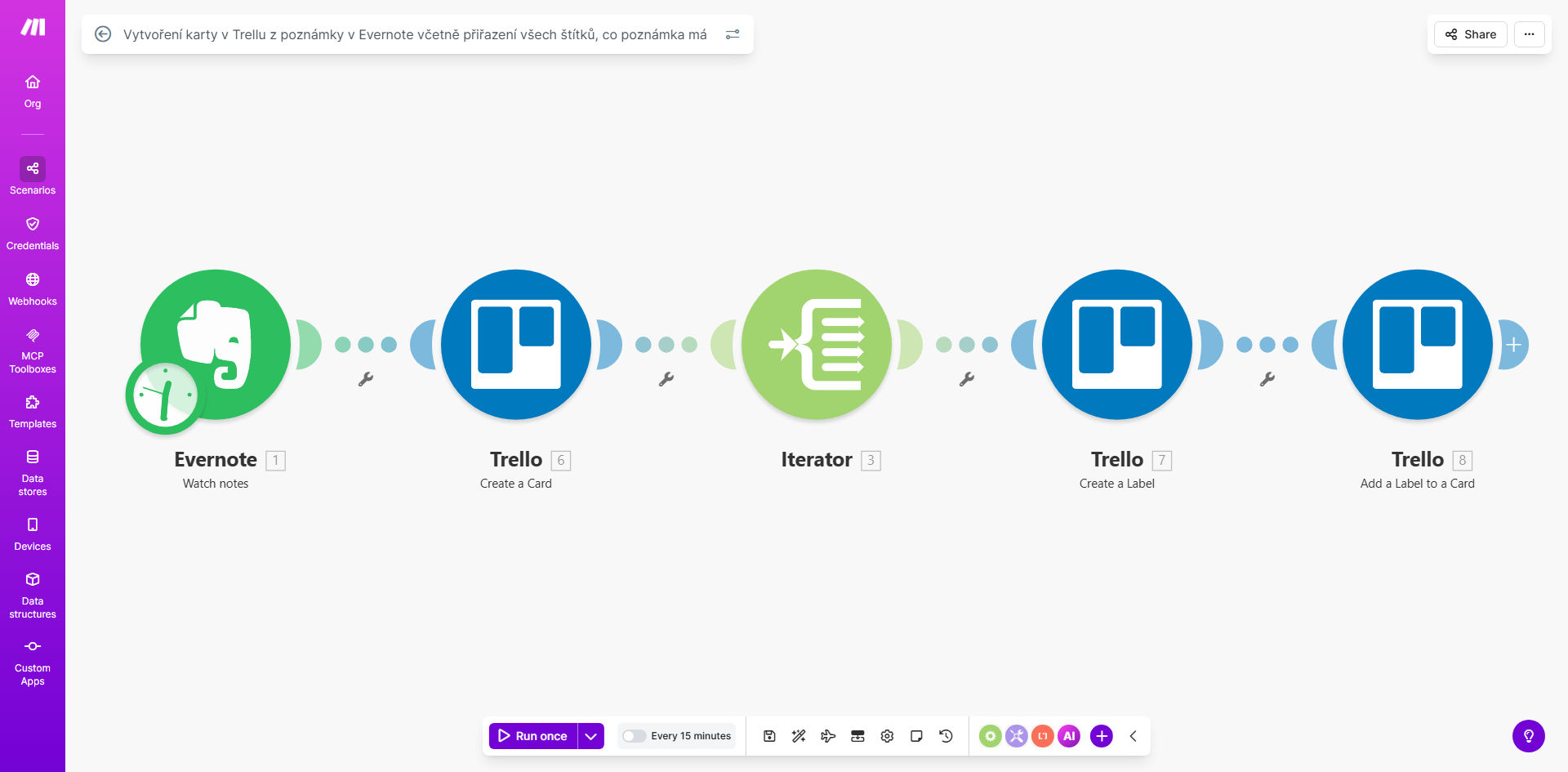
What This Workflow Does
For knowledge workers, entrepreneurs, and project managers, the gap between capturing an idea and acting on it is where productivity leaks. You jot down brilliant thoughts, meeting notes, or project ideas in Evernote, but then they languish in digital notebooks, forgotten until it's too late. Manually transferring these notes to your task management system in Trello is tedious, error-prone, and often gets deprioritized.
This automation bridges that gap seamlessly. It creates a direct pipeline from your note-taking app (Evernote) to your action-taking app (Trello). Every time you create a new note in a designated Evernote notebook, this workflow instantly creates a corresponding card in your chosen Trello board. Even better, it preserves your organizational system by converting all Evernote tags into Trello labels, maintaining context and categorization automatically.
The result is a closed-loop system for idea execution. What you capture becomes what you do, without any manual intervention. This eliminates the "swivel-chair" work of copying and pasting, reduces cognitive load, and ensures no valuable insight gets lost in the shuffle between apps.
How It Works
The workflow operates on a simple but powerful trigger-action principle, orchestrated by Make.com.
Step 1: Watch for New Evernote Notes
The automation begins by monitoring a specific notebook you select in your Evernote account. Using Evernote's API via Make.com, it checks for new notes at regular intervals (or in real-time, depending on your plan). When a new note is detected, the workflow captures all its details: title, content, creation date, and crucially, all assigned tags.
Step 2: Prepare the Data for Trello
Make.com processes the incoming note data. It maps the Evernote note title to the Trello card name, and can place the note content into the card description. It then takes the array of tags from Evernote and prepares them for Trello's label system. This step ensures data compatibility between the two different platforms.
Step 3: Create the Trello Card with Labels
The workflow connects to your Trello account and creates a new card on the specified board and list (e.g., "To Do", "Inbox", or "Backlog"). It uses the prepared data to set the card's name and description. Then, for each Evernote tag, it either finds an existing matching label in Trello or creates a new one, and attaches it to the newly created card. This preserves your tagging hierarchy visually.
Pro tip: Use specific Evernote notebooks for different Trello boards. For example, a "Marketing Ideas" notebook could auto-populate your "Content Calendar" Trello board, while a "Bug Reports" notebook feeds into your "Development Sprint" board.
Who This Is For
This automation delivers value to anyone who uses Evernote for capture and Trello for execution.
Content Creators & Writers: Turn research notes, article outlines, and interview snippets directly into cards on your editorial calendar board. Tags like "Interview", "Stats", "Quote" become labels for easy filtering.
Project Managers & Team Leads: Convert meeting notes and action items from Evernote into assigned tasks in Trello instantly. No more post-meeting transcription or missed follow-ups.
Entrepreneurs & Solopreneurs: Capture business ideas, customer feedback, or product features on the go in Evernote and see them automatically appear in your product roadmap or task board in Trello.
Students & Researchers: Organize study notes and research findings in Evernote, then automatically create todo cards in Trello for papers to write, sources to review, or experiments to conduct.
What You'll Need
- A Make.com account (free tier is sufficient to run this template).
- An active Evernote account with notes in at least one notebook.
- A Trello account with at least one board and list ready to receive new cards.
- API connections for both Evernote and Trello, which Make.com will guide you to authorize securely.
- A clear understanding of which Evernote notebook and which Trello board/list should be connected.
Quick Setup Guide
You can have this automation running in under 10 minutes.
- Clone the template: Click "Get This Workflow" to open the template in your Make.com account and create a copy.
- Connect your apps: Authorize Make.com to access your Evernote and Trello accounts when prompted. This uses secure OAuth.
- Configure the trigger: In the first Evernote module, select the specific notebook you want to monitor for new notes.
- Set the destination: In the Trello module, choose the target board and list where new cards should be created.
- Test it: Create a new note in your selected Evernote notebook with a few tags. Within moments, check your Trello board—a new card with matching labels should appear.
- Activate: Turn on the scenario in Make.com. It will now run automatically according to your schedule (polling interval).
Key Benefits
Eliminates manual data entry, saving 1-2 hours per week. The automation removes the repetitive task of transferring notes to tasks, freeing up mental energy for actual productive work.
Reduces errors and forgotten tasks to near zero. Since the transfer is instant and automatic, there's no risk of forgetting to create a card or copying information incorrectly.
Preserves your organizational system across platforms. Your Evernote tags become Trello labels, maintaining the context and categories you've already invested time in creating.
Creates a single source of truth for project execution. Teams can trust that everything captured in meeting notes (Evernote) will appear as accountable actions (Trello cards), improving transparency and follow-through.
Accelerates idea-to-execution velocity. Shortening the time between having an idea and creating a task for it means projects move faster and innovation happens more readily.