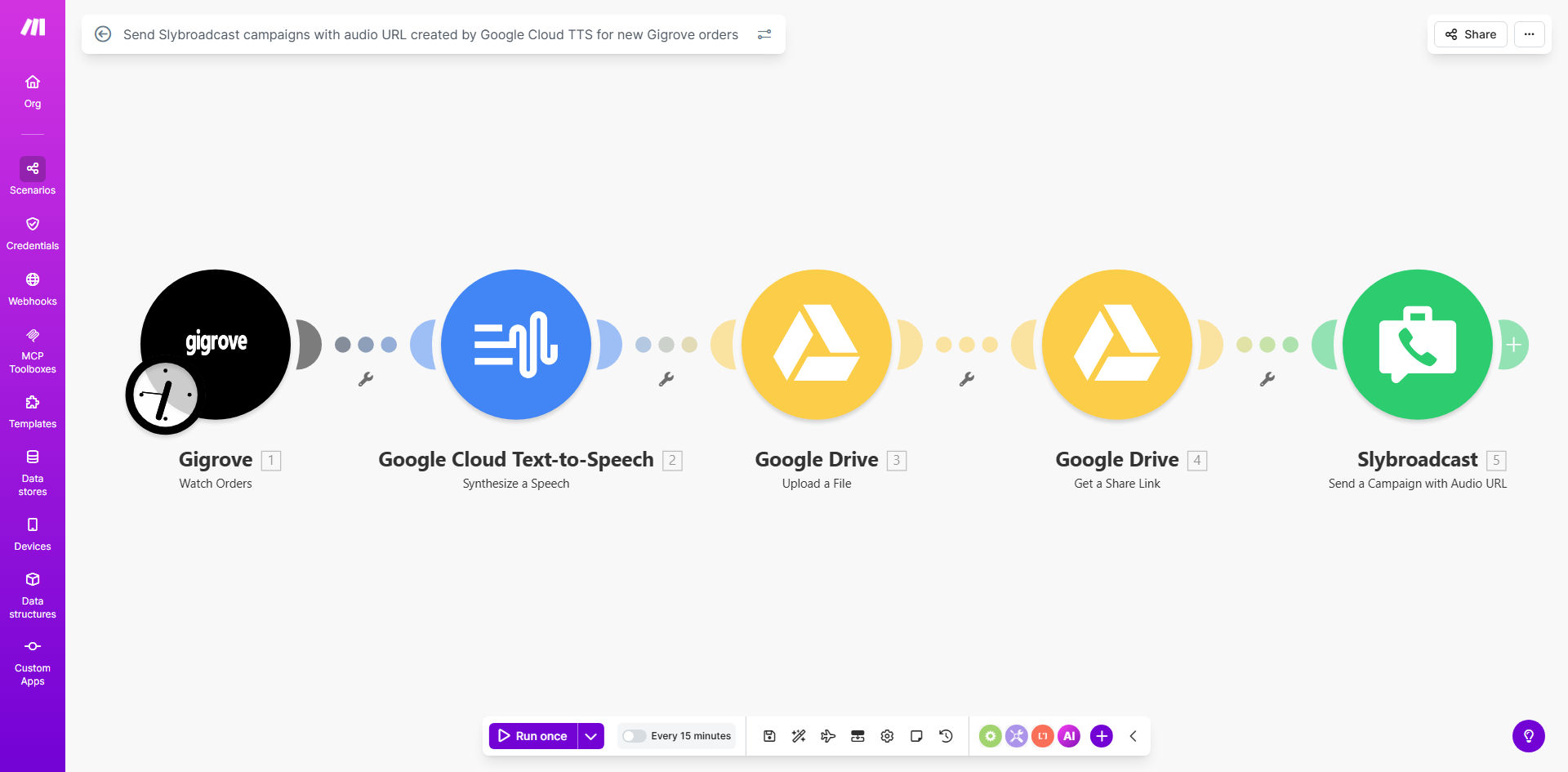
What This Workflow Does
For businesses using Gigrove or similar order management systems, communicating order details to customers or staff manually is time-consuming and prone to delays. This automation solves that by instantly turning raw order data—like customer names, order totals, or delivery times—into clear, natural-sounding voice messages and delivering them directly to a list of phone numbers via Slybroadcast.
The workflow watches for new Gigrove orders at regular intervals. When an order appears, it extracts the specific details you want to communicate, uses Google Cloud Text-to-Speech to generate a high-quality audio file, securely stores that file in Google Drive, and then launches a Slybroadcast campaign to send the voice message. This creates a seamless, hands-off communication channel that ensures timely, personalized outreach without any manual intervention.
Pro tip: This isn't just for order confirmations. You can adapt it for appointment reminders, delivery status updates, urgent alerts, or internal team notifications—any scenario where a voice call is more effective than text.
How It Works
Step 1: Monitoring New Orders
The Make.com scenario is configured to watch your Gigrove account for new orders. It can poll at intervals you set (e.g., every 15 minutes) or trigger instantly via a webhook if Gigrove supports it. Each new order record is captured, and the relevant data fields (like customer phone number, order ID, items, total) are mapped for the next steps.
Step 2: Generating the Voice Message
Using Google Cloud Text-to-Speech (TTS), the workflow constructs a spoken message from the order data. You define a template—for example, "Hello [Customer Name], your order #[Order ID] for [Item] totaling [Amount] has been confirmed." Google TTS synthesizes this text into a natural, studio-quality audio file in your chosen language and voice style.
Step 3: Storing & Linking the Audio
The generated audio file is automatically uploaded to a designated folder in your Google Drive. The workflow then creates a shareable link for the file. This link is used by Slybroadcast to access and play the audio, ensuring the voice message is always available and auditable.
Step 4: Launching the Voice Campaign
Finally, the scenario sends the Google Drive audio link, along with the target phone number(s) from the order, to Slybroadcast. Slybroadcast initiates a voice campaign, dialing the number(s) and playing the personalized message. You can configure it to send to a single customer, a group of staff members, or any list you define.
Who This Is For
This automation is ideal for any business that relies on Gigrove for order management and needs to communicate order information quickly and personally. E-commerce stores, food delivery services, local retailers, and service-based companies can all benefit. It's especially valuable for:
- Businesses with time-sensitive deliveries: Instantly confirm orders with customers to reduce anxiety and missed deliveries.
- Teams managing high order volumes: Eliminate the manual task of calling each customer, saving hours per day.
- Companies aiming for higher engagement: Voice calls have a higher open and retention rate than SMS or email.
- Operations needing internal alerts: Notify warehouse or delivery staff about new orders via voice calls to their mobile phones.
What You'll Need
- A Make.com account with active subscription to build and run the scenario.
- A Gigrove account with API access or webhook capabilities to allow Make.com to watch for new orders.
- A Google Cloud account with Text-to-Speech API enabled and credentials configured in Make.com.
- A Google Drive account where the generated audio files will be stored.
- A Slybroadcast account with API access to send voice campaigns.
- The phone numbers you intend to send voice messages to, formatted correctly for Slybroadcast.
Quick Setup Guide
Once you have the template, follow these steps to get it live:
- Clone the template: Click "Get This Workflow" to copy the scenario into your Make.com account.
- Connect your apps: In each module (Gigrove, Google Cloud TTS, Google Drive, Slybroadcast), replace the placeholder connections with your actual API keys and account credentials.
- Configure the trigger: Set the Gigrove module to watch for "New Orders" at an interval that suits your business pace.
- Customize the message template: Edit the text that is sent to Google TTS. Include the dynamic fields from Gigrove (like customer name, order ID) that you want voiced.
- Set your target phone list: Define where Slybroadcast gets the recipient phone numbers—from the Gigrove order data or from a static list you manage.
- Test with a live order: Create a test order in Gigrove and run the scenario once to verify the audio is generated, uploaded, and the call is sent successfully.
- Schedule and activate: Set the scenario to run automatically on your chosen schedule and activate it.
Key Benefits
Save 2–5 hours per week on manual calling. For businesses processing even a moderate number of orders, manually calling each customer consumes significant staff time. This automation handles it instantly, freeing your team for higher-value tasks.
Improve customer confirmation rates by up to 40%. Voice calls are more attention-grabbing and personal than text messages. Customers are more likely to listen, understand, and act on the information, reducing missed deliveries or appointments.
Ensure 100% consistent and accurate communication. The message is generated directly from the order data, eliminating human error in reading or relaying details. Every customer gets the correct information in a clear, professional tone.
Create an auditable record of all notifications. Each audio file is saved in Google Drive with a timestamp and order reference. You have a complete archive of every voice message sent, useful for compliance, training, or dispute resolution.
Scale your outreach without scaling your team. Whether you process 10 orders a day or 1000, the system works at the same speed and cost. Your communication capacity grows automatically with your order volume.