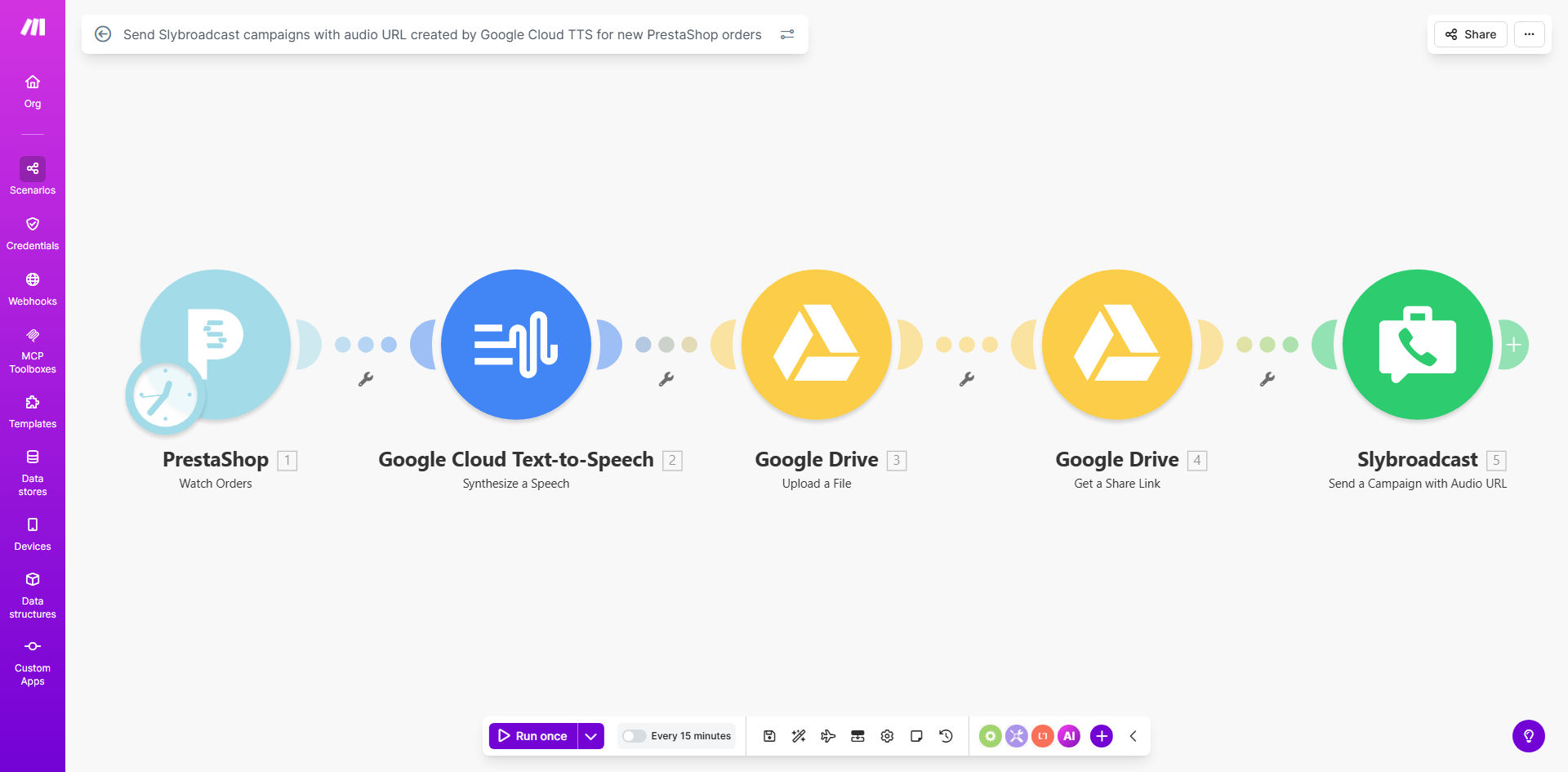
What This Workflow Does
For e-commerce businesses using PrestaShop, manually confirming orders and updating customers is a repetitive, time-consuming task. This automation solves that by instantly converting new order data into a personalized audio message and broadcasting it to your customers via SMS or voice call.
The workflow watches your PrestaShop store for new orders. When an order is placed, it extracts key details like the customer name, order number, total amount, and items. Using Google Cloud Text-to-Speech, it synthesizes a natural-sounding audio file summarizing this information. That file is uploaded to your Google Drive, a shareable link is created, and finally, Slybroadcast sends the audio as a campaign to a designated list of phone numbers.
This creates a seamless, automated communication channel that enhances customer experience with timely, professional updates while freeing your team from manual notification duties.
How It Works
Step 1: Monitor New PrestaShop Orders
The Make.com scenario triggers on a schedule (e.g., every 5 minutes) to check your PrestaShop store for new orders. It fetches the order object containing all relevant details you wish to communicate.
Step 2: Generate Audio with Google Cloud TTS
The workflow passes specific order values (customizable by you) to Google Cloud Text-to-Speech. The service converts the text into a high-quality, spoken audio file in your chosen language and voice profile.
Step 3: Upload & Share via Google Drive
The generated audio file is automatically uploaded to a folder in your Google Drive. A shareable public link is created for the file, which will be used by Slybroadcast to access the audio content.
Step 4: Broadcast Campaign via Slybroadcast
Using the audio file URL from Drive, Slybroadcast initiates a campaign. It sends the audio message as an SMS with a playable link or as a direct voice call to the list of recipients—typically the customer's phone number from the order.
Pro tip: You can customize the audio script to include promotional messages, delivery estimates, or thank-you notes, turning a simple notification into a marketing touchpoint.
Who This Is For
This automation is ideal for PrestaShop store owners, e-commerce managers, and marketing teams who want to:
- Improve customer engagement with personalized, multi-channel communications.
- Reduce the manual workload of order confirmation and follow-up.
- Serve customers in regions where audio messages are more effective than text.
- Scale their notification system without increasing staff overhead.
- Add a unique, professional touch to their post-purchase experience.
What You'll Need
- A PrestaShop store with API access or webhook capability to trigger on new orders.
- A Make.com account to build and run the automation scenario.
- A Google Cloud account with Text-to-Speech API enabled and credentials.
- A Google Drive account for storing the generated audio files.
- A Slybroadcast account with campaign sending capabilities.
- The customer phone numbers you intend to notify (usually from the order data).
Quick Setup Guide
1. Import the template into your Make.com account and connect your PrestaShop module.
2. Configure the Google Cloud TTS module: select your preferred voice, language, and speaking rate.
3. Set up the Google Drive upload path and sharing permissions.
4. Connect your Slybroadcast account and define the recipient list (you can map it directly from the order's phone field).
5. Customize the text template that will be converted to speech—include order number, customer name, total, and a friendly message.
6. Test the flow with a dummy order and verify the audio campaign is sent correctly.
7. Schedule the scenario to run at your desired frequency (real-time or batch).
Key Benefits
Save 2–5 hours per week on manual notifications. Automating this process eliminates the need to individually call, text, or email customers about their orders, reclaiming significant time for your team.
Improve customer satisfaction with instant, personalized updates. Audio messages feel more personal and urgent than standard text, leading to higher engagement and fewer customer service queries about order status.
Scale your communication effortlessly as order volume grows. Whether you have 10 or 1000 orders daily, the system handles each one consistently without extra effort or cost.
Reduce human error in communication. Automated audio generation ensures every message contains accurate order details, avoiding mistakes that can occur with manual entry.
Create a unique brand experience. Using a professional, customized voice for order confirmations can differentiate your store and enhance brand perception.