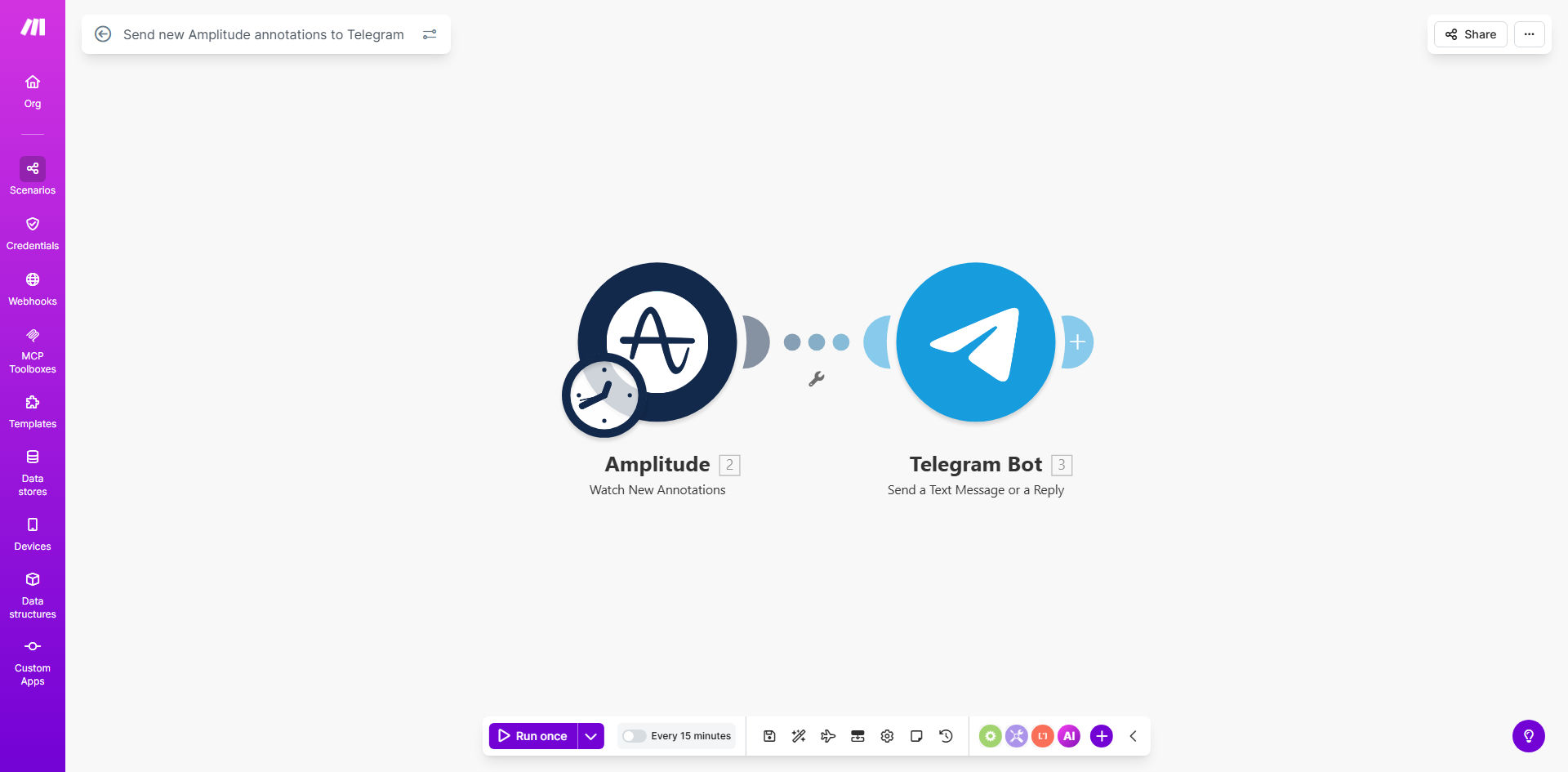
What This Workflow Does
In product analytics, annotations are crucial markers—they highlight significant events like a spike in user engagement after a launch, a drop in conversion rates, or reaching a milestone. But these insights often stay trapped within Amplitude, requiring someone to manually copy and share them with the team. This delay can mean missed opportunities for quick reaction or collaborative discussion.
This automation solves that by creating a seamless bridge between Amplitude and Telegram. It continuously monitors Amplitude for newly created annotations. Whenever an analyst adds a note to a chart, the workflow instantly captures it, formats a clear message, and posts it directly to your designated Telegram channel or group. This turns a static analytics note into a dynamic team alert, fostering immediate awareness and action.
The value is profound: your product, marketing, and engineering teams stay synchronized with the latest data insights without ever opening Amplitude. It reduces the friction of data sharing and ensures that key observations trigger conversations in the place where your team already communicates daily.
How It Works
Step 1: Monitor Amplitude for New Annotations
The workflow uses a scheduled trigger, checking Amplitude's API at regular intervals (e.g., every 15 minutes). It searches for annotations created since the last check, filtering by date, project, or even specific tags if configured.
Step 2: Extract Annotation Details
For each new annotation found, the automation pulls essential details: the annotation text, the author who created it, the date, and the specific chart or metric it references. This data is structured to create a meaningful notification.
Step 3: Format the Telegram Message
The raw data is then transformed into a user-friendly message for Telegram. Typically, it includes a clear headline ("New Amplitude Annotation"), the annotation content, the author's name, and a link back to the Amplitude chart for context. You can customize this format to match your team's style.
Step 4: Send to Telegram Channel
Finally, the formatted message is sent via the Telegram Bot API to your pre-configured channel or group chat. The message appears as a regular post from your bot, instantly visible to all members. The workflow logs each send for reliability.
Pro tip: Add a filtering step to only send annotations tagged as "Urgent" or "Team Alert". This prevents routine notes from flooding the chat and ensures only high-priority insights get broadcasted.
Who This Is For
This workflow is ideal for data-driven teams that rely on Amplitude for product analytics and use Telegram for daily communication.
Product Managers & Analysts: They create annotations to highlight trends. This automation ensures their insights immediately reach the entire product team, sparking discussion.
Marketing Teams: When monitoring campaign impact on user behavior, annotations about conversion spikes can be instantly shared with the marketing squad for quick strategy adjustments.
Engineering & Development Teams: Annotations about performance issues or feature adoption drops can alert engineers proactively, enabling faster troubleshooting.
Cross-functional Leadership: Executives and managers who need a high-level pulse on product health benefit from getting key annotations without diving into the analytics platform.
What You'll Need
- An Amplitude Account: You need access to an Amplitude project where annotations are being created. Admin or analyst permissions are typically required to access the API.
- Amplitude API Key: A generated API key from your Amplitude project settings to allow Make.com to fetch annotation data.
- A Telegram Bot: Created via BotFather on Telegram. This bot will be the sender of the messages to your channel.
- Telegram Channel or Group ID: The unique identifier for the Telegram channel or group where you want annotations posted. You'll need to add your bot as a member.
- A Make.com Account: Free or paid plan to build and run the automation scenario.
Quick Setup Guide
1. Get the Template: Click "Get This Workflow" above to copy the ready-made scenario into your Make.com account.
2. Connect Amplitude: In the first module, add your Amplitude API key and specify the project ID you want to monitor.
3. Configure the Trigger: Set the schedule interval (e.g., every 15 minutes) for checking new annotations. Adjust the filter if you want to watch only specific annotation types.
4. Connect Telegram: In the Telegram module, add your Bot Token and the Chat ID of your target channel or group.
5. Customize the Message: Edit the text template to include the details you want (annotation text, author, link). You can add emojis or formatting for better readability.
6. Test & Activate: Run a test by creating a dummy annotation in Amplitude. Verify it appears correctly in Telegram. Then turn on the scenario to run automatically.
Pro tip: Start with a longer interval (like hourly) to avoid overwhelming your team. Once you see the value, you can increase the frequency to near real-time.
Key Benefits
Instant Team Alignment: Eliminates the lag between insight creation and team awareness. Annotations become live discussion points within seconds, keeping everyone on the same data page.
Reduced Manual Overhead: Saves analysts and managers the tedious task of copying and pasting annotations into chats. This can reclaim 1–2 hours per week per team member.
Proactive Decision Making: Critical trends are highlighted immediately, allowing teams to react before issues escalate or opportunities fade. This speeds up the decision cycle significantly.
Centralized Communication: Brings data insights into the primary team communication tool (Telegram), reducing platform switching and ensuring insights are seen in context.
Scalable Notification System: The automation can be extended to route different types of annotations to different teams or channels, creating a tailored alert system for your entire organization.