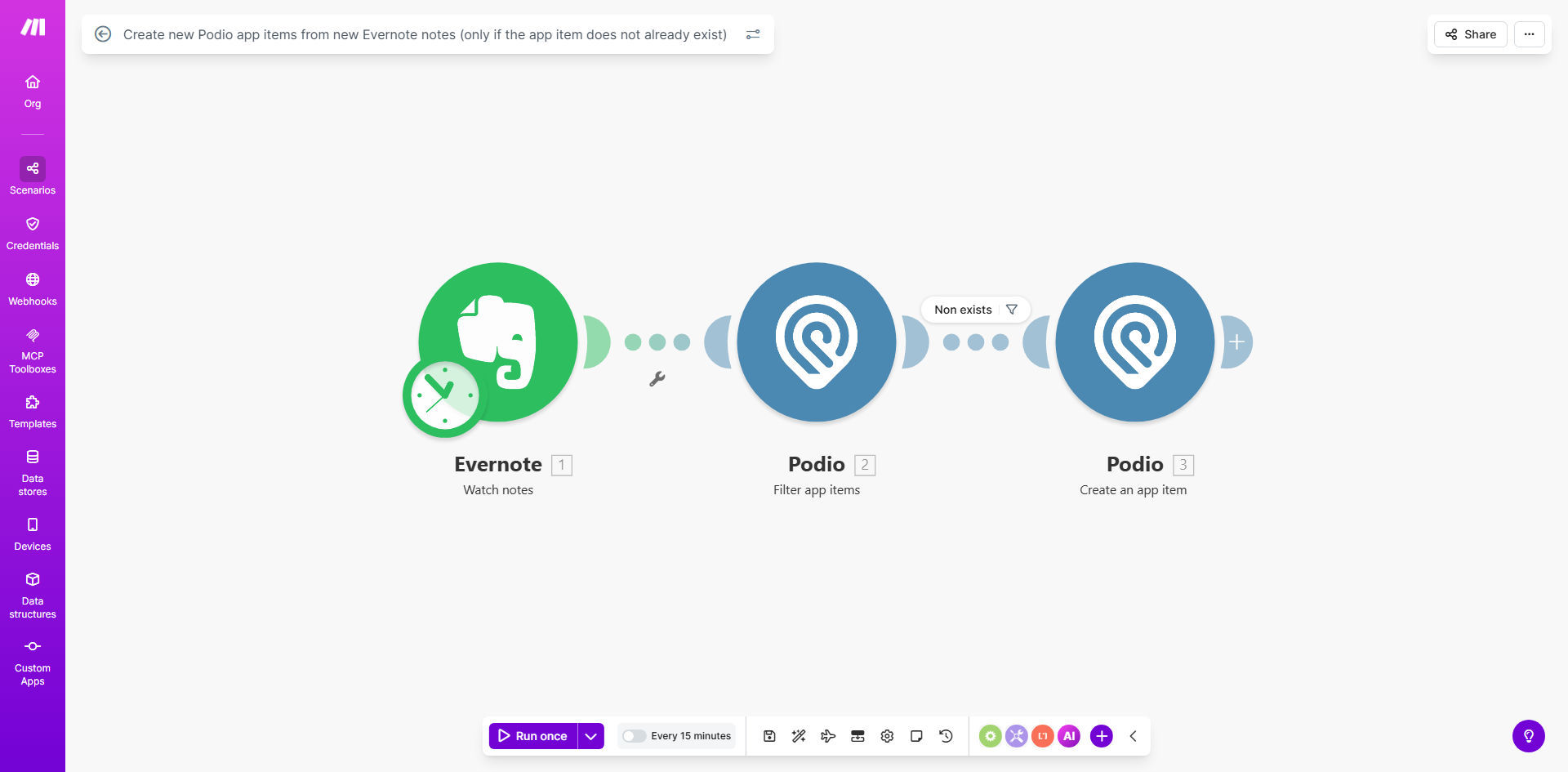
What This Workflow Does
For teams that use Evernote for capturing ideas, meeting notes, and research, and Podio for project management and CRM, a significant bottleneck exists: manual data transfer. Valuable information gets trapped in notes, requiring someone to manually recreate it as a task, client record, or project brief in Podio. This process is slow, prone to errors, and leads to inconsistent data.
This automation solves that by creating a seamless, intelligent bridge between the two platforms. Every time a new note is created in Evernote, this Make.com workflow automatically checks if a corresponding item already exists in your specified Podio app. If it doesn't, it creates a new Podio item, mapping the note's title, content, and other details to the appropriate fields. If a match is found, the workflow stops, preventing duplicate entries and maintaining data integrity.
The result is a frictionless flow from ideation to execution. Ideas captured in Evernote instantly become actionable items in your team's project hub, saving hours of administrative work each week and ensuring nothing falls through the cracks.
How It Works
The workflow uses a logical sequence to ensure reliable and duplicate-free syncing.
Step 1: Trigger on New Evernote Note
The automation is initiated by the "Watch Notes" module in Make.com. It monitors your connected Evernote account for new notes, either in a specific notebook or across your entire account. When a new note is detected, the workflow captures all its data, including the title, rich text content, tags, author, and creation date.
Step 2: Search Podio for an Existing Item
Before creating anything, the workflow performs a crucial check. It uses the "Search Items" module in Podio to look for an item that matches the new note. Typically, this search uses a unique identifier, such as the Evernote note title or a custom ID field you've designated. This step is the core of the duplicate prevention logic.
Step 3: Router – Does the Item Exist?
The output of the search is passed through a router. If the search returns one or more matching items (meaning a duplicate exists), the workflow takes the "Yes" path and simply ends—no action is taken. If the search returns zero results (meaning the note is truly new to Podio), the workflow proceeds down the "No" path to the final step.
Step 4: Create a New Podio App Item
On the "No" path, the "Create an Item" module in Podio is activated. The data from the Evernote note is mapped into the fields of your chosen Podio app. You can configure this to include the note title as the item title, the note body in a description field, attach tags, and even set the creator or due date based on note metadata.
Pro tip: Use Evernote tags to control the automation. For example, tag a note with "#ToPodio" to trigger the sync, or use different tags to route notes to different Podio apps (like #Podio-CRM vs. #Podio-Projects).
Who This Is For
This template is ideal for any business or team that relies on both Evernote for information gathering and Podio for workflow execution.
Consulting Agencies & Freelancers: Capture client meeting notes in Evernote and have them automatically turn into action items or project updates in your Podio client workspace.
Product & Development Teams: Jot down feature ideas or bug reports in Evernote and see them instantly populate your product backlog or development sprint app in Podio.
Sales Professionals: Quickly note down prospect details or follow-up points after a call in Evernote, and create a new lead or activity record in your Podio CRM automatically.
Researchers & Content Creators: Organize research snippets and content outlines in Evernote, then sync them as structured briefs or tasks to your editorial calendar app in Podio.
What You'll Need
- A Make.com account (free tier available).
- An Evernote account (Personal, Professional, or Teams) with notes you want to sync.
- A Podio account with an existing app set up to receive the data. You need admin or edit rights to this app.
- Clear understanding of which Evernote field (e.g., Note Title) will be used as the unique key to check for duplicates in Podio.
- Basic knowledge of your Podio app's field structure to map Evernote data correctly.
Quick Setup Guide
Follow these steps to deploy this automation in under 15 minutes.
- Get the Template: Click the "Get This Workflow" button above. It will clone the scenario into your Make.com account.
- Connect Your Apps: In the cloned scenario, click on the Evernote and Podio modules. Authorize Make.com to access your accounts by logging in when prompted.
- Configure the Trigger: In the Evernote "Watch Notes" module, select the specific notebook you want to monitor, or leave it as "All Notebooks."
- Set Up the Search: In the first Podio "Search Items" module, select your Workspace, App, and the field you will search by (e.g., "Title"). Map the search value to the corresponding Evernote field (e.g., "Note Title").
- Map the Creation Fields: In the second Podio "Create Item" module, select the same App. Map each Podio field (like "Name," "Description," "Tags") to the data from the Evernote note that arrived in the first step.
- Test & Activate: Turn on the scenario and create a test note in your monitored Evernote notebook. Verify that a new item appears in your Podio app. Check that creating a note with a duplicate title does NOT create a second item.
Key Benefits
Eliminate Manual Data Entry: Save 5-15 minutes per note previously spent copying, pasting, and reformatting information between apps. For teams creating 20 notes a week, that's over 15 hours saved monthly.
Guarantee Data Accuracy & Consistency: Automated mapping ensures every Podio item is created with the same, complete set of information from Evernote, removing the risk of human error or omission during manual transfer.
Maintain a Clean, Duplicate-Free Podio Workspace: The built-in search logic prevents clutter by ensuring the same note is never turned into multiple Podio items, preserving the integrity of your project management data.
Accelerate Project Velocity: By turning notes into actionable Podio items in seconds, you drastically reduce the lag between idea capture and task assignment, helping your team move faster and be more responsive.
Improve Cross-Team Visibility: Information captured privately in Evernote becomes instantly visible to the entire team within the collaborative Podio environment, fostering better alignment and accountability.