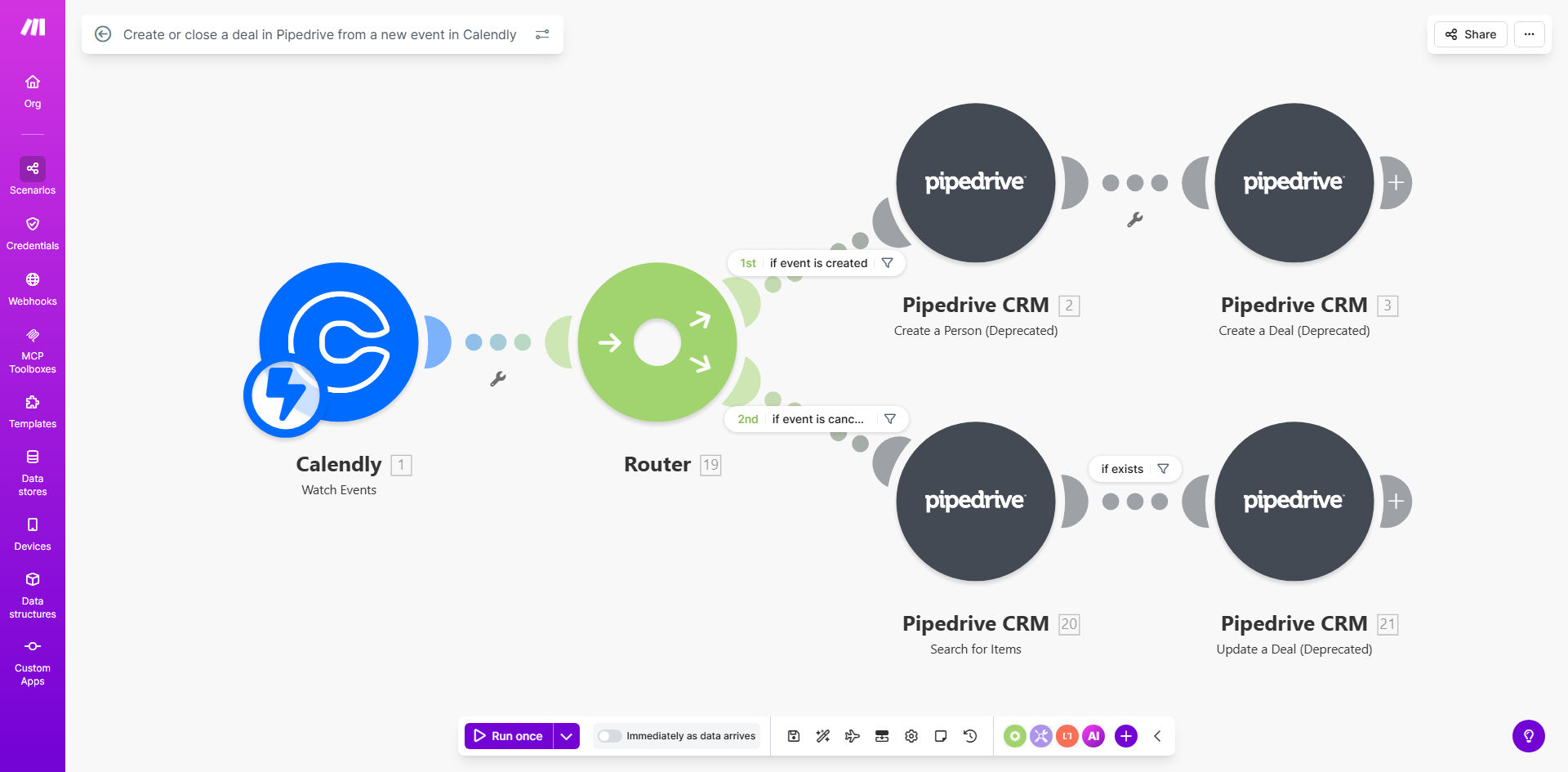
What This Workflow Does
For sales teams, the gap between a prospect booking a meeting and that interaction being logged in the CRM is where deals get lost. Manual data entry is slow, error-prone, and distracts from selling. This automation bridges that gap seamlessly.
Every time someone schedules a meeting with you via Calendly, this workflow instantly creates a corresponding deal in your Pipedrive pipeline. It captures the prospect's name, email, meeting time, and any custom questions they answered. If the meeting is later canceled, the workflow automatically updates the deal status to "Lost," keeping your pipeline accurate without any manual intervention. This turns your scheduling tool into a powerful lead capture and qualification system.
Pro tip: Use Calendly's custom questions to capture qualifying information (like budget or timeline) during booking. Map these answers to custom fields in Pipedrive so your sales team has context before the call even starts.
How It Works
The workflow runs on Make.com, listening for events in Calendly and performing actions in Pipedrive. Here's the step-by-step process:
Step 1: Trigger on New Calendly Event
The automation is triggered the moment a new event is scheduled in your connected Calendly account. Make.com captures the event details, including the invitee's information, event type, scheduled time, and answers to any custom questions.
Step 2: Create or Find Contact in Pipedrive
The workflow searches Pipedrive to see if a contact with the invitee's email already exists. If found, it links the new deal to this existing contact. If not, it creates a new contact record using the details from Calendly, ensuring your database stays clean and unified.
Step 3: Create a New Deal in the Pipeline
A new deal is created in your specified Pipedrive pipeline. The deal title is typically formatted using the invitee's name and the meeting type (e.g., "Discovery Call with John Doe"). The scheduled meeting time is added to the deal notes or a custom field, and the deal is placed in the appropriate stage, such as "Meeting Scheduled."
Step 4: Handle Cancellations or Reschedules
The workflow also watches for canceled events. When a cancellation is detected, it finds the corresponding deal in Pipedrive and updates its status to "Lost" or moves it to a "Canceled" stage. This automatic cleanup prevents sales reps from wasting time pursuing dead leads.
Who This Is For
This automation is ideal for sales teams, business development representatives, consultants, and agency owners who use Calendly for scheduling and Pipedrive to manage their pipeline. It's particularly valuable for:
- Sales Teams: Who need instant pipeline updates after a demo is booked.
- Solo Consultants & Coaches: Who want to automate their client onboarding process.
- Marketing Agencies: Who schedule discovery calls and need to track leads efficiently.
- Recruiters: Who schedule interviews and need to track candidates in a pipeline.
- Any business that loses track of leads between scheduling and CRM entry.
What You'll Need
- A Make.com account (free tier available).
- A Calendly Premium account (required for API integration).
- An active Pipedrive account with admin or owner permissions to generate an API token.
- The Pipedrive pipeline and stage where you want new deals to be created.
- Basic understanding of how to copy and connect a template in Make.com (guidance provided).
Quick Setup Guide
You can have this automation running in under 30 minutes. Follow these steps:
- Get the Template: Click "Get This Workflow" to copy the template to your Make.com account.
- Connect Calendly: In the first module, authenticate your Calendly account using your API key (found in Calendly's Integrations settings).
- Connect Pipedrive: In the Pipedrive modules, authenticate with your Pipedrive domain and API token (generated in Pipedrive Settings > Personal Preferences).
- Map Your Data: Ensure the fields from Calendly (name, email, event name) are correctly mapped to the corresponding fields in Pipedrive (contact name, email, deal title).
- Set Your Pipeline: Specify the exact Pipedrive pipeline ID and stage ID where new deals should be created. You can find these IDs in Pipedrive's URL when viewing a pipeline.
- Test & Activate: Schedule a test meeting with yourself via Calendly. Check if a deal is created in Pipedrive. Then cancel the meeting to verify the deal updates. Once confirmed, activate the scenario.
Pro tip: For the cancellation flow to work perfectly, ensure the "Canceled" event trigger in Calendly is correctly configured in Make.com. Test this thoroughly, as event UIDs must match between the scheduling and cancellation triggers.
Key Benefits
Eliminate manual data entry and save 5+ hours per rep each month. Your sales team no longer needs to switch between Calendly and Pipedrive to create deals manually. This time is reinvested into actual selling activities.
Achieve 100% pipeline accuracy with zero missed leads. Every booked meeting instantly becomes a tracked deal. There's no risk of a lead being forgotten in an inbox or spreadsheet, giving you complete visibility into your sales funnel.
Speed up your sales cycle with instant follow-up. Because the deal is created the moment the meeting is booked, sales reps can immediately begin preparing personalized outreach or send automated confirmation sequences, improving the prospect experience.
Maintain a clean CRM automatically. The workflow handles the lifecycle of a deal. When meetings are canceled, deals are marked accordingly, preventing pipeline clutter and ensuring your sales forecasts remain accurate.
Scale your sales process without adding overhead. As booking volume increases, this automation handles the growing workload effortlessly. You can onboard new team members and know their scheduled meetings will automatically feed into the central CRM.