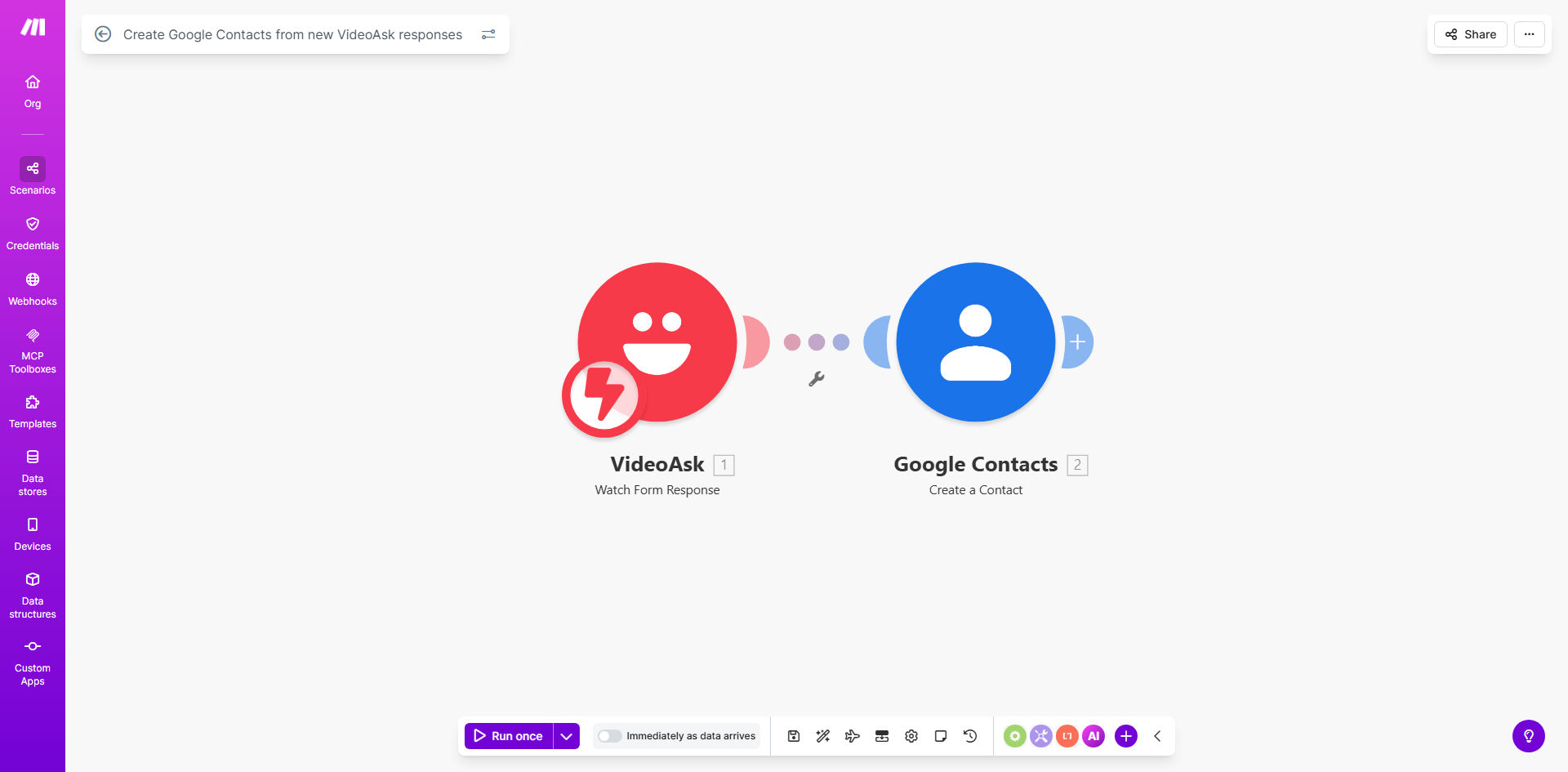
What This Workflow Does
If you use VideoAsk for lead generation, customer feedback, or event registrations, you know the frustration of manually transferring respondent data into your contact management system. This process is not only time-consuming but also prone to errors, leading to missed follow-up opportunities and a disorganized CRM.
This automated workflow solves that problem entirely. Every time a new person submits a response through your VideoAsk form, this Make.com scenario instantly captures their information—name, email, phone, or any custom fields—and creates a corresponding, fully detailed contact in your Google Contacts. It turns a multi-step manual task into a seamless, background process that works 24/7.
The business value is clear: you reclaim hours each week, ensure 100% data capture accuracy, and can engage with leads faster. Your sales or marketing team gets a constantly updated, clean contact list ready for outreach campaigns, without ever having to open a spreadsheet.
How It Works
The automation follows a simple, reliable sequence. Once set up, it runs autonomously, connecting your VideoAsk account directly to Google Contacts.
Step 1: Trigger on New VideoAsk Response
The workflow is initiated the moment someone completes and submits your VideoAsk. Make.com watches your VideoAsk account for new "response added" events. This trigger is instant, ensuring no lead sits in a queue.
Step 2: Extract and Map Response Data
Make.com receives the complete response payload. It intelligently parses the data, identifying key pieces of information like first name, last name, email address, and any additional answers provided in the video conversation or form fields.
Step 3: Create Contact in Google Contacts
Using the mapped data, the workflow executes the "Create a Contact" action in your connected Google account. It populates all relevant fields in Google Contacts, organizing the new entry with the correct labels and ensuring it's immediately available across Gmail, Google Calendar, and other linked services.
Pro tip: Use Google Contact Groups during the creation step to automatically segment leads (e.g., "VideoAsk - Webinar Leads," "Product Feedback"). This enables targeted email campaigns right from the start.
Who This Is For
This automation is a game-changer for solopreneurs, coaches, marketers, and sales teams who rely on VideoAsk for interactive engagement.
Course Creators & Coaches: Automatically add students who sign up for discovery calls or waitlists into your mailing list for nurture sequences.
B2B Sales Teams: Instantly capture leads from prospect video interviews or demo request forms, ensuring immediate follow-up by the sales team.
Event Organizers: Seamlessly register attendees from video-based event sign-up pages directly into your contact management system.
Market Researchers: Systematically compile feedback and respondent details from video surveys without manual data compilation.
What You'll Need
- A Make.com account (free tier available).
- A VideoAsk account with an active form or video that collects respondent information.
- A Google account with access to Google Contacts.
- API connections (OAuth) set up between Make.com and both VideoAsk and Google Contacts—this is a simple click-to-connect process.
Quick Setup Guide
You can have this automation live in under 15 minutes.
- Clone the Template: Click "Get This Workflow" to copy the ready-made scenario into your Make.com account.
- Connect Your Apps: In the Make.com scenario editor, authorize the connections to your VideoAsk and Google Contacts accounts when prompted.
- Select Your VideoAsk Form: Point the trigger module to the specific VideoAsk form or video you want to monitor for new responses.
- Map the Data Fields: Review the Google Contacts module to ensure the information from VideoAsk (like "email", "firstName") is correctly mapped to the corresponding Google Contacts fields.
- Test & Activate: Use the "Run once" feature to test with a past response. Once confirmed, turn the scenario "ON." It will now run automatically for all future responses.
Key Benefits
Eliminate Manual Data Entry: Save 2-5 hours per week by automatically syncing contacts, freeing up time for high-value tasks like engagement and strategy.
Zero Missed Leads: Achieve 100% capture rate from your VideoAsk interactions. Every respondent is guaranteed a spot in your CRM the moment they submit, removing human error from the equation.
Faster Lead Engagement: Reduce lead response time from hours/days to mere minutes. Contacts created instantly can be immediately added to email automation sequences, dramatically improving conversion rates.
Improved Data Organization: Maintain a consistently formatted and enriched Google Contacts database. Automated creation ensures every contact has uniform data structure, making segmentation and searching effortless.
Scalable Lead Capture: Handle 10 or 10,000 VideoAsk responses with the same efficiency. This automation scales effortlessly with your business growth, requiring no additional effort on your part.