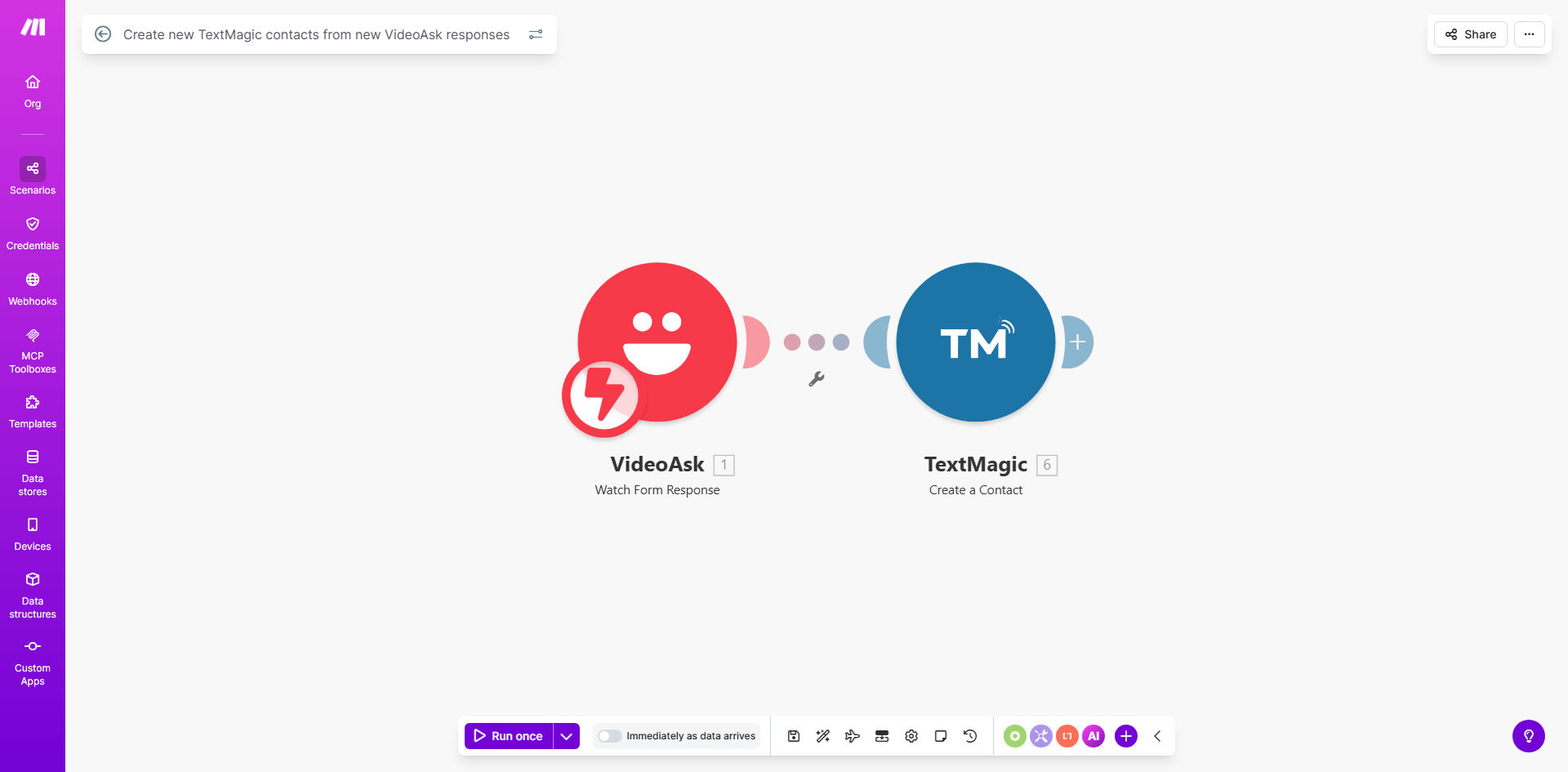
What This Workflow Does
This automation solves a critical gap in modern marketing: capturing leads through engaging video interactions and immediately moving them into your SMS marketing funnel. VideoAsk allows you to create interactive video forms that feel personal and engaging, but manually transferring respondent data to your SMS platform (TextMagic) is slow and error-prone. This workflow bridges that gap automatically.
Every time a potential customer completes your VideoAsk form—whether they're signing up for a webinar, requesting a demo, or answering a survey—their contact information is instantly added as a new contact in your TextMagic account. This means they can receive timely, personalized SMS follow-ups within minutes, not days. The business value is clear: faster lead response times, higher conversion rates, and a fully automated lead-to-nurture pipeline that requires zero manual effort from your team.
For businesses using video for lead generation, this integration turns a passive data collection point into an active marketing channel. It ensures no lead falls through the cracks because of delayed processing. You can start building relationships via SMS immediately, increasing the likelihood that the prospect will take the next step with your business.
How It Works
Step 1: Trigger on New VideoAsk Response
The workflow starts when a new response is submitted to your VideoAsk form. Make.com monitors your VideoAsk account for this event, capturing the entire response payload including the respondent's name, email, phone number, and any custom answers they provided.
Step 2: Extract and Format Contact Data
The automation then parses the response data, focusing on the fields needed for TextMagic. It typically extracts the first name, last name, and mobile phone number. It can also pull additional data like company name or specific answers to use for segmentation later.
Step 3: Create Contact in TextMagic
Using the extracted data, Make.com calls the TextMagic API to create a new contact in your specified list or address book. The contact is added with all available details, ready to be used in your SMS campaigns.
Step 4: Optional Data Enhancement & Notification
You can add additional steps, such as sending a confirmation email to the respondent, updating a spreadsheet log, or sending a notification to your team via Slack or email that a new lead has been captured and added to the SMS list.
Pro tip: Use the VideoAsk response data to add custom fields or tags to the TextMagic contact. For example, if someone answered "Yes" to a question about interest in a product, tag them as "Product Interested" in TextMagic. This allows for highly targeted SMS campaigns later.
Who This Is For
This workflow is ideal for marketers, sales teams, and business owners who use VideoAsk for lead generation and TextMagic for SMS marketing. Specifically, it benefits:
- Course Creators & Educators: Who use VideoAsk for enrollment questions and want to SMS students about start dates or materials.
- Service Businesses: Like consultants or agencies using video forms for client inquiries, wanting to SMS prospects about booking a call.
- Event Organizers: Using VideoAsk for event registrations and needing to SMS attendees with reminders or updates.
- E-commerce Brands: Using interactive video for product feedback or sign-ups, then SMSing customers about flash sales or new launches.
- Any Business: That values speed in lead response and uses SMS as a key communication channel.
What You'll Need
- A VideoAsk account with an active form collecting responses.
- A TextMagic account with an SMS list or address book ready to receive new contacts.
- A Make.com account (free tier available) to build and run the automation.
- The API keys or login credentials for both VideoAsk and TextMagic to connect them in Make.com.
- Basic understanding of the data fields you want to transfer (e.g., phone number field name in VideoAsk).
Quick Setup Guide
- Open the provided Make.com template link and click "Use this template".
- Connect your VideoAsk account in the first module. Authorize Make.com to access your responses.
- Connect your TextMagic account in the second module. Provide your TextMagic API credentials.
- Map the data fields: Select which VideoAsk response field contains the phone number, name, etc., and map them to the corresponding TextMagic contact fields.
- Choose the TextMagic list or address book where new contacts should be added.
- Turn on the scenario and test it by submitting a test response to your VideoAsk form. Verify the contact appears in TextMagic.
Key Benefits
Instant Lead Processing: Eliminates the manual data transfer delay. Leads are added to your SMS marketing list within seconds of engaging with your video, allowing for immediate follow-up.
Higher Conversion Rates: Timely SMS communication after a video interaction significantly increases the chance of conversion. The prospect is still warm and engaged.
Zero Manual Effort: Frees your team from repetitive copy-paste tasks. The automation runs 24/7, capturing leads even when you're offline.
Data Accuracy: Automated transfer reduces human errors like mistyped phone numbers or missed entries, ensuring your SMS list is clean and reliable.
Scalable Marketing Funnel: Allows you to scale your video lead generation efforts without worrying about the backend administrative burden. Every new VideoAsk form can seamlessly feed into your SMS campaigns.