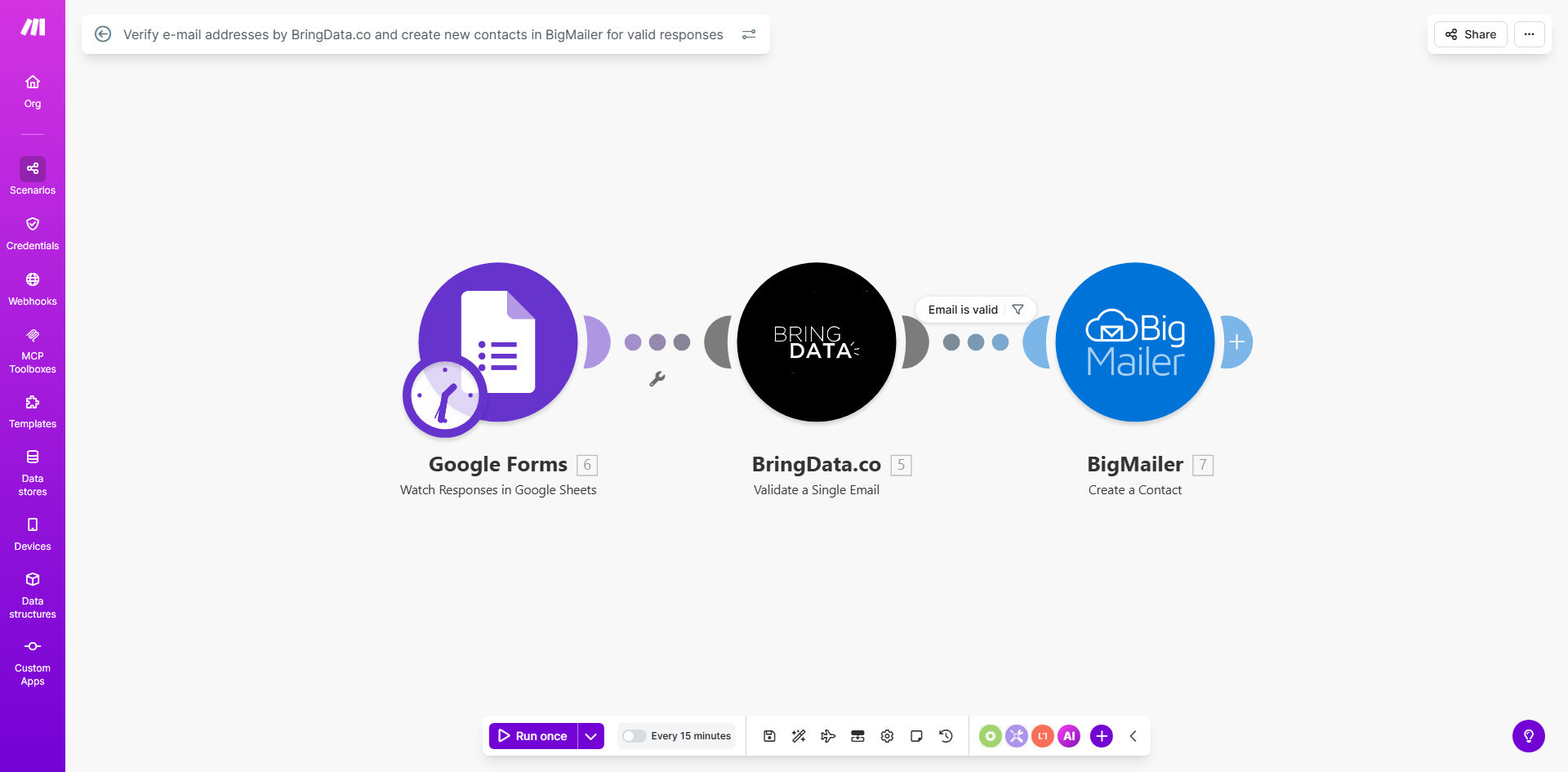
What This Workflow Does
Every business using online forms faces the same problem: invalid email addresses. Typos, fake sign-ups, and disposable emails pollute your contact list, wasting marketing budget, hurting deliverability, and skewing your analytics. Manually checking each submission is impossible at scale.
This automation solves that by inserting a smart gatekeeper between your Google Forms and your email marketing platform, BigMailer. When someone submits a form, their email address is instantly sent to BringData.co for verification. Only addresses that pass the check—proven to be real and deliverable—are created as new contacts in BigMailer. Invalid submissions are filtered out, keeping your list pristine and your campaigns effective.
The result is a fully automated, self-cleaning lead pipeline. You capture leads, verify their quality, and onboard them into your nurturing sequences—all without a single manual click. It turns your form from a simple data collector into a reliable growth engine.
How It Works
Step 1: Capture the Submission
The workflow is triggered the moment a new response is submitted to your connected Google Form. Make.com watches for this event and instantly captures all the form data, with a primary focus on the email address field.
Step 2: Verify with BringData.co
The captured email is sent to the BringData.co email verification service via an API call. BringData.co performs a series of checks: syntax validation, domain existence, mail server (MX record) lookup, and checks for disposable or role-based addresses. It returns a clear result: valid, invalid, or risky.
Pro tip: Configure the workflow to also check for "catch-all" domains. These domains accept all emails, making verification less certain. You can choose to treat them as "risky" and route them for manual review instead of automatic addition.
Step 3: Decision & Routing
A router module in Make.com examines the verification result. If the email is marked "valid," the workflow proceeds to the next step. If it's "invalid" or "risky," the workflow can stop, log the data to a Google Sheet for review, or send a notification—keeping these contacts out of your main list.
Step 4: Create the BigMailer Contact
For valid emails, the workflow uses BigMailer's API to create a new contact. It maps the form data (like name, company, etc.) to the corresponding fields in BigMailer. You can also automatically add the contact to a specific list or tag them based on which form they submitted, enabling immediate segmentation and targeted follow-up.
Who This Is For
This template is ideal for marketers, founders, and community managers who rely on email lists for growth.
- Digital Marketers: Running webinars, lead magnets, or newsletter sign-ups who need high-quality lists for campaigns.
- SaaS & E-commerce Businesses: Using free trials, waitlists, or contact forms where email accuracy is critical for onboarding.
- Event Organizers: Collecting registrations and needing to ensure confirmation emails reach attendees.
- Agencies & Consultants: Managing client lead generation campaigns who must demonstrate list quality and ROI.
- Anyone tired of manual data cleaning and watching their email deliverability scores drop due to bounces.
What You'll Need
- A Make.com account (free tier works for moderate volume).
- A Google Form set up and collecting email addresses.
- A BringData.co account with API credits for verification.
- A BigMailer account with API access enabled.
- The form submission data you wish to map to BigMailer (e.g., First Name, Last Name, etc.).
Quick Setup Guide
- Clone the Template: Click "Get This Workflow" to open the template in your Make.com account and create a copy.
- Connect Google Forms: In the first module, authenticate your Google account and select the specific form that will trigger the workflow.
- Configure BringData.co: Add your BringData.co API key to the corresponding module. Test the connection with a sample email.
- Set Up BigMailer: Authenticate your BigMailer account in the final module. Define which list or tags the new contact should receive.
- Map Your Data: Drag and drop the form response fields (from Google Forms) into the correct contact fields in BigMailer (e.g., map "Email Address" to "Email").
- Test & Activate: Turn on the scenario and submit a test form response. Check that a valid test email appears in your BigMailer list and an invalid one does not.
Key Benefits
Protect Your Sender Reputation: Internet Service Providers (ISPs) track your bounce rates. By ensuring only valid emails enter your list, you maintain a low bounce rate, which is crucial for landing in the primary inbox instead of the spam folder.
Save Money on Email Credits: Most email marketing platforms charge based on the number of contacts. Why pay for fake or dead addresses? This automation ensures you only pay to store and message real, potential customers.
Improve Campaign Metrics Instantly: Clean lists lead to higher open rates, click-through rates, and conversion rates. Your reporting becomes accurate, allowing you to truly measure the performance of your forms and content.
Eliminate Manual Data Entry & Cleaning: Free up hours per week previously spent exporting CSV files, checking emails, and uploading cleaned lists. This time can be reinvested in strategy and content creation.
Accelerate Lead Nurturing: Valid contacts are added to BigMailer in real-time. They can be instantly enrolled in a welcome or onboarding email sequence, dramatically reducing the time between expressing interest and receiving value.