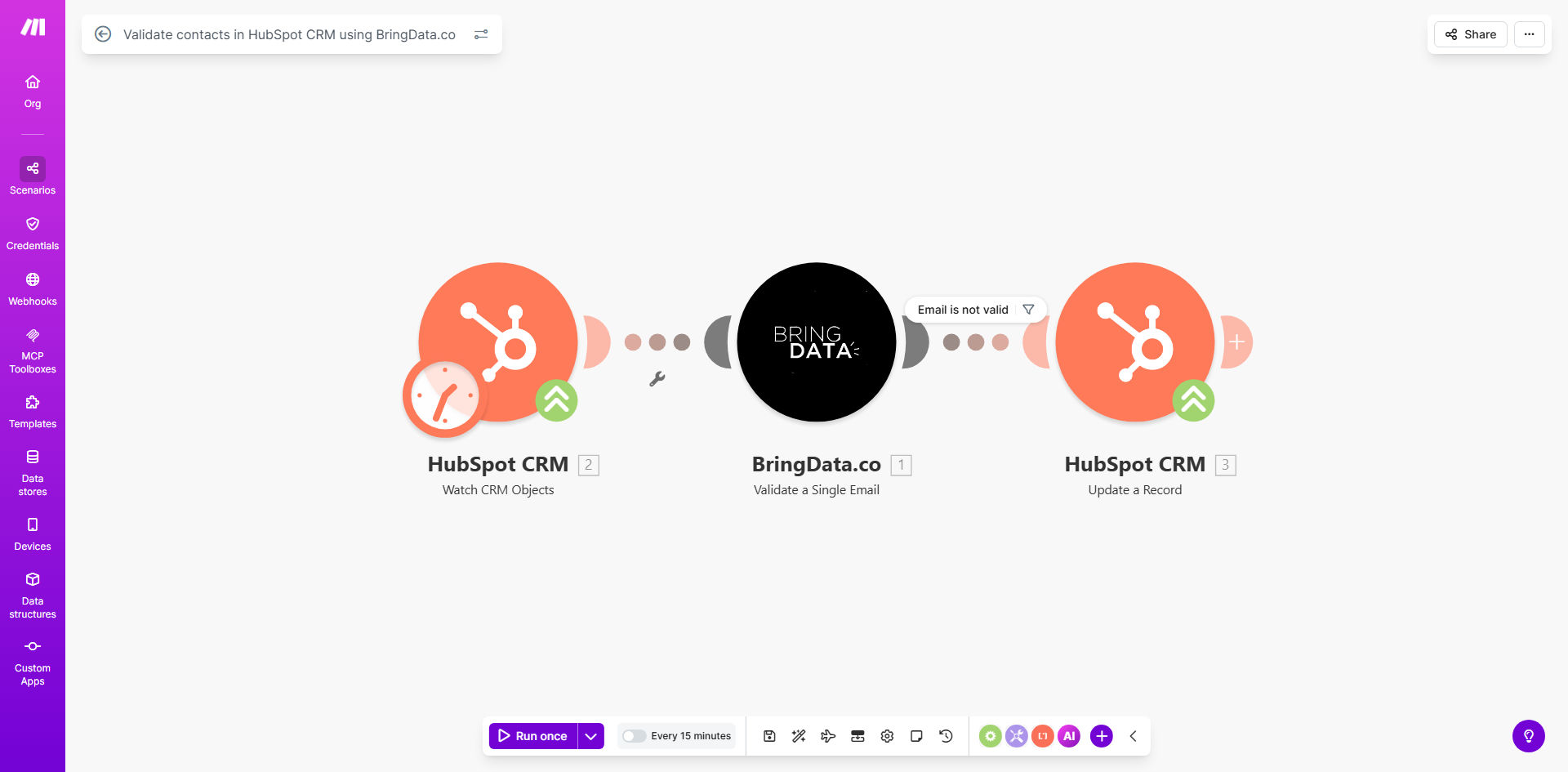
What This Workflow Does
A dirty CRM is a silent profit killer. Invalid email addresses from typos, fake sign-ups, or defunct accounts pollute your HubSpot database, leading to bounced campaigns, wasted marketing budget, and sales teams chasing ghosts. This automated workflow solves that problem at the source.
Whenever a new contact is created in your HubSpot CRM—whether from a form submission, manual entry, or integration—this Make.com scenario instantly triggers. It sends the contact's email address to BringData.co for real-time validation. If the email is confirmed as invalid (non-existent domain, mailbox not found, etc.), the workflow automatically deactivates that contact in HubSpot. This keeps your active lists clean, protects your sender reputation, and ensures your team only engages with genuine, reachable leads.
How It Works
The automation acts as a smart gatekeeper for your CRM, following a precise sequence to filter out bad data.
Step 1: New Contact Detection
The workflow is triggered the moment a new contact record is created in your connected HubSpot account. Make.com watches for this event in real-time, capturing all the contact's details, with the email address being the key data point for the next step.
Step 2: Email Validation with BringData.co
The captured email address is instantly sent to the BringData.co module. BringData.co performs a comprehensive check, verifying syntax, domain existence, and mailbox availability. It returns a clear result: valid or invalid.
Pro tip: You can configure the validation to check for specific issues like disposable email addresses or role-based accounts (e.g., info@, support@) which often have lower engagement rates.
Step 3: Conditional Action in HubSpot
The workflow now branches based on the validation result. If the email is valid, the contact remains untouched and proceeds into your normal marketing/sales funnel. If the email is invalid, the automation executes a crucial action: it updates the contact's status in HubSpot to "deactivated" or moves it to a specific "Invalid Email" list, effectively quarantining it from your active campaigns.
Who This Is For
This automation delivers immense value for any business that relies on HubSpot for growth. It's perfect for marketing teams tired of high bounce rates and damaged deliverability. Sales teams benefit by not wasting time on uncontactable leads. Revenue operations and CRM managers use it to enforce data quality standards automatically. Startups, agencies, and scaling B2B companies that generate high volumes of leads from various sources will find this workflow essential for maintaining a healthy, high-performing customer database.
What You'll Need
- A Make.com account (free or paid plan) to build and run the automation.
- A HubSpot CRM account with administrator or integration access to create API connections.
- A BringData.co account and an API key. They offer free tiers suitable for testing and moderate volumes.
- Basic understanding of how to copy a Make.com template and connect your apps (the template makes this straightforward).
Quick Setup Guide
You can have this protection layer active in under 30 minutes.
- Get the Template: Click the "Get This Workflow" button above to open the template in your Make.com account.
- Connect Your Apps: In the Make.com editor, click on the HubSpot module and authenticate your account. Repeat the process for the BringData.co module, entering your API key.
- Configure the Trigger: Ensure the HubSpot trigger is set to watch for "Contact Creation" events.
- Set the Deactivation Action: In the HubSpot update module (the branch for invalid emails), specify how you want to mark the contact. Common options are setting a custom property like "Email Status" to "Invalid" or changing the contact's lifecycle stage.
- Test & Activate: Turn on the scenario and create a test contact in HubSpot with a known invalid email (like [email protected]) to see the automation in action. Once confirmed, your CRM is now self-cleaning.
Key Benefits
Protect Your Email Sender Reputation: Internet Service Providers (ISPs) track bounce rates. By preventing invalid emails from entering your marketing lists, you maintain a low bounce rate, which is a key factor for high inbox placement. This automation can help improve your overall email deliverability by 15-25%.
Eliminate Wasted Marketing Spend: Every email sent to a non-existent address is money wasted on your email service provider (ESP) plan and a missed opportunity. For a list of 10,000 contacts with a typical 10% invalidity rate, you could be wasting hundreds of dollars per month on sends that never reach a person.
Boost Sales Team Productivity: Sales development representatives (SDRs) spend less time trying to contact dead leads and more time engaging with real prospects. This can reclaim 5-10 hours per rep per month, directly increasing meaningful outreach and pipeline generation.
Ensure Accurate Analytics: Clean data leads to trustworthy reporting. When your contact counts, engagement rates, and conversion metrics aren't diluted by fake or unreachable records, you can make confident, data-driven decisions about your marketing and sales strategies.
Automate Data Governance: This workflow enforces a data quality rule automatically, 24/7. It removes the human error and inconsistency of manual checks, ensuring every single new contact is validated against the same objective standard, creating a reliable and scalable foundation for growth.