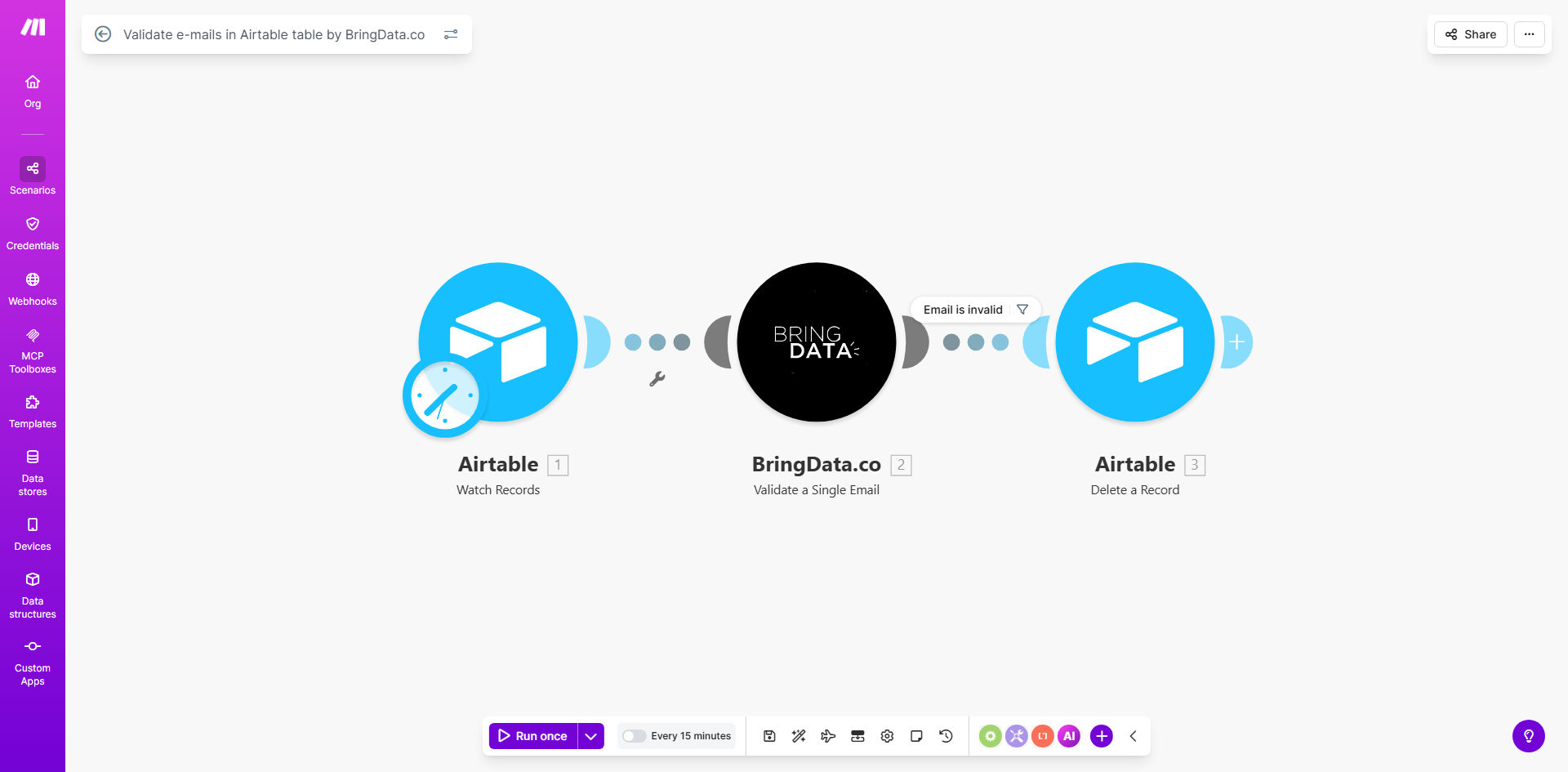
What This Workflow Does
Invalid email addresses are a silent killer for marketing campaigns, sales outreach, and customer communication. They lead to bounced messages, wasted budget, and skewed analytics. Manually checking each new contact is time-consuming and prone to error.
This automated workflow solves that problem at the source. Whenever a new record is created in your Airtable base—whether from a web form, imported list, or manual entry—the email field is instantly sent to BringData.co for professional validation. If the email is confirmed as invalid (due to typos, fake domains, or inactive mailboxes), the record is automatically removed from your table. This ensures your Airtable database remains a trusted source of clean, actionable contact data without any manual intervention.
The result is a self-cleaning database that improves the performance of every downstream process, from email campaigns and CRM syncs to analytics and reporting.
How It Works
The automation acts as a real-time gatekeeper for your Airtable data, following a simple but powerful sequence.
Step 1: Trigger on New Airtable Record
The workflow is activated the moment a new record appears in your specified Airtable table. Make.com watches your base and instantly captures the new data, ready for processing.
Step 2: Extract and Send Email for Validation
The email address from the new record is isolated and sent to the BringData.co module. BringData.co performs a comprehensive check, verifying format, domain existence, and mailbox availability.
Step 3: Evaluate the Validation Result
BringData.co returns a clear result: valid or invalid. The workflow uses a router to decide the next action based on this result.
Step 4: Delete Invalid Records
If the email is marked as invalid, the workflow triggers an action to delete that specific record from your Airtable table. This immediate removal prevents bad data from polluting your lists.
Step 5: Handle Valid Records (Optional)
Records with valid emails continue down another path. You can easily extend the workflow to trigger follow-up actions, like sending a welcome email, adding the contact to a CRM, or notifying your team.
Pro tip: Instead of deleting invalid records, consider updating a "Status" field to "Invalid" or moving them to a separate "Review" table. This preserves data for audit purposes and allows for manual correction attempts.
Who This Is For
This automation is ideal for any business or team that relies on Airtable as a source of truth for contact information.
Marketing Teams: Ensure every subscriber or lead captured through forms is reachable, improving campaign deliverability and ROI.
Sales & Business Development: Maintain a clean pipeline in Airtable-based CRMs, ensuring outreach efforts are focused on genuine prospects.
Community Managers & Event Organizers: Validate attendee or member sign-ups automatically, keeping participation lists accurate.
Startups and SMBs: Automate data hygiene without a dedicated data team, saving hours of manual cleaning and preventing costly mistakes.
Freelancers & Agencies: Offer clients a premium, automated data validation service as part of their Airtable management package.
What You'll Need
- A Make.com account (free tier available).
- An Airtable account with a base containing a table that collects email addresses.
- Access to the BringData.co API (you'll need an API key, which you can obtain from their website).
- The email field in your Airtable record must be clearly identified (e.g., a field named "Email" or "Contact Email").
Quick Setup Guide
You can have this automation running in under 15 minutes.
- Clone the Template: Click "Get This Workflow" to open the template in your Make.com account and create a copy.
- Connect Airtable: In the first module, connect your Make.com account to Airtable and select the specific base and table you want to monitor.
- Configure BringData.co: In the validation module, add your BringData.co API key and map the email field from the previous Airtable step.
- Set Up the Filter: The router will already be configured to check the validation result. Ensure the path for "invalid" emails leads to the Airtable "Delete a Record" action.
- Test the Scenario: Turn on the scenario and add a test record with a deliberately invalid email (like "test@example") to your Airtable table. Watch as the workflow detects and deletes it.
- Activate & Monitor: Once testing is successful, let the automation run. You can check the scenario history in Make.com to see validation logs.
Key Benefits
Eliminate Manual Data Cleaning: Save 5–10 hours per month typically spent on scrubbing email lists. The automation works 24/7, validating every entry the moment it arrives.
Boost Marketing Campaign Performance: Clean lists can increase email deliverability by up to 98% and open rates by reducing bounces. This directly translates to higher conversion rates and better marketing spend efficiency.
Improve Data-Driven Decision Making: With a verified contact database, your analytics on customer acquisition, engagement, and retention become far more accurate and reliable.
Protect Sender Reputation: High bounce rates from invalid emails can damage your domain's reputation with ISPs. Proactive validation helps maintain a positive sender score, ensuring your important emails reach the inbox.
Scale with Confidence: As your business grows and your Airtable base collects thousands of contacts, this automated guardrail ensures data quality scales automatically, without requiring additional personnel.