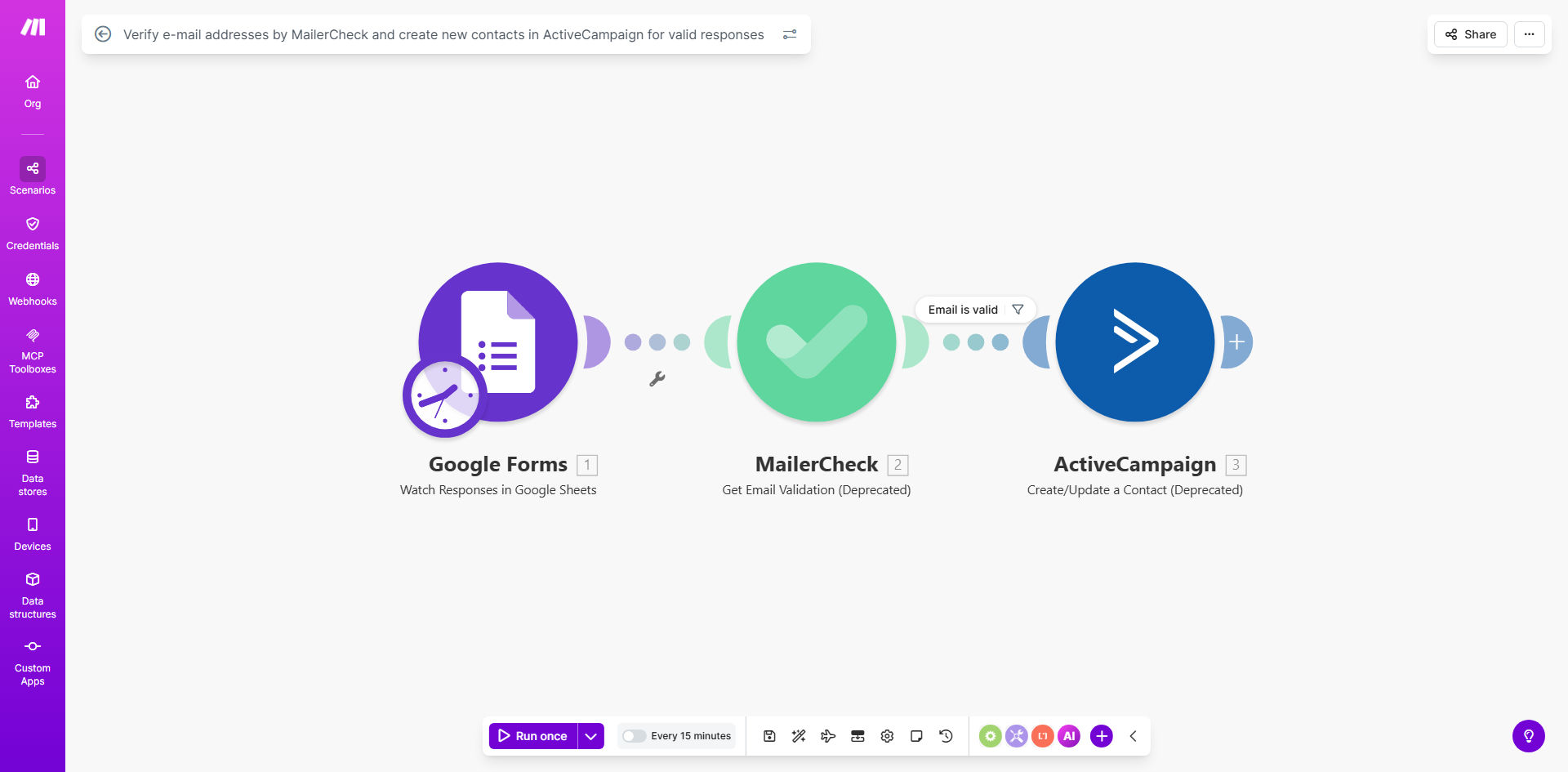
What This Workflow Does
Every business collecting leads online faces a hidden problem: invalid email addresses. Whether from typos, fake submissions, or inactive accounts, these bad emails clog your CRM, waste marketing budget, and damage your sender reputation. This automation solves that by acting as a gatekeeper for your contact list.
When someone submits a Google Form, their email address is instantly sent to MailerCheck for validation. The service checks for deliverability, domain existence, and spam traps. Only if the email passes these checks is the contact created in ActiveCampaign. Invalid submissions are filtered out, keeping your list clean and your campaigns effective.
This workflow transforms a manual, error-prone process into a seamless, automated funnel. It ensures your sales and marketing teams only spend time on real, reachable prospects, dramatically improving lead quality and campaign ROI from the moment a form is submitted.
How It Works
Step 1: Trigger from Google Forms Submission
The workflow starts whenever a new response is submitted to your configured Google Form. Make.com captures the form data, including the submitted email address and any other fields like name, company, or phone number.
Pro tip: Use this for webinar sign-ups, newsletter subscriptions, contact forms, or any lead capture point. The automation works for any form type.
Step 2: Validate Email with MailerCheck
The captured email address is immediately sent to the MailerCheck module. MailerCheck performs a real-time verification, analyzing the address for syntax errors, domain validity, and mailbox existence. It returns a clear result: valid, invalid, or risky.
Step 3: Decision Router – Filter Results
A router in Make.com examines MailerCheck's response. If the email is marked as "valid," the workflow proceeds to the next step. If it's "invalid" or "risky," the workflow can stop, log the entry, or even send a notification to an admin—preventing bad data from entering your system.
Step 4: Create Contact in ActiveCampaign
For valid emails, the workflow uses the ActiveCampaign module to create a new contact. All the original form data (name, etc.) is mapped to corresponding fields in ActiveCampaign. The contact is added to your specified list, ready for segmentation, tagging, and immediate follow-up campaigns.
Who This Is For
This template is ideal for any business that relies on email marketing and collects leads through online forms.
Marketing Teams: Professionals who need clean lists to ensure high open rates, low bounce rates, and accurate campaign analytics.
Sales Teams: Teams that want to ensure every lead in their CRM is a real, reachable person, saving time on chasing dead-end contacts.
Small Business Owners: Entrepreneurs using Google Forms for inquiries, who want to automate lead processing without manual data cleaning.
Event & Webinar Organizers: Anyone collecting registrations who needs to verify attendees' emails before sending event details and follow-ups.
Agency & Freelancers: Service providers managing client lead generation campaigns, who need to guarantee data quality for their clients.
What You'll Need
- A Make.com account (free or paid) to run the automation.
- A Google Forms form set up and collecting responses.
- A MailerCheck account and API key for email validation services.
- An ActiveCampaign account with an API key and at least one list ready to receive contacts.
- Basic understanding of how to connect these apps within Make.com (the template provides the blueprint).
Quick Setup Guide
1. Clone the Template: Use the "Get This Workflow" button to copy the scenario into your Make.com account.
2. Connect Your Apps: In the Make.com scenario, update the connections for Google Forms, MailerCheck, and ActiveCampaign with your own accounts and API keys.
3. Configure the Trigger: Select your specific Google Form from the dropdown in the Google Forms module.
4. Map Your Data: Ensure the fields from your form (email, first name, etc.) are correctly mapped to the corresponding fields in the MailerCheck and ActiveCampaign modules.
5. Set Your ActiveCampaign List: Choose the specific list in ActiveCampaign where new, verified contacts should be added.
6. Test & Activate: Submit a test entry to your Google Form. Check that a valid email creates a contact in ActiveCampaign and an invalid email is handled appropriately. Then activate the scenario.
Pro tip: Consider adding a notification step for invalid emails. You could send a Slack message or email to an admin to review suspicious submissions.
Key Benefits
Protect Your Sender Reputation & Save Money. Email service providers penalize accounts with high bounce rates. By ensuring only valid emails enter your list, you maintain a healthy reputation, avoid spam filters, and stop wasting campaign budget on undeliverable addresses.
Instant Lead Qualification, No Manual Work. The validation happens in seconds, automatically qualifying leads as they submit. Your team never has to manually check or clean lists, freeing up hours each week for more strategic tasks.
Higher Campaign Performance & ROI. Clean lists directly translate to higher open rates, click-through rates, and conversions. Your marketing analytics become accurate, allowing you to truly measure the ROI of your efforts and optimize campaigns effectively.
Seamless Integration, Zero Data Silos. The workflow connects three critical tools without any manual copying or pasting. Data flows from capture to validation to storage in one automated pipeline, eliminating errors and ensuring consistency.
Scalable Foundation for Growth. As your form submissions increase from 10 to 10,000 per month, this automation scales effortlessly. It maintains data quality at any volume, providing a reliable foundation for your growing marketing and sales operations.