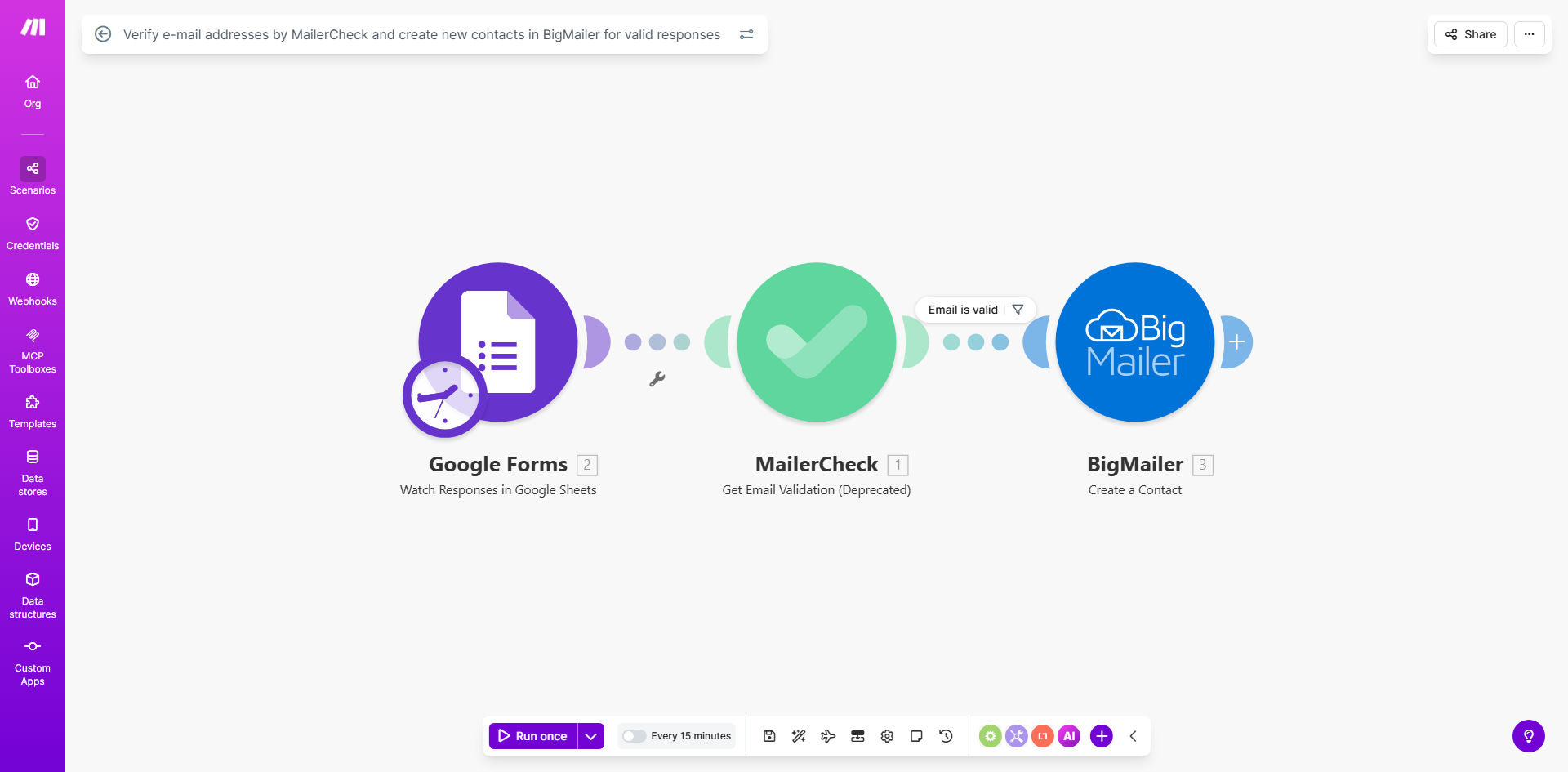
What This Workflow Does
Every business collecting leads online faces a common problem: dirty data. Up to 20% of email addresses collected via forms can be invalid, mistyped, or from disposable services. Adding these to your marketing list hurts your sender reputation, increases bounce rates, and wastes your marketing budget on emails that never reach a real person.
This automated workflow solves that by acting as a quality gatekeeper for your contact list. It connects your Google Forms—used for lead magnets, event sign-ups, or contact requests—directly to MailerCheck for instant email verification. Only emails that pass verification are then created as new, clean contacts in your BigMailer account, ready for nurturing campaigns.
The process eliminates manual checking and data entry, ensuring your marketing team spends time engaging with real prospects, not cleaning spreadsheets. It turns a raw lead capture process into a reliable, scalable system for list growth.
How It Works
The automation runs silently in the background, triggered by each new form submission. Here’s the step-by-step process:
Step 1: Capture the Lead
A visitor fills out your Google Form, providing their name, email, and other details. The moment they hit "submit," the workflow is triggered. Make.com instantly receives the submission data, including the all-important email address.
Step 2: Verify the Email
The workflow sends the submitted email address to MailerCheck, a dedicated email verification service. MailerCheck performs a series of checks on the email's syntax, domain, and mailbox to determine if it's valid, risky, or invalid. It returns a clear status and risk score.
Step 3: Make a Decision
Based on MailerCheck's response, the workflow makes an automated decision. If the email status is "valid" and the risk is low, the process continues. If the email is marked as "invalid," "disposable," or "high-risk," the workflow can stop, log the entry, or send an alert—keeping your main list clean.
Pro tip: You can extend this workflow to send an automatic reply to users who provide an invalid email, asking them to correct it. This can recover up to 15% of otherwise lost leads.
Step 4: Create the Contact
For valid emails, the workflow takes all the form data (name, company, etc.) and uses it to create a new contact in your BigMailer account. The contact is instantly added to a designated list or tagged appropriately, making them immediately available for your email sequences, newsletters, or sales outreach.
Who This Is For
This automation is ideal for any business or marketer that relies on lead generation forms and email marketing. Specifically, it's perfect for:
- Digital Marketers & Agencies: Managing multiple client lead funnels who need to ensure list quality and demonstrate ROI from clean data.
- Course Creators & Coaches: Using Google Forms for webinar registrations or freebie downloads, wanting to build a high-quality email list for launching offers.
- Small Business Owners: Wearing multiple hats who don't have time to manually vet every email sign-up but understand the cost of spam traps and bounces.
- Event Organizers: Collecting registrations and needing a verified attendee list for communication before and after the event.
What You'll Need
- A Make.com account (free tier available) to build and run the automation.
- A Google Forms setup that is actively collecting lead information.
- A MailerCheck account with API access to verify emails (they offer pay-as-you-go credits).
- A BigMailer account (or a similar email marketing platform) where you want to store your verified contacts.
- The API keys or connection credentials for MailerCheck and BigMailer ready to input into Make.com.
Quick Setup Guide
You can have this workflow live in under 30 minutes. Follow these steps after clicking "Get This Workflow":
- Clone the Template: In Make.com, use the provided link to create a copy of the template in your own account.
- Connect Your Apps: Authorize the connections to your specific Google account (where the form lives), your MailerCheck account, and your BigMailer account.
- Map the Data: Point the Google Forms module to your specific form. Then, map the form fields (like 'Email', 'First Name') to the corresponding fields in the MailerCheck and BigMailer modules.
- Set Your Filter: Configure the router or filter module to only proceed to BigMailer if MailerCheck returns a "valid" status. You can adjust the risk score threshold based on your preference.
- Test & Activate: Turn on the scenario and submit a test entry to your Google Form. Check that a valid test email becomes a contact in BigMailer and an invalid one is handled appropriately.
Key Benefits
Improve Email Deliverability by up to 40%. By ensuring only valid addresses enter your list, you dramatically lower bounce rates. Internet Service Providers (ISPs) see you as a trustworthy sender, which increases the chances your emails land in the primary inbox, not spam.
Save 5+ Hours per Month on Manual List Cleaning. Eliminate the tedious task of exporting lists, running them through bulk verification tools, and manually importing the clean data back. The automation handles this in seconds, freeing your team for higher-value work.
Increase Marketing ROI with Higher Engagement. Clean lists mean your open and click rates reflect engagement with real people. This provides accurate data for optimizing campaigns and ensures your marketing spend is effective, not wasted on non-existent addresses.
Scale Lead Capture Confidently. Whether you get 10 or 1,000 form submissions a day, the system works consistently. You can run larger ads or promotions knowing your backend will automatically qualify and onboard leads without breaking or requiring extra manpower.
Enhance Data Integrity from the Start. This workflow embeds data quality at the point of entry. It prevents bad data from ever polluting your CRM or marketing platform, leading to more reliable segmentation, reporting, and customer insights.