What This Workflow Does
Every invalid email address on your Mailchimp list is a direct cost to your marketing efforts and a risk to your sender reputation. Bounce rates climb, engagement drops, and your carefully crafted campaigns land in spam folders. This problem often starts at the point of capture—online forms where typos, fake addresses, and spam signups slip through.
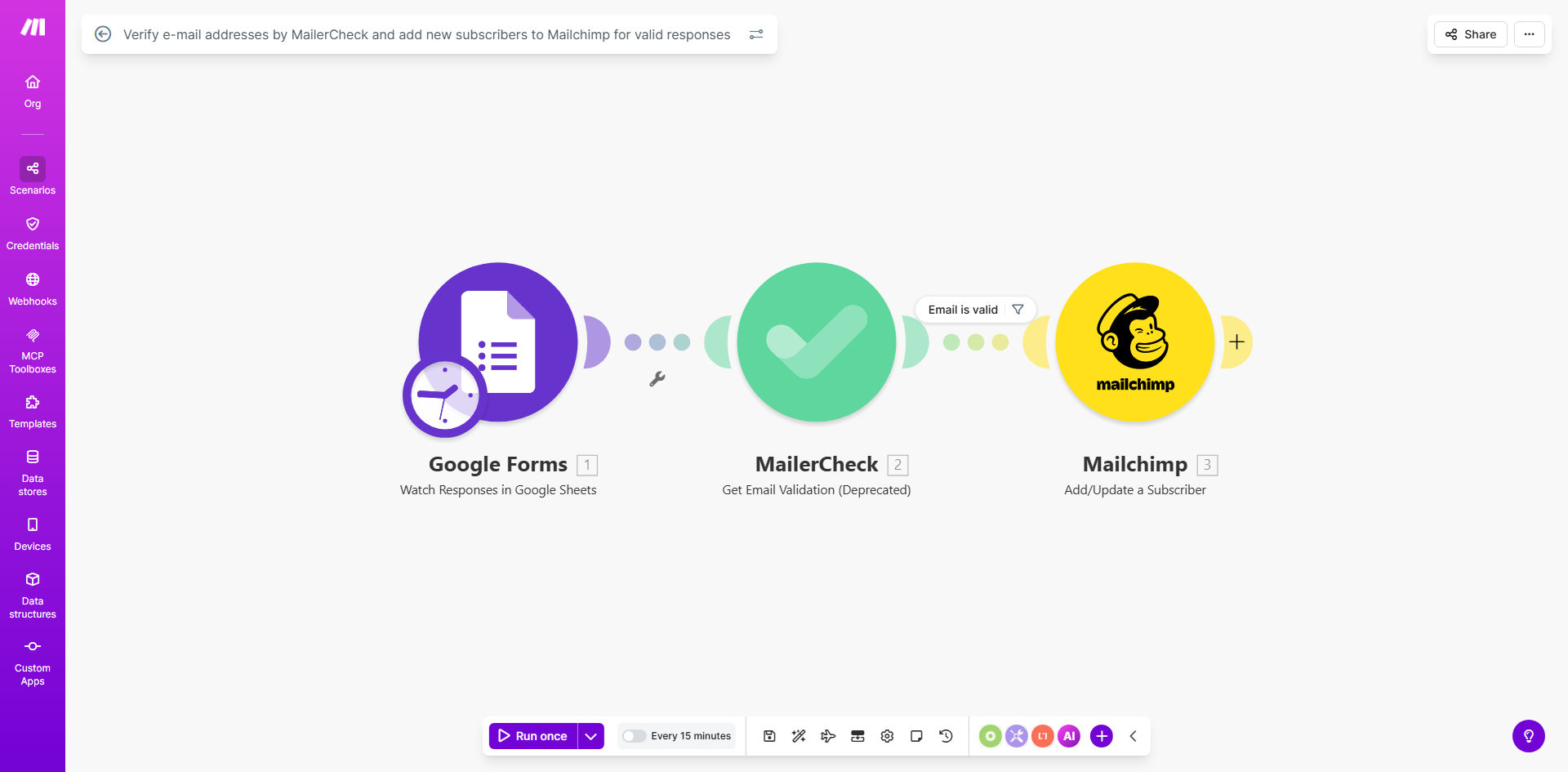
This automation solves that by placing a guardrail between your Google Forms and Mailchimp. It acts as an intelligent filter. When someone submits a form, their email address is instantly sent to MailerCheck for verification. The system checks for validity, mailbox existence, and risk factors. Only emails that pass this check are added as subscribers to your designated Mailchimp list. Invalid entries are filtered out, keeping your list clean from the very first touchpoint.
The result is a powerful, self-cleaning lead capture system. You build an audience of genuinely interested, reachable contacts, which translates to higher open rates, better deliverability, and a stronger return on your email marketing investment—all without any manual intervention from you or your team.
How It Works
The workflow is a straightforward three-step process that runs silently in the background on Make.com.
Step 1: Capture the Submission
The automation is triggered the moment a new response is submitted to your connected Google Form. Make.com watches for this event and immediately captures all the form data, with a primary focus on extracting the submitted email address field.
Step 2: Verify with MailerCheck
The captured email is sent to the MailerCheck API. MailerCheck performs a real-time validation, checking syntax, domain, and mailbox existence. It returns a detailed result, typically classifying the email as "valid", "invalid", "risky", or "unknown".
Pro tip: You can configure the workflow to only proceed with emails marked "valid". For "risky" addresses (like those from disposable email services), you can route them to a separate review process or a different list.
Step 3: Conditionally Add to Mailchimp
Make.com uses a router to check MailerCheck's result. If the email is valid, the workflow proceeds to add the contact to your specified Mailchimp audience. You can map other form fields (like name, company, etc.) to corresponding Mailchimp merge tags at this stage. If the email is invalid, the workflow stops or can be set to log the attempt elsewhere, ensuring no bad data enters your primary list.
Who This Is For
This template is ideal for any business or marketer using Google Forms for lead generation and Mailchimp for email outreach. It's particularly valuable for:
- Event Organizers: Ensuring only real emails are added from webinar, workshop, or conference registration forms.
- Course Creators & Coaches: Protecting the email list for their waitlist or free resource signup forms.
- Small Business Owners: Automating list building from contact forms, newsletter signups, or quote request forms on their website.
- Marketing Agencies: Implementing robust list hygiene for clients to improve campaign performance metrics and demonstrate value.
- Non-Profits: Maintaining a clean donor or volunteer communication list gathered through online forms.
What You'll Need
- A Make.com account (free tier available).
- A Google Forms form that collects email addresses.
- A MailerCheck account with an API key (they offer a free tier with credits).
- A Mailchimp account and an existing audience/list to add subscribers to.
- The Mailchimp API key and audience ID for the list you want to use.
Quick Setup Guide
You can have this automation running in under 15 minutes.
- Clone the Template: Click the "Get This Workflow" button to open the template in your Make.com account and create a copy.
- Connect Google Forms: In the first module, authorize Make.com to access your Google account and select the specific form you want to use as the trigger.
- Configure MailerCheck: In the verification module, add your MailerCheck API key. Test the connection to ensure it's working.
- Set Up Mailchimp: In the final module, connect your Mailchimp account using your API key. Select the target audience and map the email field from the Google Form.
- Activate & Test: Turn the scenario on and submit a test entry to your Google Form using a known good email address. Check your Mailchimp audience to confirm the subscriber was added.
Key Benefits
Protect Your Sender Reputation: By preventing invalid emails from ever entering your list, you drastically reduce bounce rates. Major email service providers like Gmail and Outlook use bounce rates as a key factor in determining your sender score. A high score ensures your marketing and transactional emails reliably reach the primary inbox.
Save Money on Email Marketing: Most email marketing platforms, including Mailchimp, charge based on the number of contacts in your list. By filtering out invalid addresses, you avoid paying for contacts that will never engage, optimizing your marketing spend from day one.
Improve Campaign Performance Metrics: A list composed of verified, real email addresses naturally leads to higher open and click-through rates. This not only looks better in your reports but also further signals to algorithms that your content is valuable, improving future deliverability.
Eliminate Manual List Cleaning: This workflow automates a tedious, error-prone task. Your team no longer needs to periodically export lists, run them through bulk verification services, or manually delete bad entries. The list is cleaned in real-time, as leads come in.
Enhance Data Quality for Segmentation: Starting with a verified list means any subsequent segmentation or automation (like welcome sequences) is built on a foundation of accurate data. This increases the relevance and effectiveness of all your downstream email marketing activities.