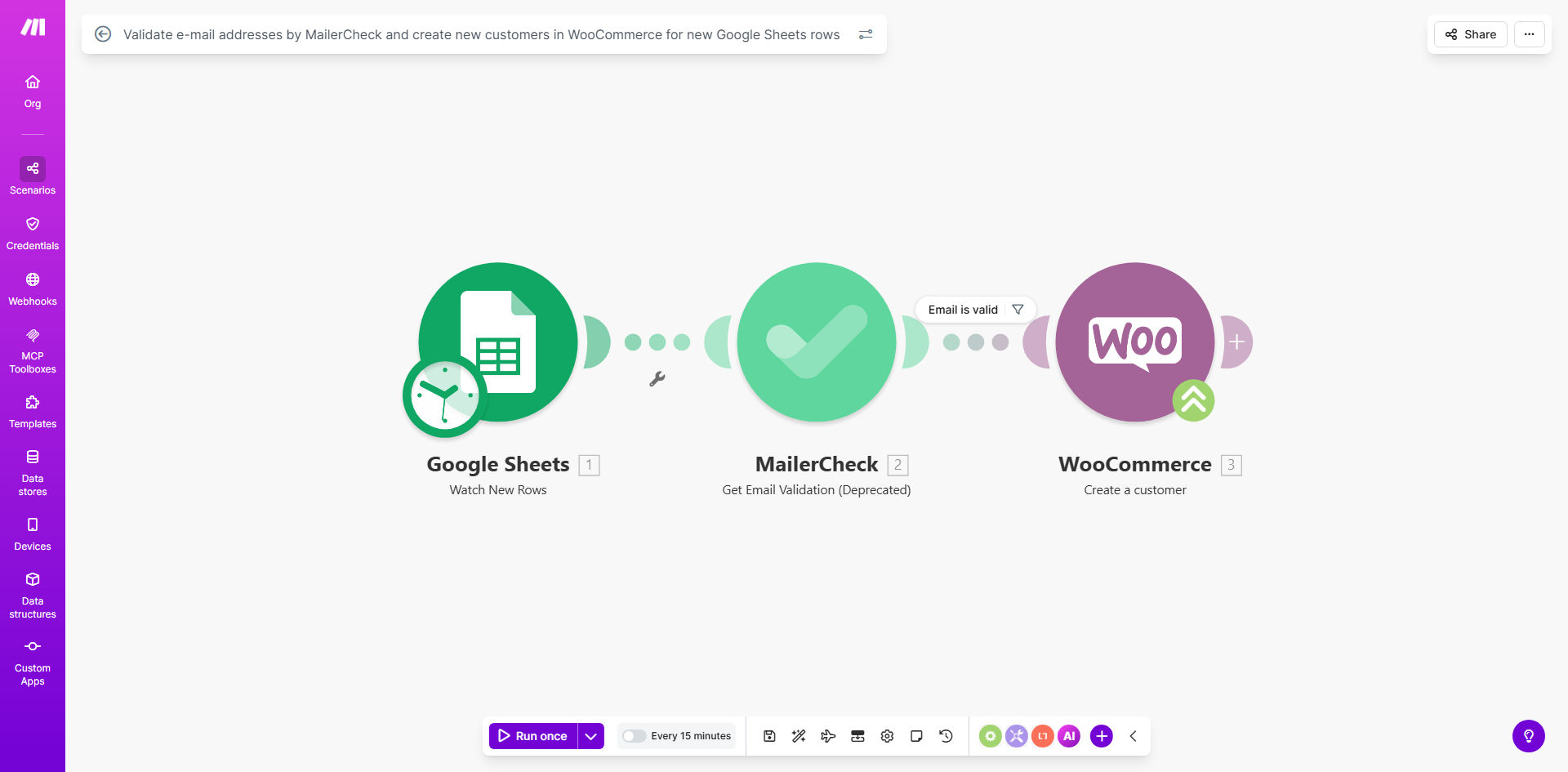
What This Workflow Does
For e-commerce businesses, collecting leads from events, webinars, or contact forms often means ending up with a messy spreadsheet. Manually checking each email for validity and then creating customer accounts in WooCommerce is a tedious, error-prone process that wastes valuable time.
This automation solves that by creating a seamless bridge between your lead collection (Google Sheets) and your customer database (WooCommerce). Every time a new row is added to your designated sheet—containing a name, email, and other details—the workflow springs into action. It first validates the email address using MailerCheck to ensure it's deliverable and not a spam trap. If the email passes validation, the system automatically creates a new customer record in your WooCommerce store with all the provided information.
The result is a clean, marketing-ready customer list built without any manual intervention. You stop invalid emails from ever entering your system, protect your sender reputation, and ensure every lead is instantly actionable for your sales and marketing teams.
How It Works
The automation follows a logical, three-step process to transform raw lead data into a qualified customer.
Step 1: Trigger from Google Sheets
The workflow watches a specific Google Sheet for new rows. This could be a sheet linked to a Typeform, a manual entry sheet for trade show leads, or a shared spreadsheet from a partner. When a new row appears, Make.com captures all the data (like First Name, Last Name, Email, Phone, etc.) and passes it to the next step.
Pro tip: Structure your Google Sheet with clear column headers (e.g., "Email", "First Name"). This makes mapping the data in later steps much easier and more reliable.
Step 2: Validate with MailerCheck
The captured email address is sent to MailerCheck, a dedicated email validation service. MailerCheck performs real-time checks to verify if the email address syntax is correct, the domain exists, and the mailbox can receive mail. It also checks for risky signals like disposable email addresses or known spam traps.
Step 3: Create Customer in WooCommerce
If the email is validated as "safe" or "valid," the workflow proceeds to WooCommerce. It uses the WooCommerce API to create a new customer account. All the data from the sheet—name, billing details, any custom metadata—is formatted and added to the new customer profile. If the email fails validation, the workflow can be set to log the entry in a separate sheet or notify your team, preventing bad data from entering your store.
Who This Is For
This automation is a game-changer for WooCommerce store owners, marketing managers, and operations teams who rely on spreadsheets for lead management.
E-commerce Brands: Perfect for brands that collect emails at pop-up shops, markets, or through offline campaigns and need to onboard those leads quickly for email marketing.
Marketing Agencies: Agencies managing client WooCommerce stores can use this to automate lead imports from various client campaigns into a unified, clean customer database.
Businesses with Partner Networks: If distributors or affiliates send you customer leads via shared Sheets, this automation validates and imports them seamlessly, ensuring data quality from multiple sources.
What You'll Need
To set up this automation, you'll need active accounts and API access for the following services:
- A Google Sheets spreadsheet with your lead data.
- A Make.com account (free tier available).
- A MailerCheck account (offers a free tier with limited credits).
- A WooCommerce store with REST API enabled. You'll need to generate API keys (Consumer Key & Secret) from your WooCommerce settings.
Quick Setup Guide
You can have this automation running in under 30 minutes by following these steps.
- Clone the Template: Click "Get This Workflow" to copy the template into your Make.com account.
- Connect Google Sheets: In the first module, authenticate your Google account and select the specific spreadsheet and worksheet that contains your leads.
- Configure MailerCheck: Connect your MailerCheck account in the second module. The template is pre-set to validate the email address captured from the sheet.
- Connect WooCommerce: In the final module, add your WooCommerce store URL and the API keys (Consumer Key & Secret). Map the fields from your Google Sheet (like first name, email) to the corresponding WooCommerce customer fields.
- Test & Activate: Add a test row to your Google Sheet. The workflow should run, validate the email, and create a draft customer in WooCommerce. Once confirmed, activate the scenario to run automatically.
Pro tip: Start by running the scenario in "Test Mode" or with a limited number of rows. This lets you verify the data mapping and customer creation without affecting your live store's customer list.
Key Benefits
Eliminate 2–3 hours of manual data entry per 100 leads. This automation completely removes the need to copy-paste, validate, and create customer accounts by hand. Your team can redirect that time towards high-value activities like customer engagement and sales strategy.
Protect your email sender score and marketing ROI. By ensuring only valid, deliverable emails enter your WooCommerce list, you dramatically reduce bounce rates. This protects your domain's reputation with email providers, leading to better inbox placement for your crucial order updates and marketing campaigns.
Ensure 100% data consistency and accuracy. Manual entry is prone to typos and inconsistencies. An automated workflow applies the same rules and formatting every single time, creating uniform, reliable customer records that make segmentation and personalization easier.
Scale your lead onboarding process instantly. Whether you receive 10 leads or 1,000 leads in a day, the automation handles them all at the same speed. This allows your business to scale its marketing and sales efforts without creating a data management bottleneck.
Gain a clear audit trail for all new customers. Every customer created via this automation is traceable back to the original Google Sheets row and its validation status. This provides invaluable insight into your lead sources and the quality of your data collection methods.