What This Workflow Does
For businesses operating in regions with Electronic Sales Registration (EET) requirements, manually reporting each transaction is a tedious, error-prone chore. Staff must interrupt customer service to log into a system, enter details, and verify submissions. This process slows down operations and risks compliance penalties for mistakes or delays.
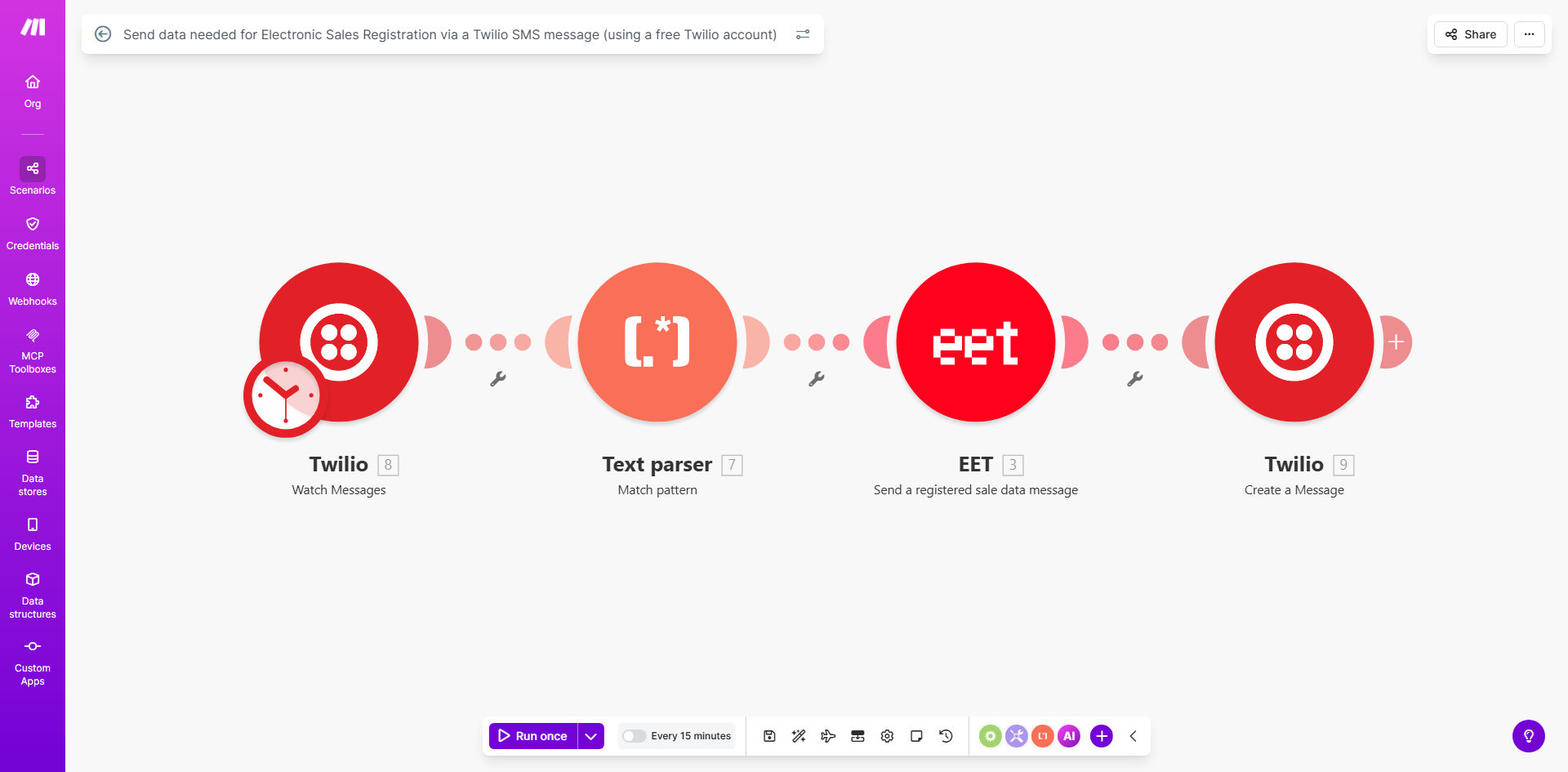
This automation solves that by turning a simple SMS message into a complete EET compliance action. When a sale is made, an employee sends a quick SMS with the amount to a dedicated Twilio number. The Make.com workflow instantly triggers, extracts the sale data, queries your EET system for the full registration details, and sends a confirmation SMS back with all necessary data. It transforms minutes of manual work into a secure, automated process that happens in seconds.
How It Works
Step 1: SMS Trigger
A new SMS message is received in your Twilio account from a pre-authorized phone number (e.g., a store manager's mobile). The message contains the sale amount or a simple code.
Step 2: Data Parsing
Make.com reads the incoming SMS text. Using text functions or simple patterns, it identifies and isolates the numerical sale amount from the message.
Step 3: EET Data Fetch
The workflow then uses the extracted sale amount to make an API call to your Electronic Sales Registration system. It requests and retrieves all the required data for that specific transaction, such as the tax base, VAT, receipt ID (FIK/BKP), and timestamp.
Step 4: SMS Response
Finally, Make.com formats the retrieved EET data into a clear, readable text message and uses Twilio to send it back to a specified number—confirming the registration and providing the essential details for records.
Pro tip: Use this workflow to create a dual verification system. Send the confirmation SMS to a second manager's phone for instant oversight, adding an extra layer of compliance control.
Who This Is For
This template is ideal for retail stores, restaurants, cafes, service providers, and any small to medium-sized business mandated to use EET for sales reporting. It's perfect for owners or managers who want to:
- Empower floor staff to report sales instantly without computer access.
- Reduce training time on complex EET software interfaces.
- Maintain a reliable, timestamped SMS log of all registrations.
- Start automating with a free Twilio trial account to test the concept.
What You'll Need
- A Make.com account (free tier available).
- A Twilio account (a free trial account works perfectly for this use case).
- Access to your EET system's API or a method to programmatically retrieve registration data.
- Two phone numbers: one to send trigger SMS from, and one to receive confirmation SMS to.
Quick Setup Guide
- Clone the template: Click "Get This Workflow" to copy the scenario into your Make.com account.
- Connect Twilio: In the first module, authenticate your Twilio account and specify the phone number that will receive the trigger SMS.
- Configure the parser: Adjust the text parsing logic in the second module to match how your staff will format their SMS messages (e.g., "Sale: 1250 CZK").
- Set up the EET API call: Replace the placeholder HTTP request module with the actual API call to your EET provider. Map the sale amount as a parameter.
- Set the response number: In the final Twilio SMS module, enter the phone number that should receive the confirmation message with the EET data.
- Test and activate: Send a test SMS from your authorized number. Check that the correct EET data is fetched and a confirmation SMS is received. Then turn the scenario on.
Key Benefits
Eliminate manual data entry errors. By automating the fetch from the EET system, you ensure the data sent for registration is 100% accurate, preventing costly compliance mistakes.
Save 2–5 minutes per transaction. What used to require logging into a system and typing details now happens automatically in the background, freeing your staff for revenue-generating tasks.
Create a verifiable audit trail. Every trigger and confirmation SMS is stored in Twilio, providing a simple, searchable record of when each sale was registered for peace of mind during inspections.
Operate from anywhere. Managers can trigger and verify EET registration remotely using just a mobile phone, enabling flexible oversight of multiple locations.
Start with zero cost. The workflow is designed to work with free-tier accounts on both Make.com and Twilio, allowing you to pilot and prove the value before any investment.