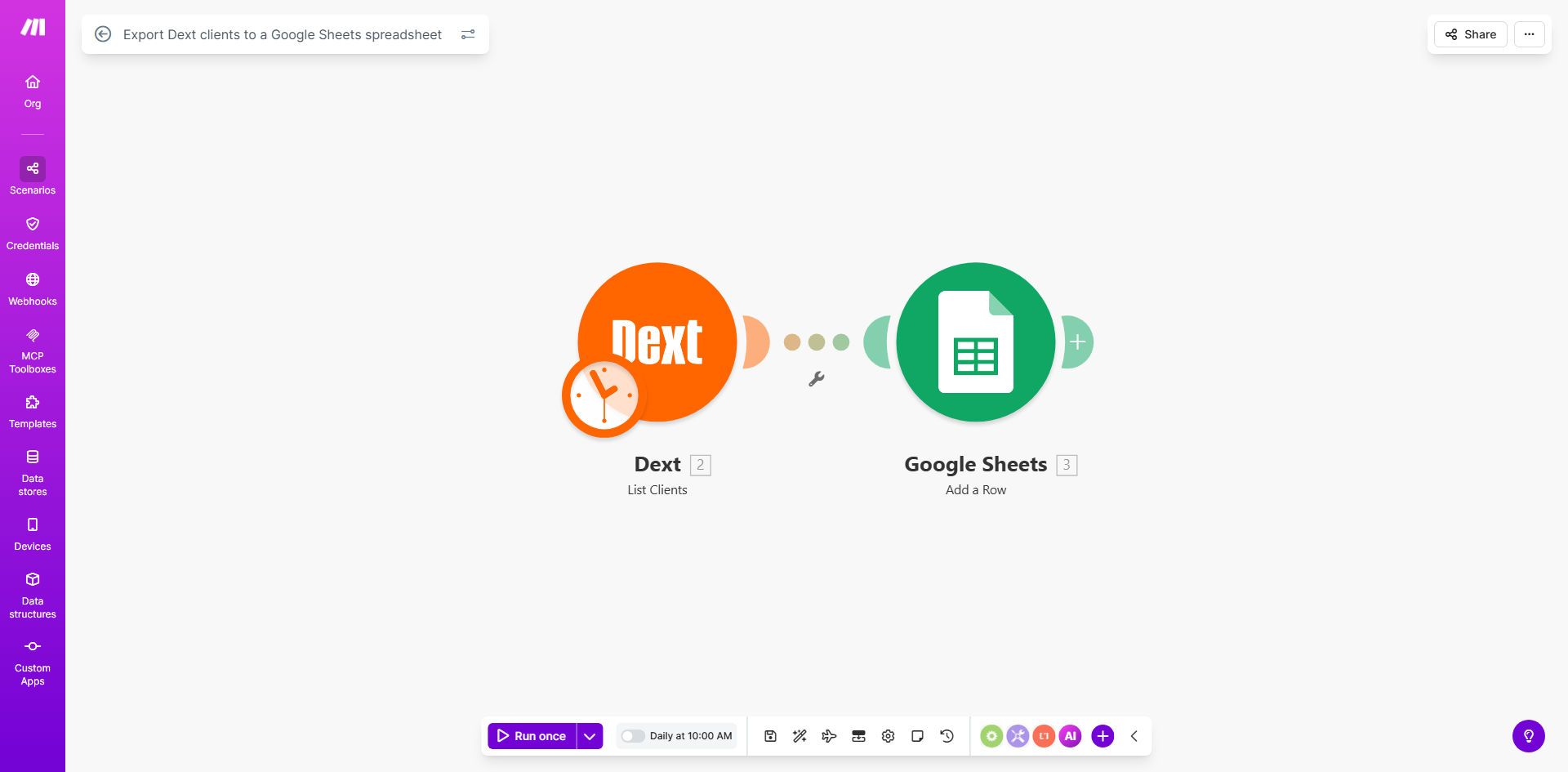
What This Workflow Does
For accounting firms and bookkeepers using Dext (formerly Receipt Bank), managing a growing client list can become a manual, time-consuming chore. You might need a client roster for internal reporting, to share with partners, or to feed into other marketing and onboarding systems. Manually copying client details from Dext into a spreadsheet is not only tedious but also prone to errors and quickly becomes outdated.
This automated workflow solves that problem by creating a seamless bridge between Dext and Google Sheets. It runs on a schedule you set (daily by default), fetches your complete list of clients from your Dext account, and neatly writes their details into a designated Google Sheets spreadsheet. The result is a live, automatically updated client directory that requires zero ongoing effort from you or your team.
The business value is clear: it transforms a recurring administrative task into a set-and-forget system. This frees up valuable staff time—time that can be redirected towards client service, advisory work, or business growth activities. It also ensures everyone in your firm is working from the same, accurate client data, improving operational consistency.
How It Works
The automation is built on Make.com and follows a simple, reliable sequence. Once activated, it operates silently in the background according to your chosen schedule.
Step 1: Scheduled Trigger
The workflow is initiated by a Schedule module set to run every day at 10:00 AM. You can easily modify this timing to hourly, weekly, or any other interval that suits your business rhythm directly within the Make.com scenario.
Step 2: Fetch Clients from Dext
When triggered, the automation connects to your Dext account via a secure API connection. It sends a request to retrieve a list of all clients associated with your account, pulling key details like client name, email, company number, and address.
Step 3: Process and Format Data
The raw data from Dext is then processed and mapped into a clean, columnar format suitable for a spreadsheet. This step ensures that the data is structured correctly, with each client becoming a row and each detail (name, email, etc.) occupying its own column.
Step 4: Update Google Sheets
Finally, the formatted client data is sent to your specified Google Sheets spreadsheet. The automation can add new clients as rows, update existing ones, or completely refresh the sheet with the latest list. Your spreadsheet becomes a real-time mirror of your Dext client portfolio.
Pro tip: Use the exported Google Sheet as a source for other automations. Connect it to a tool like Mailchimp for client newsletter campaigns or to a dashboard like Google Data Studio for visual client analytics.
Who This Is For
This automation is ideal for any professional service business that uses Dext to manage client documents and needs efficient access to client information.
Accounting & Bookkeeping Firms: Perfect for practices that need a master client list for internal reporting, capacity planning, or to provide to a virtual assistant for administrative tasks.
Multi-Partner Practices: Enables easy sharing of the client roster with all partners in a familiar spreadsheet format, without needing to grant everyone Dext admin access.
Firms Using Google Workspace: If your team lives in Google Sheets for collaboration, this workflow brings your client data directly into that environment, eliminating app-switching.
Businesses Scaling Quickly: As you onboard new clients, the automated list ensures your team always has an up-to-date view, preventing oversights and supporting seamless client service.
What You'll Need
- A Make.com account (free tier is sufficient to run this workflow).
- A Dext Prepare account with administrator access to generate API credentials.
- A Google account with access to Google Sheets (part of any free Gmail or Google Workspace account).
- A Google Sheets spreadsheet created and ready to receive the client data. The template will guide you on the required column headers.
- 5-10 minutes for the initial one-time setup to connect your accounts and configure the schedule.
Quick Setup Guide
Getting this automation live is straightforward. Follow these steps to activate your client data sync.
- Get the Template: Click the "Get This Workflow" button above to copy the template to your Make.com account.
- Connect Dext: In the first Dext module, click to create a connection. You'll be prompted to log into your Dext account and authorize Make.com to access your client data.
- Connect Google Sheets: Similarly, authorize the connection between Make.com and your Google account to allow writing to Sheets.
- Configure Your Sheet: Specify the exact Google Sheets file and worksheet where you want the client data to appear. You can use an existing sheet or create a new one.
- Set Your Schedule: The template is pre-set to run daily at 10:00 AM. Click the clock icon on the Schedule module to change this to any frequency you prefer.
- Turn It On: Save your scenario and toggle the switch to "on". The automation will run at its next scheduled time and populate your sheet.
Key Benefits
Save 2-5 hours per month on manual data entry. Eliminate the repetitive task of exporting and copying client lists. This time savings directly translates to increased capacity for revenue-generating client work or business development.
Ensure 100% data accuracy and eliminate human error. Automated transfers remove the risk of typos, missed entries, or outdated information that comes with manual processes, giving you confidence in your client data.
Gain instant, shareable access to your client portfolio. Your team, partners, or external consultants can access the live client list in Google Sheets without needing a Dext login, fostering better collaboration and transparency.
Create a foundation for further business intelligence. With clean, updated client data automatically in Sheets, you can easily build charts, run analyses, or connect it to other tools for advanced reporting and insights.
Improve client onboarding and communication. Having an automated list of new clients allows you to trigger welcome sequences, service reminders, or feedback requests, enhancing the client experience from day one.