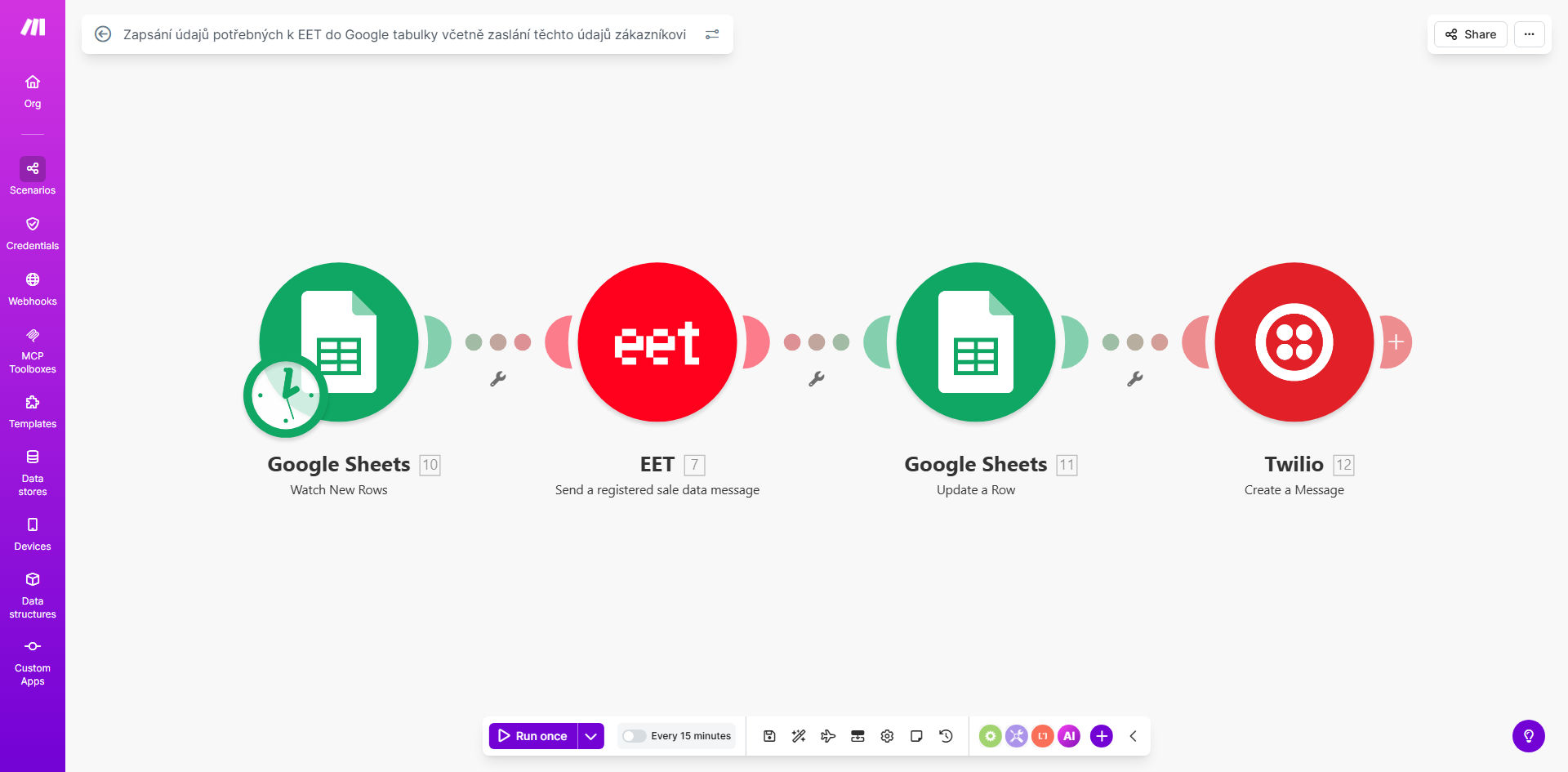
What This Workflow Does
For businesses operating in the Czech Republic, complying with the Electronic Evidence of Sales (EET) system is a mandatory but often tedious process. Each sale requires generating a unique BKP (Security Code) and FIK (Fiscal Identification Code) and providing them to the customer. Manually logging into the tax system, submitting data, copying codes, and then sending them to customers creates a significant administrative bottleneck, especially for high-volume sellers.
This automation solves that problem entirely. It connects your sales log (in Google Sheets) directly to the official EET module and your customer's phone via Twilio SMS. Every time a new sale is added as a row in your spreadsheet, the entire compliance and notification process happens automatically in the background. This not only ensures you never miss a submission but also delivers a superior customer experience with instant, digital proof of purchase.
The workflow transforms a complex regulatory requirement into a seamless, behind-the-scenes operation. It reduces the risk of human error, saves countless hours of manual work each month, and provides a reliable audit trail for your financial records. You maintain full control through your familiar spreadsheet interface while the automation handles the technical heavy lifting.
How It Works
The automation is triggered by a new row of data and follows a precise sequence to ensure accuracy and delivery.
Step 1: Detecting a New Sale in Google Sheets
The scenario starts by monitoring a specific Google Sheet for new rows. You structure your sheet with columns for the essential EET data: sale amount, VAT rate, customer phone number, and any other required details. When you or your system adds a new row (representing a completed sale), Make.com instantly detects this change and passes the entire row's data to the next module.
Step 2: Submitting Data to the EET System
The captured data is formatted into the required XML structure and sent to the official EET web service via Make.com's HTTP or EET module. This step simulates the manual submission you would do through a tax portal. The system validates the data and, if successful, returns the uniquely generated BKP and FIK codes for that specific transaction.
Pro tip: Ensure your Google Sheets data matches the EET requirements precisely (e.g., correct VAT categories, proper rounding). Test with a few "dummy" sales in a test environment provided by the financial administration before going live.
Step 3: Updating the Spreadsheet with Codes
Immediately after receiving the BKP and FIK codes from the EET system, the workflow writes these codes back into the original Google Sheets row. It typically adds them in two new dedicated columns (e.g., "BKP" and "FIK"). This action provides a permanent, searchable record within your spreadsheet, linking the sale details to its official fiscal verification. This log becomes your primary source for any future accounting or audit needs.
Step 4: Sending Codes to the Customer via Twilio SMS
Finally, the workflow takes the customer's phone number from the row and the newly acquired BKP/FIK codes, crafting a clear, professional SMS message. It then uses the Twilio module to send this message directly to the customer's phone. The message can be customized with your business name and instructions, providing immediate value and proof of transaction.
Who This Is For
This template is ideal for any Czech business or freelancer required to comply with EET regulations. It's particularly valuable for:
- Small Retailers & E-shops: Businesses with a steady flow of sales who want to avoid the daily hassle of manual EET submissions.
- Service Providers & Freelancers: Consultants, tradespeople, or other service-based professionals who issue invoices and need to provide EET codes to clients.
- Multi-channel Sellers: Businesses that aggregate sales from various platforms (e.g., eBay, Facebook Marketplace) into a central Google Sheet for accounting.
- Accountants & Bookkeeping Services: Firms managing EET compliance for multiple client businesses, seeking a scalable, error-proof method.
- Businesses Prioritizing Customer Experience: Companies that want to impress customers with instant, digital receipts instead of slow email attachments or paper slips.
What You'll Need
To implement this automation, you will need the following accounts and data prepared:
- A Make.com account (free tier may suffice for lower volume).
- A Google Sheets spreadsheet set up with columns for: Date, Amount (CZK), VAT Rate, Customer Phone Number, and any other data required for EET submission.
- Valid EET Credentials issued by the Czech Financial Administration, including your VAT ID, Premises ID, Cash Register ID, and the PKP key for signing requests.
- A Twilio account with an active phone number and sufficient credits for sending SMS messages.
- (Optional but recommended) A test environment for the EET system to validate your setup before processing real transactions.
Quick Setup Guide
Follow these steps to configure the template for your business:
- Clone the Template: Use the "Get This Workflow" button to copy the scenario into your Make.com account.
- Connect Google Sheets: In the first module, authenticate Make.com with your Google account and select the specific spreadsheet and worksheet that contains your sales log.
- Configure the EET Module: Enter your official EET credentials (VAT ID, Premises ID, etc.) into the HTTP/EET module. Point the request to the correct EET web service URL (production or test). Map the incoming spreadsheet data (amount, VAT) to the correct XML fields.
- Map the Response: Instruct the "Update Row" module to write the returned BKP and FIK codes into two new columns in the same row. Ensure the column letters or names are correctly specified.
- Set Up Twilio SMS: Connect your Twilio account in the final module. Customize the SMS message template, inserting the BKP and FIK codes dynamically. Specify the "From" number (your Twilio number) and map the "To" field to the customer phone number column from your sheet.
- Test Thoroughly: Run the scenario in a scheduled "once" mode and add a test row to your sheet with a small amount. Verify that codes are generated, written back to the sheet, and an SMS is received. Check the EET test portal to confirm the submission was recorded.
- Go Live: Once testing is successful, switch the Google Sheets module to "Watch New Rows" mode and activate the scenario. Your automation is now live and will process every new sale you add.
Key Benefits
Eliminate Manual Entry & Reduce Errors: By automating the entire EET submission and code distribution process, you remove the risk of forgotten submissions, typos in codes, or sending codes to the wrong customer. The system works the same way every single time, ensuring 100% consistency and compliance.
Save 5-15 Minutes Per Transaction: What used to be a multi-step, manual task involving logins, copy-pasting, and customer communication now happens automatically. For a business with 10 daily sales, this can reclaim over 50 hours of productive time per month.
Enhance Professionalism & Customer Trust: Instant SMS delivery of fiscal codes provides customers with immediate proof of their purchase. This transparency builds trust and positions your business as modern and reliable, improving the overall post-purchase experience.
Create a Perfect Audit Trail: The automated update of your Google Sheets creates a clean, timestamped log where every sale is directly linked to its official BKP and FIK codes. This makes accounting reconciliation and responding to tax audits dramatically simpler and faster.
Scale Effortlessly with Your Business: Whether you process 5 sales a day or 500, the automation handles the volume without requiring additional staff. It grows with your business, ensuring compliance never becomes a bottleneck to your expansion.