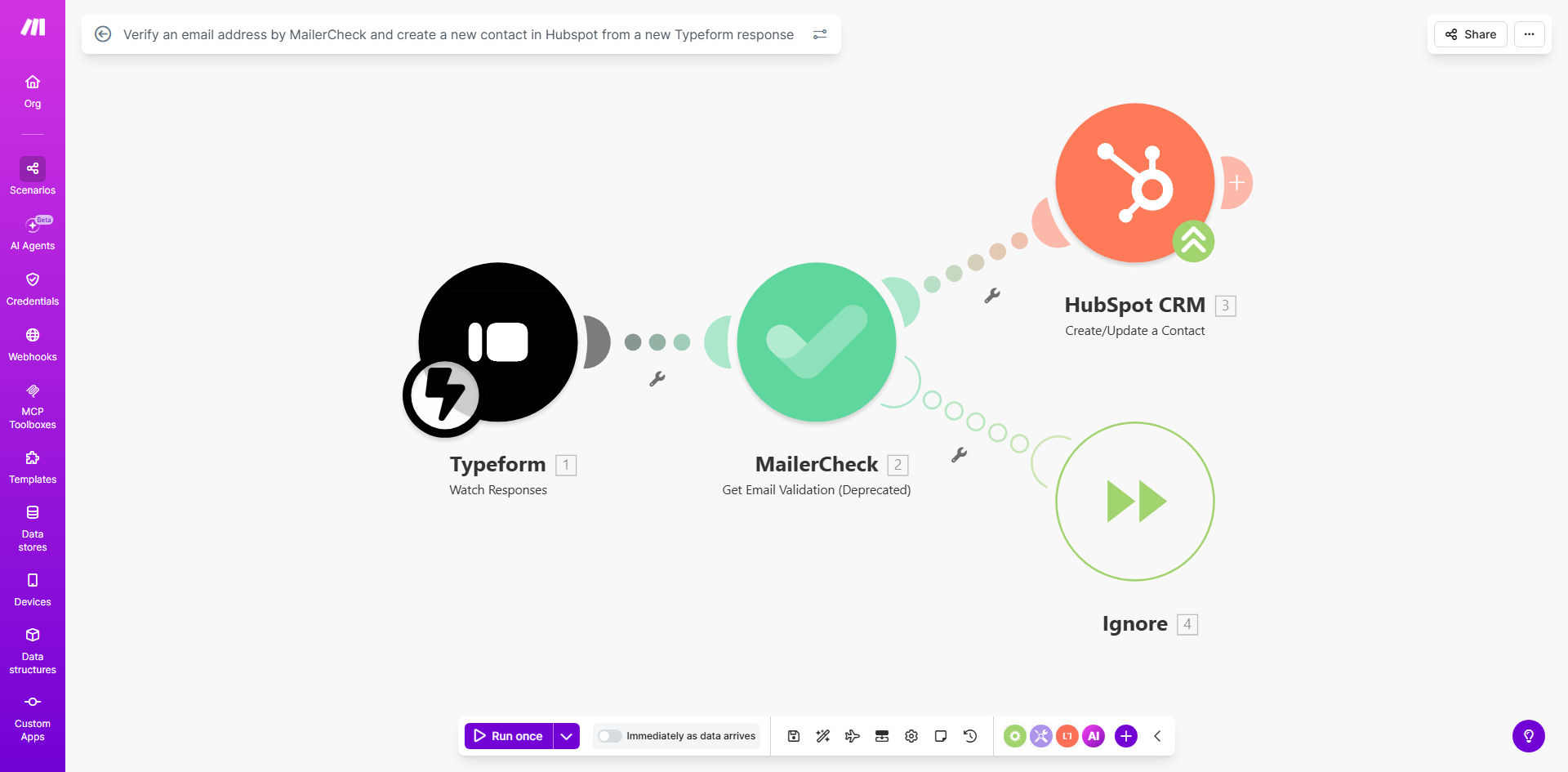
What This Workflow Does
For businesses using Typeform for lead generation, contact forms, or surveys, a major hidden cost is dirty data. Up to 20% of form submissions can contain invalid, mistyped, or fake email addresses. When these contacts enter your HubSpot CRM, they pollute your database, waste sales efforts, and damage your email sender reputation with high bounce rates.
This automation solves that problem by acting as a intelligent gatekeeper. Every time someone submits a Typeform, the workflow instantly validates their email address using MailerCheck—a professional email verification service. Only if the email is confirmed as valid and deliverable does it create a new contact in HubSpot. This ensures your sales team spends time only on genuine leads with reachable email addresses, dramatically improving conversion rates and marketing ROI.
The business value is clear: cleaner CRM data, higher productivity for sales reps, and more effective marketing campaigns. Instead of manually checking emails or dealing with bounced messages, you get an automated system that qualifies leads before they ever enter your pipeline.
How It Works
The workflow follows a simple but powerful three-step process that runs completely in the background.
Step 1: Capture New Typeform Responses
The automation is triggered the moment a new response is submitted to your Typeform. It immediately extracts all the form data, with special attention to the email address field. This happens in real-time, so there's zero delay between someone showing interest and your system beginning to process their information.
Step 2: Validate Email with MailerCheck
The extracted email address is sent to MailerCheck for comprehensive validation. MailerCheck performs multiple checks: verifying the email syntax is correct, confirming the domain exists and has valid mail servers, and checking whether the specific mailbox can receive emails. It also flags disposable email addresses and catch-all domains.
Pro tip: MailerCheck provides a detailed "risk" score and specific reasons for validation failures (like "mailbox not found" or "domain does not exist"). You can use this information to customize follow-up actions for invalid emails, such as sending an automatic reply asking for correction.
Step 3: Create Verified Contact in HubSpot
If MailerCheck returns a "valid" result, the workflow proceeds to create a new contact in your HubSpot CRM. It maps all the relevant form fields (name, company, phone number, etc.) to the corresponding HubSpot contact properties. The contact is created with a timestamp and can be automatically tagged or added to specific lists based on the Typeform they submitted. If the email is invalid, the workflow can be configured to take alternative actions, like logging the submission for review without cluttering your CRM.
Who This Is For
This automation is ideal for marketing teams, sales organizations, and business owners who rely on inbound leads. Specifically, it's perfect for:
- B2B Companies using Typeform for demo requests, whitepaper downloads, or webinar registrations who need high-quality leads for their sales teams.
- Marketing Agencies managing client lead generation campaigns who must deliver verified contacts and demonstrate clean data to clients.
- SaaS Businesses with free trial sign-up forms who want to ensure only legitimate users enter their onboarding sequences.
- Event Organizers collecting registrations who need accurate attendee information for communication and logistics.
- Educational Institutions using forms for course inquiries or applications where follow-up communication is essential.
What You'll Need
- A Make.com account (free tier available) to host and run the automation.
- A Typeform account with at least one form that collects email addresses.
- A MailerCheck account with API access (they offer a free tier with limited checks).
- A HubSpot CRM account (free or paid) where contacts will be created.
- Basic information about your Typeform field names and how you want them mapped to HubSpot contact properties.
Quick Setup Guide
Getting this automation live takes about 15-20 minutes if you have your accounts ready.
- Clone the template: Click "Get This Workflow" above to open the template in your Make.com account and create a copy.
- Connect Typeform: In the first module, authorize Make.com to access your Typeform account and select the specific form you want to monitor.
- Configure MailerCheck: In the second module, add your MailerCheck API key and ensure the email field from Typeform is correctly mapped.
- Set up HubSpot: In the third module, connect your HubSpot account and map the Typeform fields (name, email, company, etc.) to the corresponding HubSpot contact properties.
- Test and activate: Turn on the scenario and submit a test response to your Typeform. Check that a verified contact appears in HubSpot.
Pro tip: Before going live, use MailerCheck's bulk verification feature to clean your existing Typeform submissions. This gives you a fresh start with a validated contact database before the automation takes over for new submissions.
Key Benefits
Eliminate manual data entry and validation. This automation saves approximately 5-7 minutes per lead that your team would spend copying information, checking email validity, and creating CRM records. For 100 leads per month, that's over 8 hours of recovered productivity.
Improve email deliverability and sender reputation. By ensuring only valid emails enter your HubSpot database, you dramatically reduce bounce rates. This protects your domain reputation, which directly impacts whether your marketing emails reach the primary inbox instead of spam folders.
Increase sales team efficiency and conversion rates. Sales representatives contact leads with 100% confidence that the email address works. This means more first emails get delivered, more conversations start, and less time is wasted on unreachable prospects. Early engagement with warm leads can boost conversion rates by 20-30%.
Maintain a pristine CRM database. A clean HubSpot database improves segmentation accuracy, campaign performance tracking, and reporting. You get reliable analytics on lead sources and marketing effectiveness because you're not counting invalid contacts in your metrics.
Scale your lead capture process effortlessly. Whether you receive 10 or 1,000 Typeform submissions daily, the automation handles them all with consistent quality. There's no additional work as your business grows—the system automatically maintains data quality at any volume.