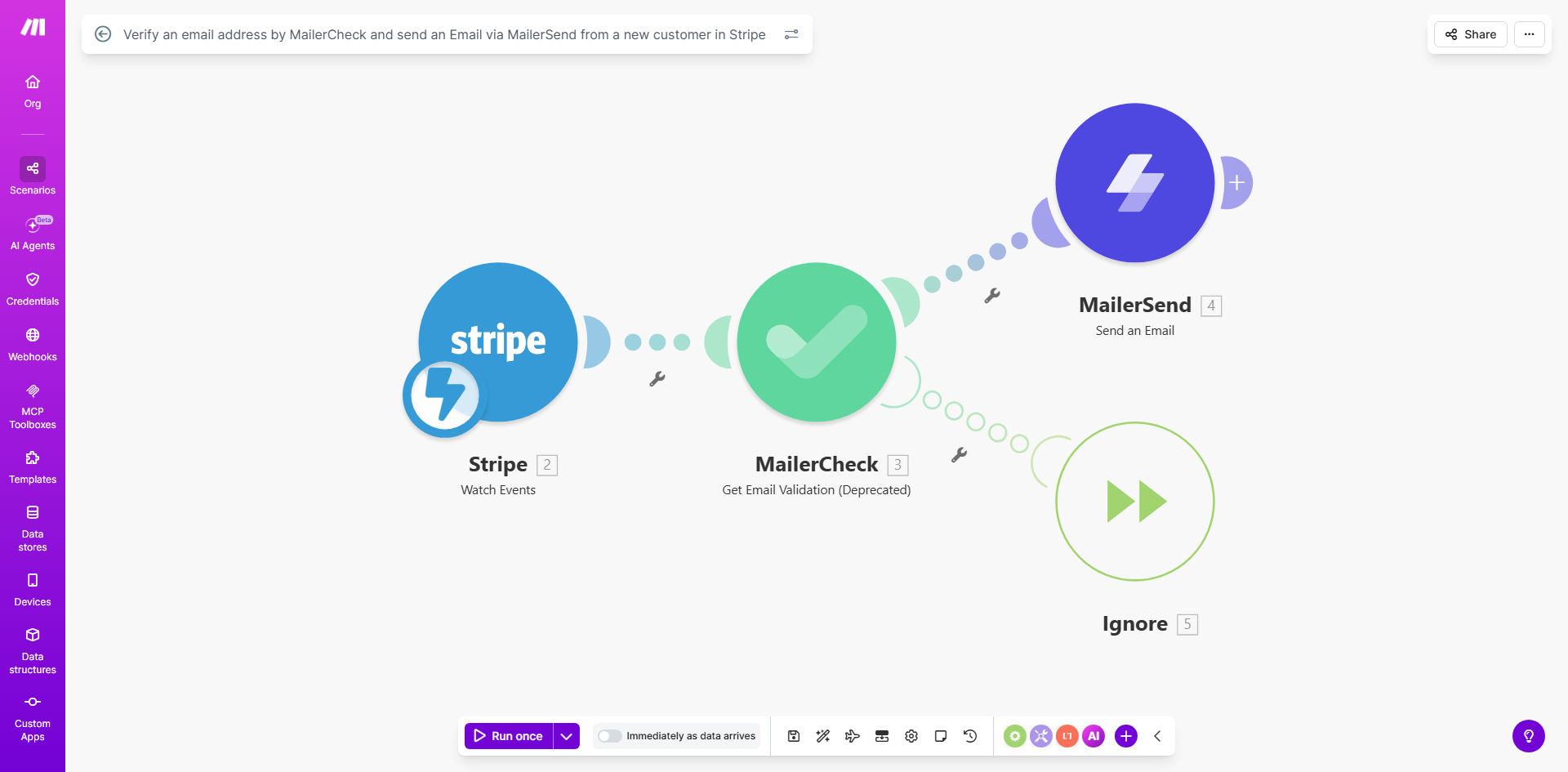
What This Workflow Does
When a new customer completes a payment in Stripe, their email address is often the primary point of contact. However, not all collected emails are valid or deliverable. Invalid emails lead to bounced messages, wasted communication efforts, and a damaged sender reputation. This automation solves that problem by instantly verifying the email's validity using MailerCheck and, if successful, sending a tailored welcome email via MailerSend.
The business value is clear: you ensure that your onboarding or follow-up communication actually reaches the customer. This improves the customer's first impression, provides immediate post-purchase guidance, and protects your email marketing channels from high bounce rates. Instead of manually checking lists and sending emails, this workflow turns a multi-step process into a single, reliable automated sequence.
For businesses that rely on Stripe for payments, this automation bridges the gap between transaction completion and customer engagement. It's particularly valuable for e-commerce, SaaS, and subscription services where timely welcome emails are crucial for retention and satisfaction.
How It Works
Step 1: Stripe Triggers the Workflow
Whenever a new customer record is created in Stripe, the automation receives the customer's details, including their email address. This trigger happens in real-time, ensuring the process starts immediately after the transaction.
Step 2: MailerCheck Validates the Email
The workflow sends the customer's email to MailerCheck, a service that checks its deliverability. MailerCheck evaluates whether the email address is valid, exists, and can receive messages. This step filters out typos, fake addresses, or inactive accounts.
Step 3: Conditional Logic Based on Verification
The automation then decides based on MailerCheck's result. If the email is marked as valid, the workflow proceeds to the next step. If it's invalid, you can configure the automation to log the issue, notify your team, or attempt an alternative action.
Step 4: MailerSend Sends the Welcome Email
For valid emails, the workflow composes and sends a welcome email via MailerSend. You can personalize this email using data from the Stripe customer object, such as their name, purchase details, or account information. The email is dispatched automatically, completing the onboarding loop.
Pro tip: Use the verification result to segment your customer list. Valid emails go into your main onboarding sequence; invalid ones trigger a data cleanup process, perhaps sending a follow-up request for correction via another channel.
Who This Is For
This workflow is ideal for any business that uses Stripe for payments and wants to automate its initial customer communication. E-commerce stores can send order confirmations and shipping updates. SaaS platforms can automate account activation emails with login instructions. Subscription services can deliver immediate access details and trial reminders.
Marketing teams benefit from cleaner email lists. Support teams save time on manual verification. Founders and operators ensure a consistent, professional onboarding experience for every customer, regardless of when the purchase happens.
What You'll Need
- A Stripe account with active customer data.
- A MailerCheck account or API key for email verification.
- A MailerSend account configured for sending transactional emails.
- A Make.com account to host and run the automation.
- A welcome email template designed in MailerSend.
Quick Setup Guide
1. In Make.com, create a new scenario and select the Stripe module as your trigger. Choose "New Customer" as the triggering event.
2. Add a MailerCheck module after the trigger. Configure it to receive the email address from the Stripe customer object and perform a validation check.
3. Set up a router or filter module to handle the verification result. Route valid emails to the next step; handle invalid emails as needed (e.g., send to a different path).
4. Add a MailerSend module for the valid email path. Connect your MailerSend account, design your welcome email using dynamic data from Stripe (customer name, etc.), and set it to send automatically.
5. Test the workflow by creating a test customer in Stripe and observing the entire sequence. Deploy the scenario once testing is successful.
Key Benefits
Reduced bounce rates and improved sender reputation: By verifying emails before sending, you ensure your messages only reach deliverable addresses, protecting your domain's email credibility.
Instant and consistent customer onboarding: Welcome emails are sent automatically within moments of purchase, providing a seamless and professional experience that manual processes cannot match.
Operational efficiency and time savings: This automation eliminates the manual tasks of checking email lists and sending individual welcome messages, freeing up team resources for higher-value work.
Enhanced data quality and segmentation: The verification step automatically identifies invalid emails, allowing you to clean your customer database and tailor your communication strategies based on data quality.
Scalable communication that grows with your business: As your customer base increases, this workflow handles each new customer without additional effort, ensuring your onboarding process scales effortlessly.