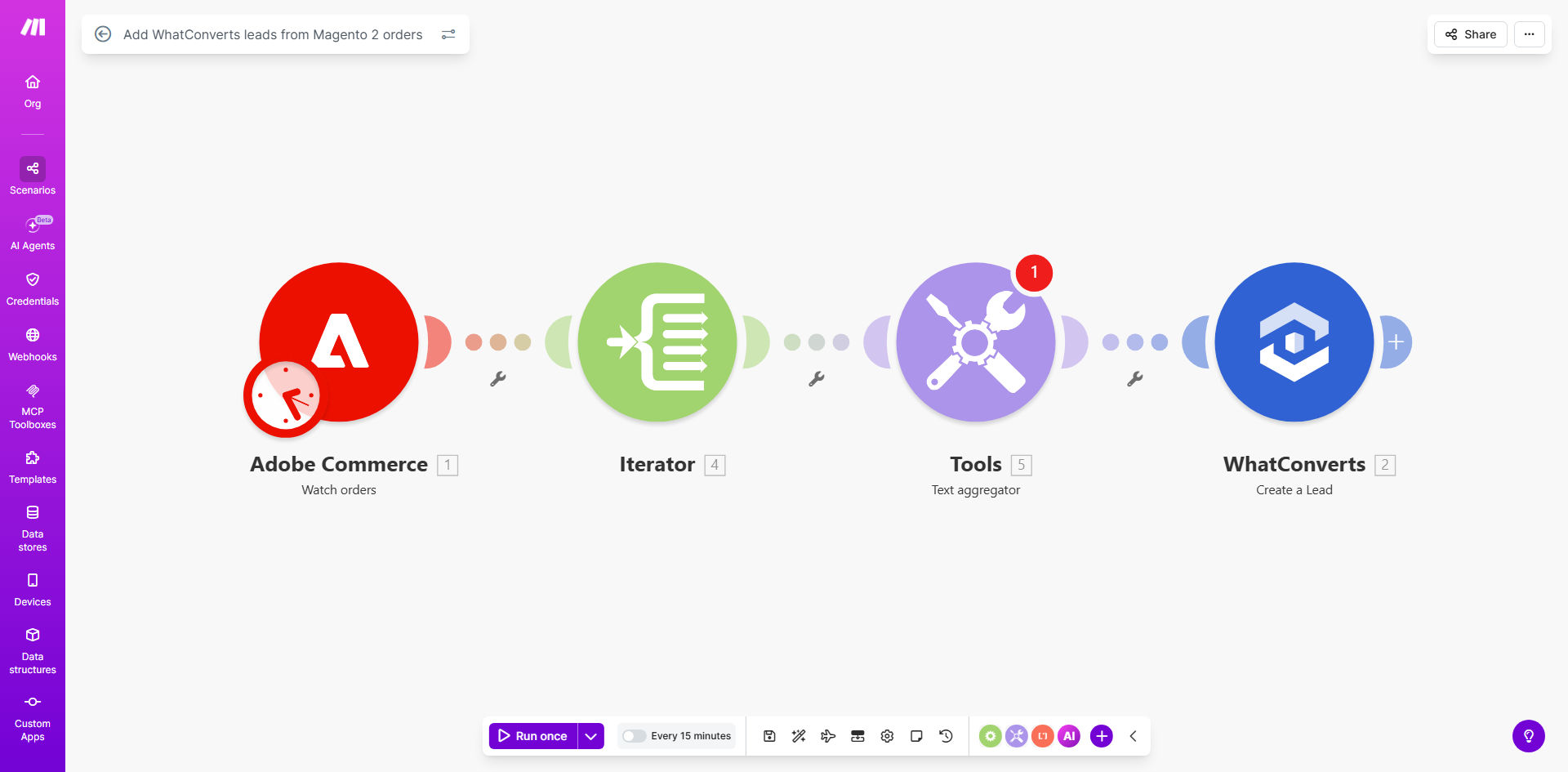
What This Workflow Does
For e-commerce businesses, understanding which marketing efforts actually drive sales is the holy grail. Many companies use tools like WhatConverts to track phone calls and form submissions, but they hit a wall when a visitor simply buys a product online. That sale disappears into a spreadsheet, disconnected from the marketing source that initiated the customer journey. This gap in data makes it impossible to accurately calculate your return on ad spend (ROAS) or know which campaigns are truly profitable.
This automated workflow solves that problem completely. It acts as a seamless bridge between your Magento 2 store and your WhatConverts account. Every time a new order is placed—whether it's a $50 purchase or a $5,000 wholesale order—the system instantly captures that transaction and creates a corresponding "lead" within WhatConverts. This links the final revenue outcome directly back to the original marketing source, keyword, and campaign that brought the customer to your site in the first place.
The result is a closed-loop attribution system. You no longer have to guess which channels work; you have definitive, dollar-based proof. This automation turns your e-commerce platform from a simple sales processor into a powerful analytics engine, empowering you to make data-driven decisions that directly boost your bottom line.
How It Works
The automation is triggered by a new order event and moves data securely between platforms without any manual intervention.
Step 1: Monitoring New Magento 2 Orders
The workflow starts by watching your Magento 2 store for any new order creation. Using Make.com's Magento 2 module, it polls the store's API at regular intervals. The moment an order status changes to "processing" or "complete" (configurable based on your business rules), the automation captures the entire order payload.
Step 2: Extracting and Structuring Lead Data
Make.com then processes the raw order data. It extracts the crucial information needed for a WhatConverts lead: the customer's first and last name, email address, phone number, the total order value, and the items purchased. It can also pull in custom order attributes or notes. This step ensures the data is clean, formatted correctly, and ready to be sent to WhatConverts.
Step 3: Creating the Lead in WhatConverts
Finally, the workflow uses the WhatConverts API module in Make.com to create a new lead. It maps the extracted Magento data to the corresponding fields in WhatConverts. The lead is instantly logged in your WhatConverts dashboard, tagged with the lead source as "Magento Order," and includes all the monetary details. Your sales and marketing teams can now see the complete customer journey, from first click to final sale, all in one place.
Who This Is For
This automation is a game-changer for any business using Magento 2 that invests in marketing and needs to prove its effectiveness. It's ideal for E-commerce Marketing Directors drowning in spreadsheets trying to match ad spend to revenue. It's perfect for Digital Agencies managing client ad budgets who need irrefutable proof of campaign success. Shop Owners who sell both online and offline will find it invaluable for attributing phone orders back to digital ads. Finally, Growth Teams at scaling DTC brands can use the precise ROI data from this integration to confidently scale winning channels and cut losers.
Pro tip: Use the lead value field in WhatConverts to segment your leads. You can then create automated follow-up sequences in your email marketing tool (like Klaviyo) specifically for high-value customers, thanking them and offering complementary products.
What You'll Need
- A Make.com account (free tier may suffice for lower order volumes).
- An active Magento 2 store with API access enabled.
- Your Magento 2 API credentials (Base URL, Access Token).
- An active WhatConverts account with API access.
- Your WhatConverts API Key and Account ID.
- A clear understanding of which Magento order status should trigger the lead creation (e.g., "processing").
Quick Setup Guide
You can have this automation running in under 15 minutes.
- Clone the Template: Click the "Get This Workflow" button above to open the pre-built template in your Make.com account and create a copy.
- Connect Magento 2: In the first Make.com module, add your Magento 2 Base URL and Access Token. Test the connection to ensure it can fetch order data.
- Connect WhatConverts: In the final module, add your WhatConverts API Key and Account ID. Perform a test to verify you can create a lead.
- Map the Data: Review the data mapping between the modules. Ensure customer name, email, phone, and order total are correctly passed from Magento to the corresponding WhatConverts lead fields.
- Set the Schedule: Configure how often the scenario runs (e.g., every 5 minutes) to process new orders promptly.
- Turn it On: Activate the scenario. Place a test order in your Magento store and verify a lead appears in your WhatConverts dashboard within a few minutes.
Key Benefits
Eliminate Manual Data Entry Entirely: Save 5-15 hours per week that your team would spend copying order details from Magento into WhatConverts or other tracking sheets. This time can be redirected to strategic tasks like customer service or campaign optimization.
Achieve 100% Accurate Marketing Attribution: Never lose track of a sale again. Know with certainty whether a sale came from a Google Ads keyword, a Facebook campaign, an organic blog post, or an email blast. This can increase marketing efficiency by up to 30% by reallocating budget to proven channels.
Improve Sales Follow-Up with Rich Context: When your sales team sees a lead in WhatConverts with a $2,000 order value attached, they can prioritize that lead and personalize their follow-up. This context leads to higher customer satisfaction and increased lifetime value.
Scale Your Tracking Effortlessly: Whether you get 10 orders a day or 1,000, the automation handles them all with the same speed and accuracy. Your system grows seamlessly with your business without adding overhead.
Gain a Unified Customer View: Consolidate online and offline customer interactions. See the full story: the initial ad click, the website visit, the phone call inquiry, and the final online purchase—all linked in one lead profile for a complete understanding of your customer journey.