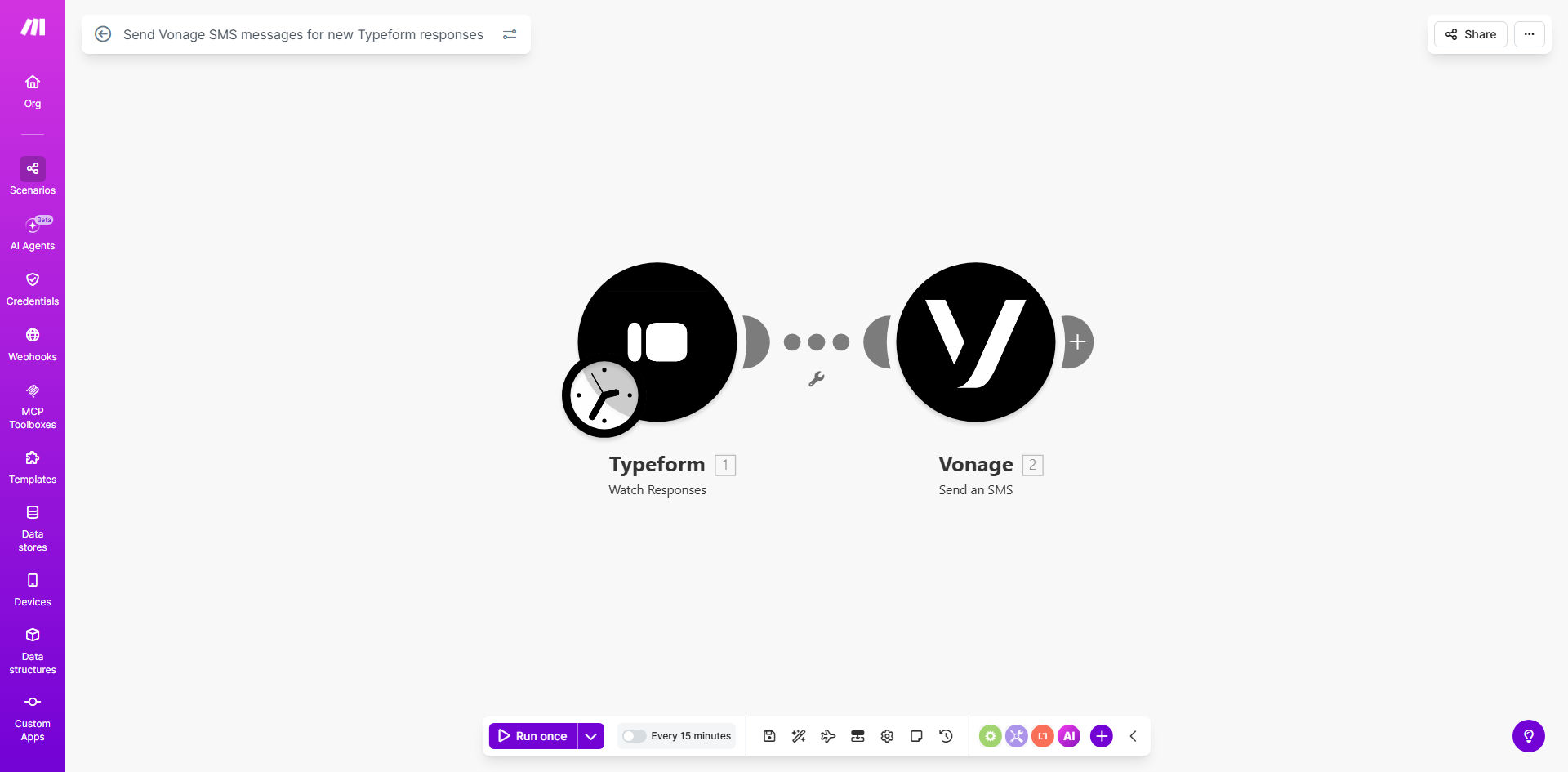
What This Workflow Does
Every time a customer fills out your Typeform—whether it's a contact request, service inquiry, or event registration—there's a critical window to respond. Manual processes where someone must check for new responses and then send a text message are slow, error-prone, and can cause you to lose business. This workflow solves that by creating a direct, automated bridge between your forms and your communication channels.
The automation watches for new Typeform responses at regular intervals. The moment a submission is detected, it instantly triggers an SMS message to be sent via Vonage (formerly Nexmo) to a pre-defined phone number. This could be an internal alert to your sales team about a hot lead, or an automated confirmation SMS to the customer who just signed up.
How It Works
The process is a simple, reliable chain of events powered by Make.com.
Step 1: Monitor Typeform for New Responses
The workflow starts with a "Watch Responses" module from Typeform. It polls your specific form at intervals you set (e.g., every 5 minutes) to detect any new submissions. When one is found, it passes all the response data—like answers, timestamps, and hidden fields—to the next step.
Step 2: Format and Prepare the SMS Message
Before sending, the workflow can manipulate the data. You can use a text parser or simple module to construct the SMS body. For example, you might create a message like: "New Lead: [Name] is interested in [Service]. Phone: [Phone Number]. Respond ASAP!" This step pulls variables directly from the form submission.
Step 3: Send SMS via Vonage
The formatted message and the target phone number (which can also be pulled from the form or set statically) are sent to the Vonage SMS module. Vonage's API delivers the SMS instantly to the recipient's mobile device, completing the automation loop in seconds.
Pro tip: Use this workflow to notify different team members based on form answers. For instance, if a respondent selects "Technical Support," send an SMS to your tech lead; if they select "Sales," alert your sales manager.
Who This Is For
This automation is a game-changer for any business or professional that relies on timely responses from form submissions.
Sales & Marketing Teams: Get instant alerts for new leads from website contact forms, demo requests, or quote calculators, enabling same-day follow-up that dramatically increases conversion rates.
Service Businesses: For consultants, agencies, or tradespeople, immediately notify yourself or a dispatcher when a new service inquiry or booking comes in via a Typeform booking form.
Event Organizers: Send instant SMS confirmations to attendees upon registration, or alert your event staff when VIP tickets are purchased.
Internal Operations: Use it for IT support tickets, HR incident reports, or facility maintenance requests where an immediate alert to the responsible person is crucial.
What You'll Need
- A Make.com account (free tier available) to build and run the automation.
- A Typeform account with at least one active form you want to monitor.
- A Vonage API account with SMS capabilities enabled. You'll need your API key and secret from the Vonage dashboard.
- The phone number(s) you want to receive the SMS alerts. This could be a personal cell, a shared team number, or a dedicated SMS inbox.
Quick Setup Guide
You can have this workflow live in under 15 minutes by following these steps.
- Clone the Template: Click the "Get This Workflow" button above to open the template on Make.com. Click "Copy" to add it to your own scenarios.
- Connect Your Apps: In your new scenario, click on the Typeform module and connect your Typeform account. Select the specific form you want to watch. Then, connect the Vonage module with your API key and secret.
- Configure the Message: In the Vonage SMS module, set the "From" field (a sender ID or virtual number from Vonage) and the "To" field (the destination phone number). In the "Message" field, construct your alert text. You can insert data from the Typeform response by mapping variables like `1.answer` (for answer to question 1).
- Test and Activate: Use the "Run once" button to test the workflow. Submit a test entry to your Typeform and verify that the SMS is received correctly. Once confirmed, schedule the scenario to run automatically (e.g., every 5 minutes) and turn it on.
Key Benefits
Cut Response Time from Hours to Seconds. The biggest cost of a manual process is delay. This automation ensures your team knows about a new lead, request, or registration the moment it happens, allowing for immediate engagement that wins trust and business.
Eliminate Human Error and Missed Submissions. No more forgetting to check the form inbox or copying a phone number incorrectly. The system works 24/7 with perfect accuracy, guaranteeing every single submission is acknowledged via a reliable channel.
Scale Your Operations Without Adding Staff. Whether you receive 10 or 1,000 form submissions a day, the automation handles them all instantly. This frees your team from monotonous administrative tasks, allowing them to focus on high-value work like closing sales or serving customers.
Improve Customer Experience with Instant Confirmation. When you send an automated SMS confirmation after a form submission (e.g., "Thanks for your booking! We'll call you shortly."), you set a professional tone and reduce customer anxiety, improving their overall perception of your brand.
Gain a Competitive Edge with Proactive Communication. In a world where speed is a differentiator, being the first to respond often wins the deal. This workflow gives you a systematic advantage, making your business feel more responsive and professional than competitors relying on manual follow-up.