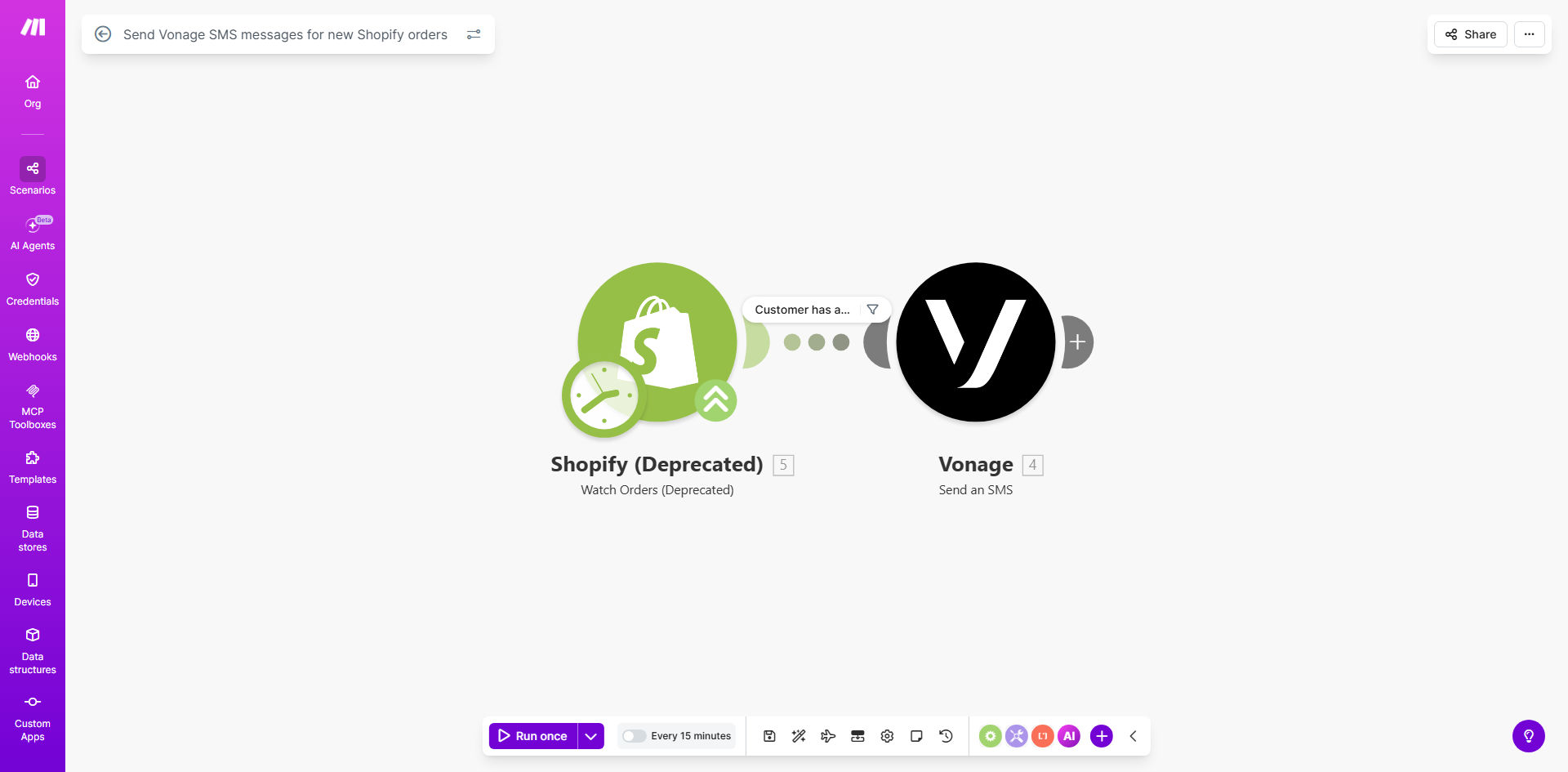
What This Workflow Does
In today's fast-paced e-commerce world, customers expect immediate confirmation after making a purchase. While email confirmations are standard, they often get buried in crowded inboxes. This automation solves that problem by instantly sending an SMS confirmation via Vonage every time a new order is placed in your Shopify store.
The workflow bridges the gap between your e-commerce platform and your customers' mobile phones. It monitors your Shopify store for new orders at regular intervals, extracts key order details like the customer's name, order number, and items purchased, then formats and sends a personalized SMS message through Vonage's reliable communication platform. This creates a seamless, professional post-purchase experience that starts the customer relationship on a positive note.
Beyond simple confirmation, this automation reduces the cognitive load on your support team. When customers receive instant SMS confirmation, they're far less likely to submit "Did my order go through?" support tickets. This translates to tangible time savings for your team and higher satisfaction scores from customers who appreciate the proactive communication.
How It Works
The automation runs on a continuous cycle, ensuring no order confirmation is missed. Here's the step-by-step process:
Step 1: Monitor for New Shopify Orders
The Make.com scenario uses Shopify's "Watch Orders" module to continuously check your store for newly created orders. You can set the polling interval based on your order volume—from every minute for high-volume stores to every 15 minutes for smaller operations. Each new order triggers the workflow automatically.
Step 2: Extract and Format Order Data
Once a new order is detected, the workflow extracts relevant customer and order information. This typically includes the customer's first name, order number, total amount, purchased items, and any special shipping notes. The data is then structured into a clean, readable format suitable for an SMS message.
Pro tip: Keep SMS messages concise but friendly. Include the most critical information: order confirmation, order number, and a thank you. Save detailed item lists for the email receipt.
Step 3: Send SMS via Vonage
The formatted message is sent to Vonage's SMS API. You'll configure the workflow with your Vonage API credentials and specify the "from" number (usually a virtual number you've purchased through Vonage). The system automatically delivers the SMS to the customer's phone number associated with the Shopify order, typically within seconds.
Step 4: Log and Handle Errors
The workflow includes error handling to manage situations like invalid phone numbers or Vonage API issues. Failed attempts can be logged to a spreadsheet or trigger an alert to your team, ensuring you maintain visibility into the communication process without manual monitoring.
Who This Is For
This automation is ideal for any Shopify store owner who wants to elevate their customer experience without adding manual work. It's particularly valuable for:
DTC (Direct-to-Consumer) brands building loyal customer relationships through exceptional post-purchase communication. An instant SMS confirmation reinforces brand reliability.
High-volume e-commerce stores where manual confirmation would be impossible. Automation ensures every customer receives timely communication regardless of order volume.
Businesses selling time-sensitive products like event tickets, food delivery, or appointment-based services where immediate confirmation reduces customer anxiety.
Retailers with international customers who may have unreliable email access but nearly universal SMS reach. SMS delivers confirmation directly to the device they always have with them.
What You'll Need
To implement this workflow, you'll need the following accounts and access:
- A Make.com account with an active subscription to create and run scenarios.
- A Shopify store with admin access to generate API credentials for the integration.
- A Vonage API account with SMS capabilities enabled and a virtual phone number purchased for sending messages.
- Basic understanding of your Shopify order data structure to customize which information appears in the SMS.
- 5-10 minutes for initial setup to connect the apps and customize the message template.
Quick Setup Guide
Follow these steps to get your automated SMS confirmations running:
- Duplicate the template: Click "Get This Workflow" above to open the template on Make.com and create a copy in your own account.
- Connect Shopify: In the first module, authenticate your Shopify store by entering your store URL and admin API credentials when prompted.
- Configure Vonage: In the SMS module, add your Vonage API key, API secret, and the "from" phone number you want messages to appear from.
- Customize the message: Edit the text template to match your brand voice. Use the data mapping tools to insert customer name, order number, and other details from Shopify.
- Test with a real order: Place a test order in your Shopify store (or use a test mode if available) and verify the SMS arrives correctly.
- Activate the scenario: Turn on the scheduler and set it to run continuously. Your automation is now live!
Key Benefits
Reduce "Where's My Order?" Support Tickets by up to 40%. Instant SMS confirmation provides immediate peace of mind, dramatically decreasing anxious customer inquiries about whether their order was received. This frees your support team to handle more complex issues.
Achieve Near-100% Open Rates for order confirmations. SMS messages have a 98% open rate compared to 20% for marketing emails. Your important transactional messages actually get seen, ensuring customers have the information they need without searching through cluttered inboxes.
Save 5-10 Hours Monthly on manual confirmation tasks. Eliminate the need for staff to manually send confirmation texts or check that automated emails went through. The system works 24/7, handling every order instantly without human intervention.
Increase Customer Trust and Repeat Purchase Likelihood. Professional, timely communication builds confidence in your brand. Customers who receive immediate SMS confirmations report higher satisfaction and are more likely to become repeat buyers.
Create a Scalable Communication Foundation. Once this basic SMS automation is in place, you can easily extend it to send shipping updates, delivery notifications, review requests, or promotional messages—all from the same integrated system.