Make.com WooCommerce Vonage SMS Automation E-commerce

Send Vonage SMS for New WooCommerce Orders

Automatically send instant SMS order confirmations to customers, reducing support tickets and building trust with every purchase.

Get This Workflow → Make.com · WooCommerce · Free Template
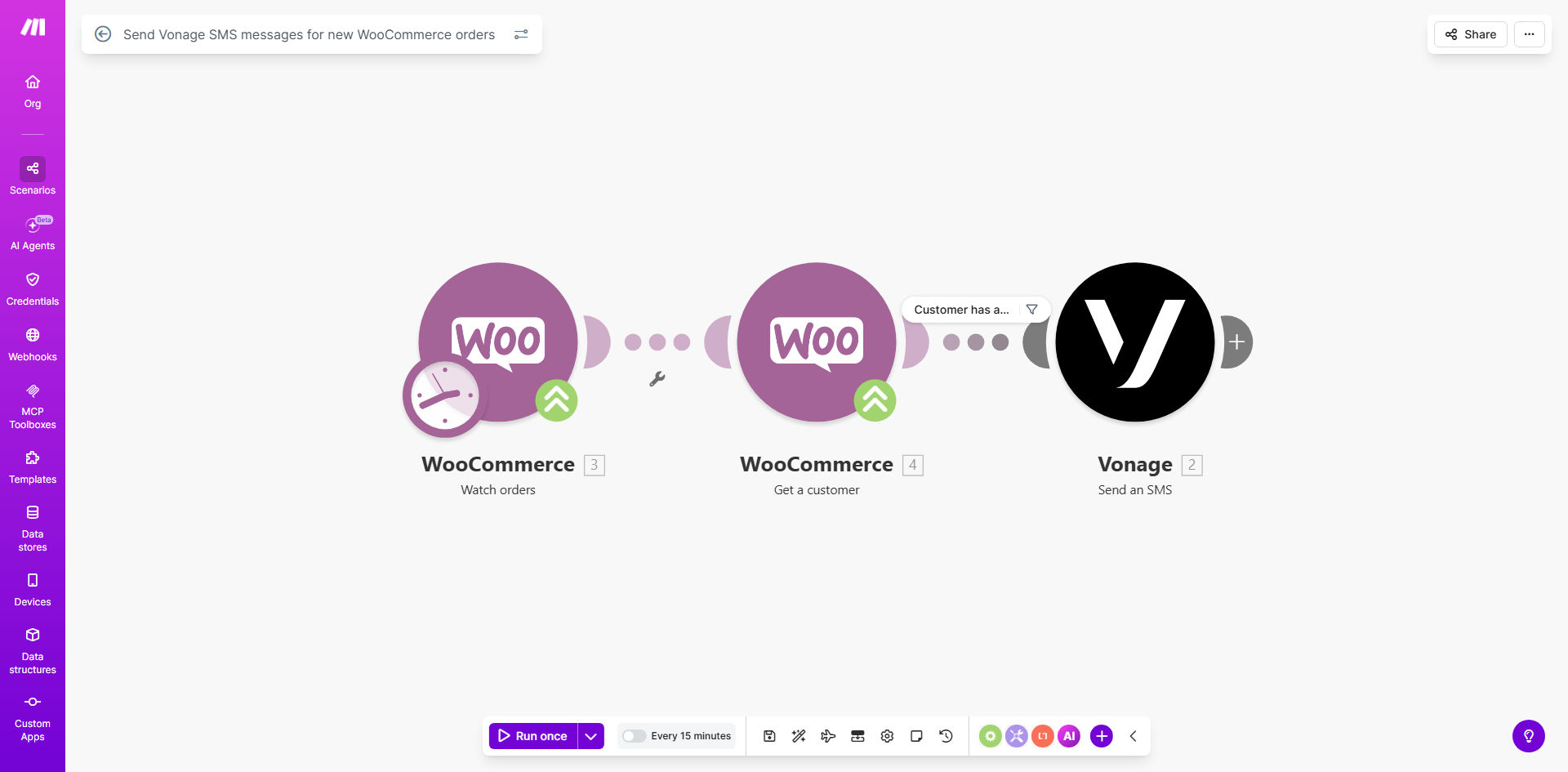
Make.com automation diagram connecting WooCommerce to Vonage SMS

What This Workflow Does

When a customer completes a purchase on your WooCommerce store, there's a critical moment of uncertainty. Did the order go through? When will it ship? Traditional email confirmations often get lost in crowded inboxes, leading to anxious customers and increased support queries. This automation solves that problem by sending instant SMS notifications via Vonage the moment an order is placed.

The workflow connects your WooCommerce store to Vonage's SMS API through Make.com. It automatically detects new orders, extracts key customer and order information, and sends a personalized text message to the customer's phone number. This creates a seamless, professional post-purchase experience that builds immediate trust and reduces the administrative burden on your team.

How It Works

The automation runs on a scheduled basis, checking for new orders and triggering SMS notifications without any manual intervention.

Step 1: Monitor for New WooCommerce Orders

Make.com periodically polls your WooCommerce store's API (typically every 1-15 minutes, configurable based on your needs) to check for newly created orders. When it detects an order with a status like "processing" or "completed," it captures all relevant data including order ID, customer details, products purchased, and total amount.

Step 2: Format the SMS Message

The workflow processes the order data to create a personalized SMS message. It can include dynamic variables like the customer's name, order number, product names, total cost, and estimated shipping timeline. You can customize the message template to match your brand voice and include only the most important information customers need immediately after purchasing.

Pro tip: Keep SMS messages under 160 characters for single-message delivery and higher readability. Include the order number and one key next step (like "shipping in 24h") for maximum impact.

Step 3: Send via Vonage SMS API

The formatted message is sent to Vonage's SMS API, which delivers it to the customer's mobile number. Vonage provides reliable global delivery, real-time status updates, and fallback options if needed. The automation can handle success/failure responses and log them for your records.

Who This Is For

This automation is ideal for WooCommerce store owners, e-commerce managers, and digital agencies who want to improve customer experience without increasing manual workload. It's particularly valuable for:

  • Physical product sellers where customers are anxious about shipping timelines
  • High-value item retailers who need to build immediate purchase confidence
  • Businesses with international customers where email deliverability can be inconsistent
  • Stores experiencing high "order status" support tickets that could be prevented with better communication
  • Agencies managing multiple client stores who need a scalable, consistent notification system

What You'll Need

  1. A Make.com account (free tier available with limited operations)
  2. WooCommerce store with REST API enabled and credentials
  3. Vonage API account with SMS capabilities and sufficient credits
  4. Customer phone numbers collected during checkout (ensure GDPR/consent compliance)
  5. Basic understanding of how to copy and configure a Make.com template

Quick Setup Guide

You can have this automation running in under 30 minutes with these simple steps:

  1. Get the template: Click "Get This Workflow" above to open the template in your Make.com account.
  2. Connect WooCommerce: Create a connection to your WooCommerce store using the Store URL, Consumer Key, and Consumer Secret from WooCommerce → Settings → Advanced → REST API.
  3. Configure Vonage: Connect your Vonage account using your API Key and API Secret from the Vonage dashboard.
  4. Set the recipient number: Specify the phone number field from WooCommerce that contains customer mobile numbers (ensure international format, e.g., +441234567890).
  5. Customize the message: Edit the SMS template to include your brand name, preferred wording, and the order variables that matter most to your customers.
  6. Test and activate: Run a test with a recent order, check the SMS delivers correctly, then activate the scenario to run automatically.

Key Benefits

Reduce support tickets by up to 30% by answering the "did my order go through?" question instantly via SMS instead of waiting for email or creating anxiety that leads to support contacts.

Improve customer satisfaction scores with 98% SMS open rates compared to 20% average for marketing emails, creating a more reliable communication channel for critical purchase confirmations.

Save 5-10 hours monthly on manual order confirmation tasks that would otherwise require copying information between systems or sending individual messages.

Increase repeat purchase likelihood by creating a professional, tech-savvy impression that builds trust from the very first interaction after payment.

Scale your communication effortlessly as order volume grows—the automation handles 1 or 1000 orders per day with identical reliability and no additional work from your team.

Frequently Asked Questions

Common questions about WooCommerce SMS automation and integration

SMS notifications provide instant, high-visibility order confirmations that customers actually see. Unlike emails that get buried, SMS messages have a 98% open rate, reducing customer anxiety and support tickets asking "Did my order go through?" This builds immediate trust and improves the post-purchase experience.

For time-sensitive purchases like event tickets, limited edition items, or perishable goods, SMS confirmation is particularly valuable. Customers receive proof of purchase on their most personal device within minutes, creating positive reinforcement that encourages future buying behavior.

Vonage offers reliable global SMS delivery, detailed analytics, and easy API integration. It's a trusted platform used by businesses worldwide, ensuring your order confirmations are delivered promptly across different carriers and regions.

Using Vonage with Make.com means you can easily customize message templates, track delivery status, and scale your messaging as your store grows. The platform provides built-in compliance tools for regulations like TCPA and GDPR, reducing legal risk while maintaining high deliverability rates.

  • Real-time delivery reports and analytics
  • Global reach with local number support
  • Automated retry for failed deliveries

Yes, you can fully customize SMS messages based on order details. The automation can include product names, order totals, shipping methods, and estimated delivery dates. You can create different message templates for digital vs. physical products, high-value orders, or specific product categories.

For example, digital product orders might say "Your download is ready" with immediate access instructions, while physical products might emphasize shipping timelines. You can even add conditional logic to mention gift wrapping, special instructions, or loyalty points earned with the purchase.

With this automation, SMS notifications are typically sent within 1-2 minutes of order completion. Make.com polls your WooCommerce store at regular intervals (configurable from 1-15 minutes) to detect new orders instantly.

This near-real-time communication reassures customers their purchase was successful while the transaction is still fresh in their mind. For high-volume stores, you can increase polling frequency, though most businesses find 5-minute intervals provide optimal balance between immediacy and API rate limit considerations.

Include order number, total amount, key product names, and next steps. Keep messages concise but informative: "Thanks for your order #1234 for $99.99! Your [Product Name] will ship within 2 business days. Track at [link]. Reply STOP to opt-out."

Avoid including full addresses or sensitive payment details for security. Focus on the 2-3 pieces of information that reduce customer anxiety most: confirmation of success, what they bought, and what happens next. Always include an opt-out option to maintain compliance with communication regulations.

While this template focuses on order confirmations, the same WooCommerce-Vonage integration can be extended for abandoned cart recovery. You would modify the trigger to watch for carts abandoned after a specific time, then send a personalized SMS reminder.

This approach can recover 10-15% of potentially lost sales with timely, personal outreach. The message might reference specific items left in the cart and possibly include a limited-time incentive. Just ensure you have proper consent for promotional messaging, as cart recovery often falls under marketing communications regulations.

SMS complements email rather than replaces it. Use SMS for time-sensitive, critical notifications like order confirmations and shipping alerts (98% open rate). Use email for detailed receipts, promotional content, and newsletters.

A combined approach using both channels typically increases customer satisfaction by 40% and reduces "Where's my order?" support contacts. Email can contain full order details, tracking links, cross-sell suggestions, and legal disclaimers, while SMS provides the immediate "we got it" reassurance that customers value most.

  • SMS: Immediate, high-open-rate, concise
  • Email: Detailed, brand-rich, comprehensive
  • Best practice: Use both strategically

Yes, GrowwStacks specializes in custom e-commerce automations. We can build a tailored SMS system that integrates with your specific WooCommerce setup, includes custom logic for different customer segments, adds multilingual support, or combines with other channels like WhatsApp or email.

Our team handles everything from strategy to implementation and ongoing optimization. We'll analyze your order volume, customer demographics, and business goals to design an automation system that saves you time while maximizing customer satisfaction and repeat purchases.

  • Custom triggers based on order value or products
  • Integration with your CRM or loyalty program
  • Advanced analytics and performance reporting

Need a Custom WooCommerce SMS Automation?

This free template is a starting point. Our team builds fully tailored automation systems for your specific business needs.