Make.com CRM Sync ActiveCampaign Salesmachine Lead Management

Automatically Sync ActiveCampaign Contacts to Salesmachine

Eliminate manual data entry and ensure your sales team instantly receives new leads from your marketing campaigns.

Get This Workflow → Make.com · CRM Sync · Free Template
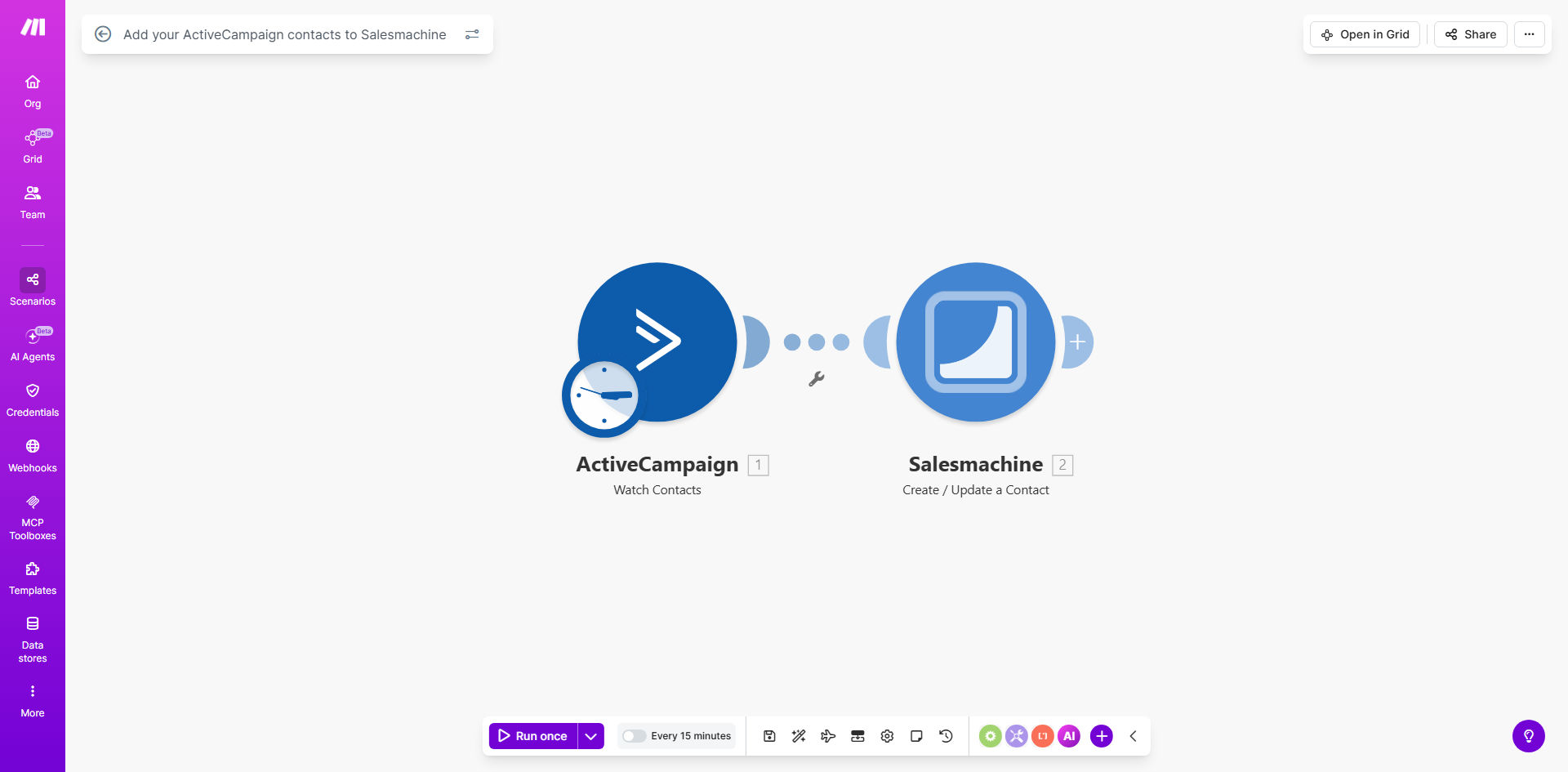
Make.com workflow diagram showing ActiveCampaign syncing with Salesmachine

What This Workflow Does

For businesses using ActiveCampaign for marketing automation and Salesmachine for sales execution, a critical gap often exists: new leads captured in marketing campaigns don't automatically appear in the sales team's CRM. This forces sales reps to manually check for new contacts, copy-paste data, or worse, miss time-sensitive opportunities entirely. The delay between lead capture and sales outreach can cost you conversions.

This automated workflow solves that problem by creating a seamless bridge between ActiveCampaign and Salesmachine. It continuously monitors your ActiveCampaign account for new contacts and instantly adds them as leads or contacts in your Salesmachine instance. The sales team gets a real-time, automated feed of qualified leads, complete with essential data like email, name, company, and any tags or lead scores, enabling immediate and informed follow-up.

Pro tip: Use ActiveCampaign tags or lead scores as triggers. You can configure the workflow to only sync contacts tagged as "Sales Qualified" or with a lead score above a certain threshold, ensuring your sales team focuses on the hottest prospects.

How It Works

The automation runs on a reliable, scheduled cycle to keep your systems in perfect sync without any manual intervention.

Step 1: Monitor for New ActiveCampaign Contacts

The workflow is triggered at regular intervals (e.g., every 15 minutes) to check your ActiveCampaign account. It searches for contacts created since the last check, ensuring no new lead is ever missed.

Step 2: Extract and Format Contact Data

For each new contact found, the automation extracts key information. This typically includes the contact's email address, first and last name, phone number, company, custom fields, and any associated tags or lead score from ActiveCampaign.

Step 3: Create or Update the Contact in Salesmachine

The workflow then uses the Salesmachine API to create a new lead record. It maps the fields from ActiveCampaign to the corresponding fields in Salesmachine. If a contact with the same email already exists, the workflow can be set to update the existing record instead, preventing duplicates.

Step 4: Log and Handle Errors

The process includes error handling. If a sync fails (e.g., due to an API issue or invalid data), the error is logged, and you can be notified via email or Slack. This ensures data integrity and allows for quick troubleshooting.

Who This Is For

This automation is ideal for sales and marketing teams that are serious about shortening their sales cycle and improving lead conversion rates.

  • B2B Sales Teams: Who rely on inbound marketing leads from webinars, content downloads, or demo requests.
  • Marketing Agencies: Managing client campaigns who need to prove ROI by showing seamless lead handoff.
  • Startups & SMBs: Where small teams can't afford manual data transfer and need every lead to be actioned immediately.
  • Companies with Inside Sales Teams: Where speed-to-lead is a critical metric for success.

What You'll Need

  1. An active Make.com account.
  2. An ActiveCampaign account with API access enabled.
  3. A Salesmachine account with administrator privileges to generate an API key.
  4. The API keys or connection credentials for both ActiveCampaign and Salesmachine.
  5. A clear understanding of which contact fields (e.g., custom fields) you want to sync between the two systems.

Quick Setup Guide

Get your automation running in under 15 minutes by following these steps:

  1. Get the Template: Click "Get This Workflow" to copy the template into your Make.com account.
  2. Connect ActiveCampaign: In the first module, create a connection to your ActiveCampaign account using your API URL and key.
  3. Connect Salesmachine: In the Salesmachine module, establish a connection using your API key from the Salesmachine settings.
  4. Set the Schedule: Configure the "Schedule" module to run as often as you need (e.g., every 5, 15, or 60 minutes).
  5. Map Your Fields: Review the "Create a Lead" module in Salesmachine. Ensure the data from ActiveCampaign (like `email`, `firstName`) is correctly mapped to the right fields in Salesmachine.
  6. Test and Activate: Run a single test cycle to create a contact in ActiveCampaign and verify it appears correctly in Salesmachine. Once confirmed, turn the scenario on.

Key Benefits

Eliminate 100% of manual data entry between your marketing and sales platforms. This saves each sales rep 30-60 minutes per day previously spent on administrative tasks, allowing them to focus on selling.

Reduce lead response time from hours to minutes. Studies show contacting a lead within 5 minutes makes you 10x more likely to qualify them. This automation ensures your team gets leads instantly.

Improve data accuracy and eliminate human error. Automated field mapping prevents typos and missing information, creating cleaner, more reliable records in your sales CRM.

Gain full visibility into the marketing-to-sales funnel. With every lead automatically tracked from first touch in ActiveCampaign to first contact in Salesmachine, you can accurately measure conversion rates and campaign ROI.

Scale your lead generation efforts without adding overhead. Whether you generate 10 or 1,000 new contacts a day, the sync handles the volume effortlessly, supporting business growth.

Frequently Asked Questions

Common questions about marketing and sales CRM automation

Syncing marketing and sales data eliminates manual data entry, ensures sales teams have immediate access to hot leads, and prevents leads from falling through the cracks. It creates a single source of truth, improving communication and increasing conversion rates by enabling timely follow-up.

For example, a lead who downloads an ebook today might be ready for a demo tomorrow. If that data isn't instantly in the sales CRM, the opportunity is missed. Automation bridges this gap, turning marketing activity into immediate sales action.

Connecting ActiveCampaign to Salesmachine automates lead handoff, ensuring every new contact from marketing campaigns is instantly available for sales outreach. This reduces lead response time from hours to seconds, improves lead scoring accuracy, and provides sales reps with full contact history and engagement data for more personalized conversations.

The integration means your sales team sees not just a name and email, but also knows which emails the lead opened, what links they clicked, and their estimated interest level, allowing for highly targeted and effective first contact.

Yes, you can set up filters in your automation to only sync contacts that meet specific criteria, such as those who have opened an email, completed a form, or reached a certain lead score. This ensures your sales team focuses on high-intent leads, improving efficiency and conversion rates.

This filtering is crucial for managing lead volume. You might only want to sync contacts tagged "MQL" (Marketing Qualified Lead) or those with a lead score above 50, preventing your sales CRM from being cluttered with cold leads not yet ready for sales conversations.

Automated lead routing instantly assigns new contacts to the right sales rep or team based on territory, product interest, or lead score. This eliminates manual distribution delays, ensures balanced workloads, and allows reps to engage leads while they are most engaged, significantly increasing the likelihood of a successful sale.

For instance, a lead from a specific region can be automatically assigned to the regional sales manager. This specialization leads to better customer understanding and faster deal closure, as reps are working within their area of expertise.

Essential data includes contact name, email, phone, company, lead score, tags, and recent engagement history like email opens or link clicks. Passing this enriched data gives sales reps context for personalized outreach, helping them understand the lead's interests and stage in the buyer's journey before making contact.

Beyond basics, consider syncing custom fields for product interest, budget, or timeline. This transforms a cold call into a warm, informed conversation where the rep can immediately address the prospect's specific needs and pain points.

For most sales teams, a near-real-time sync (every 5-15 minutes) is ideal to capitalize on hot leads. However, you can adjust the interval based on your volume and process. The key is ensuring leads are in the sales CRM before the first follow-up call is scheduled, typically within an hour of expression.

If you have a high volume of leads, more frequent syncs prevent a backlog. For lower volume or less time-sensitive leads, syncing once an hour may be sufficient and can reduce API calls to your systems.

Common mistakes include syncing all contacts without filtering for quality, not mapping custom fields correctly which loses data, failing to deduplicate records, and not setting up proper error handling for failed syncs. These can lead to data clutter, missed leads, and frustrated sales teams.

To avoid these, start with a clear data strategy. Define what a "sales-ready" lead is for your business, meticulously map all important fields during setup, and always include a module to catch and notify you of errors so they can be fixed promptly.

Yes, GrowwStacks specializes in building custom automation bridges between your marketing and sales platforms. We can design a tailored workflow that fits your unique lead scoring, routing rules, and data mapping requirements, ensuring seamless integration that boosts your team's productivity and revenue.

Our consultants analyze your current process, identify bottlenecks, and build a solution that may include multiple triggers, conditional logic, and integrations with other tools like Slack or your internal database. We handle the technical complexity so you can focus on growing your business.

  • Tailored to your specific sales process and team structure.
  • Includes advanced features like lead enrichment or round-robin assignment.
  • Comes with full documentation and support for your team.

Need a Custom CRM Sync Automation?

This free template is a starting point. Our team builds fully tailored automation systems for your specific business needs.