Make.com Mailchimp Salesmachine Lead Sync Marketing Automation

Automatically Add Mailchimp Subscribers to Salesmachine

Sync new email leads directly to your sales CRM. Eliminate manual data entry and speed up your sales follow-up.

Get This Workflow → Make.com · Mailchimp & Salesmachine · Free Template
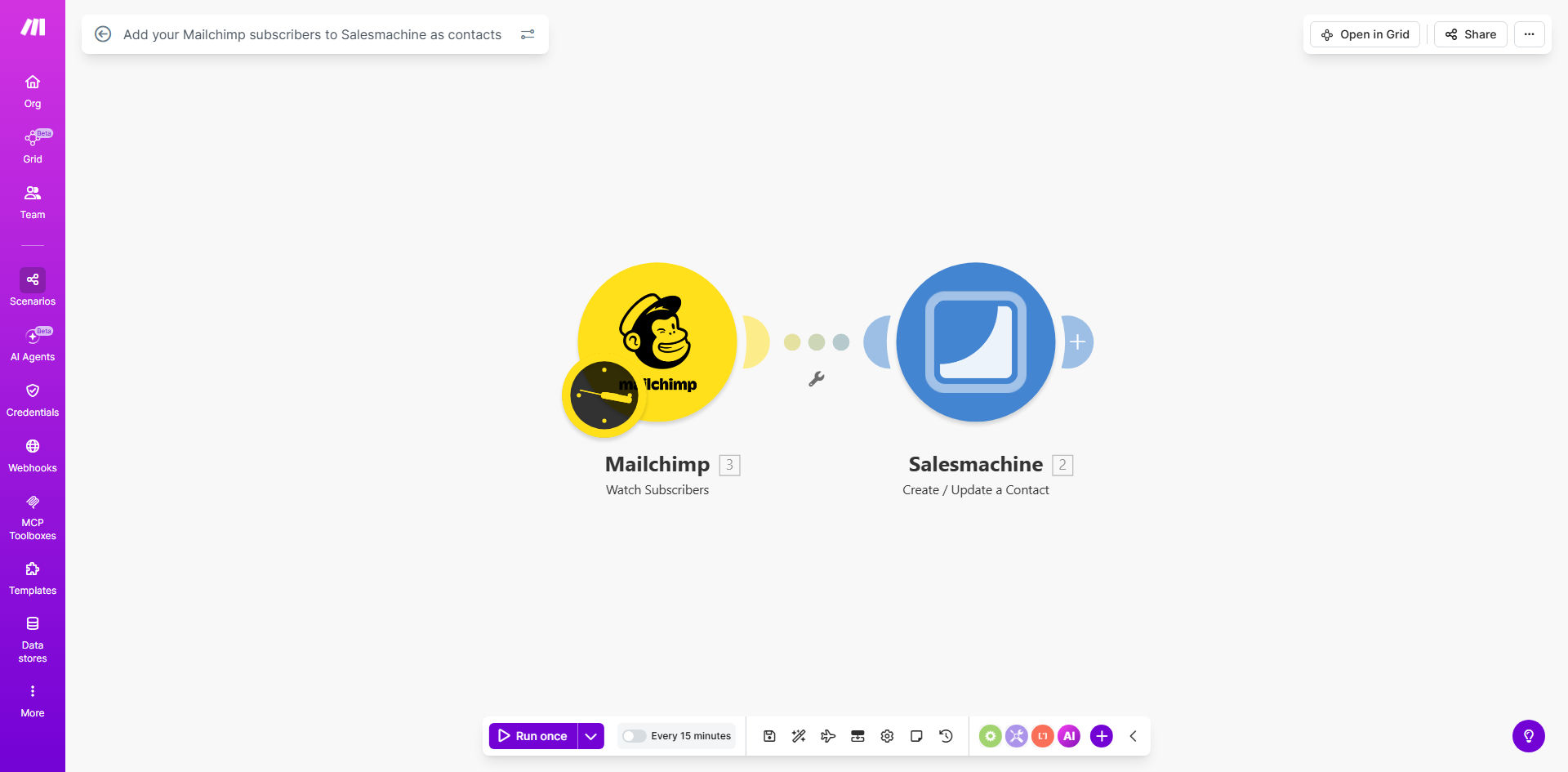
Diagram showing automation flow from Mailchimp to Salesmachine for contact syncing

What This Workflow Does

For businesses using Mailchimp for email marketing and Salesmachine for sales engagement, a critical gap often exists: new leads captured in Mailchimp don't automatically appear in the sales team's pipeline. This forces sales reps to manually check for new subscribers, copy-paste their details, and create contacts—a process that is slow, error-prone, and causes missed opportunities when leads go cold.

This free Make.com workflow solves that problem by creating a seamless, automated bridge between your marketing and sales systems. It watches your Mailchimp audience at regular intervals, detects new subscribers instantly, and creates corresponding contact records in Salesmachine. The result is a unified system where every new prospect is immediately ready for sales outreach, ensuring your team can act fast while interest is highest.

How It Works

The automation runs on a simple, reliable trigger-and-action logic that requires zero ongoing maintenance once set up.

Step 1: Monitor for New Mailchimp Subscribers

The workflow is triggered on a schedule you set (e.g., every 15 minutes). It queries your specified Mailchimp list and identifies any subscribers who have joined since the last check.

Step 2: Extract and Map Lead Data

For each new subscriber, the workflow pulls key information like their email address, first name, last name, and any custom fields you collect (like company or job title). This data is structured and prepared for the next step.

Pro tip: Use Mailchimp's merge tags to collect valuable sales intelligence during sign-up, such as "Budget" or "Timeline." This data will automatically flow into Salesmachine, giving your reps powerful context for their first call.

Step 3: Create or Update Contact in Salesmachine

The workflow sends the formatted subscriber data to Salesmachine via its API. It creates a new contact record, populating fields like name, email, and source (set as "Mailchimp"). You can configure it to add tags or assign the lead to a specific sales rep based on your rules.

Who This Is For

This automation is ideal for sales-driven organizations that rely on timely follow-up. It's perfect for B2B SaaS companies, agencies, consultants, and e-commerce brands that use Mailchimp for lead generation and need to get those leads into a salesperson's hands immediately. Marketing teams tired of exporting CSV files and sales managers frustrated by slow lead handoff will find immense value here.

What You'll Need

  1. A Make.com account (free tier available).
  2. An active Mailchimp account with at least one audience/list.
  3. A Salesmachine account with API access enabled.
  4. The API keys or OAuth credentials for both Mailchimp and Salesmachine (Make.com will guide you through connecting them).

Quick Setup Guide

  1. Clone the Template: Click "Get This Workflow" to open the template in your Make.com account and create a copy.
  2. Connect Your Apps: In the Make.com scenario editor, authorize the connections to your Mailchimp and Salesmachine accounts when prompted.
  3. Configure the Trigger: Select the specific Mailchimp list you want to monitor and set your preferred polling schedule (e.g., every 5 minutes).
  4. Map the Data Fields: In the Salesmachine module, map the incoming Mailchimp fields (email, FNAME, LNAME) to the corresponding contact fields in Salesmachine.
  5. Test and Activate: Run a single test cycle with a recent subscriber to ensure the contact appears correctly in Salesmachine. Once confirmed, turn the scenario on.

Key Benefits

Cut lead response time from hours to minutes. Sales teams get notified of new prospects instantly, allowing them to reach out while the lead is still engaged with your brand, significantly boosting conversion rates.

Eliminate 100% of manual data entry for new leads. This automation saves an estimated 2-5 hours per week for sales or marketing ops personnel, freeing them for higher-value tasks like strategy and nurturing.

Ensure perfect data consistency and zero human error. Automated field mapping guarantees that information is transferred accurately every time, maintaining a clean and reliable CRM database.

Create a measurable marketing-to-sales funnel. By tagging contacts with their source, you can finally track the full ROI of your Mailchimp campaigns by seeing which subscribers become Salesmachine opportunities and customers.

Scale your lead generation efforts without adding overhead. Whether you get 10 or 1,000 new subscribers a day, the system handles the sync effortlessly, allowing your business to grow without proportional increases in administrative work.

Frequently Asked Questions

Common questions about Mailchimp and Salesmachine integration

Connecting Mailchimp to your sales CRM ensures that every new lead from your marketing campaigns is instantly available for sales follow-up. This eliminates manual data entry, reduces lead response time, and ensures your sales team has the most current prospect information, directly improving conversion rates and pipeline velocity.

Without this connection, leads often sit in a marketing list for days before a salesperson manually imports them, by which time the prospect's intent may have cooled. Automation turns your marketing engine into a direct feed for your sales pipeline.

Automating lead sync saves hours of manual work each week, ensures zero data entry errors, and accelerates sales outreach. It creates a single source of truth for customer data, allowing for better segmentation, personalized follow-ups, and accurate reporting on campaign ROI by tracking leads from first touch to closed deal.

Beyond efficiency, it fosters alignment between marketing and sales teams. Marketing can see which leads convert, and sales trusts that their contact list is complete and up-to-date, leading to more collaborative and effective revenue operations.

  • Reduces operational costs and human error.
  • Provides real-time visibility into lead flow.
  • Enables faster, more personalized sales engagement.

Syncing subscribers automatically gives sales reps immediate notifications about warm leads, allowing them to contact prospects while interest is highest. It removes the administrative burden of copying data, so reps spend more time selling. It also enriches contact records with marketing engagement data, enabling more relevant and effective conversations.

For example, a rep can see that a new contact just downloaded an ebook about "Enterprise Solutions," allowing them to tailor their opening message to that specific interest, dramatically increasing the chance of a positive response.

Yes, most automation platforms like Make.com allow you to set filters. You can sync only subscribers from specific lists, those who opened a key email, or those who meet certain custom field criteria. This ensures your sales team focuses on high-intent leads, improving efficiency and preventing contact list clutter with unqualified prospects.

You might filter for subscribers who joined a "Product Demo" list or who have a "Job Title" containing "Director" or "Manager." This targeted sync ensures sales efforts are concentrated on leads with the highest potential value.

Typically, you transfer the subscriber's email address, first and last name, subscription status, signup date, and any custom merge fields (like company, job title, or interests). More advanced syncs can include engagement data such as email open rates or link clicks, giving sales valuable context for personalized outreach.

This foundational data populates the CRM profile, but the real power comes from transferring behavioral data. Knowing a lead opened every email about a specific product feature is a powerful signal for a sales rep to lead with that topic.

Use automation to map fields correctly between Mailchimp and Salesmachine, ensuring data formats match. Implement deduplication checks to avoid creating duplicate contacts. Schedule regular syncs to keep data fresh, and set up error handling to alert you if the connection fails, so you can maintain a clean, reliable database.

Best practice is to use a unique identifier like the email address as the key for deduplication. Also, establish a naming convention for custom fields in both systems during the initial setup to prevent mismatched data.

  • Standardize field names (e.g., "First Name" vs "FNAME").
  • Use the automation's error-handling modules.
  • Conduct periodic audits of synced records.

Absolutely. GrowwStacks specializes in building tailored automation systems that connect Mailchimp, Salesmachine, and other tools to fit your unique sales process. We can design workflows with custom filters, data enrichment, multi-step nurturing sequences, and integration with your other systems like your helpdesk or calendar for a complete solution.

Our team works with you to understand your specific lead scoring, assignment rules, and reporting needs. We then build, test, and deploy a robust automation that works seamlessly in the background, saving you time and increasing revenue. We also provide documentation and support to ensure long-term success.

  • Custom lead scoring and routing logic.
  • Integration with your full tech stack.
  • Ongoing optimization and support.

Need a Custom Mailchimp & Salesmachine Automation?

This free template is a starting point. Our team builds fully tailored automation systems for your specific business needs.