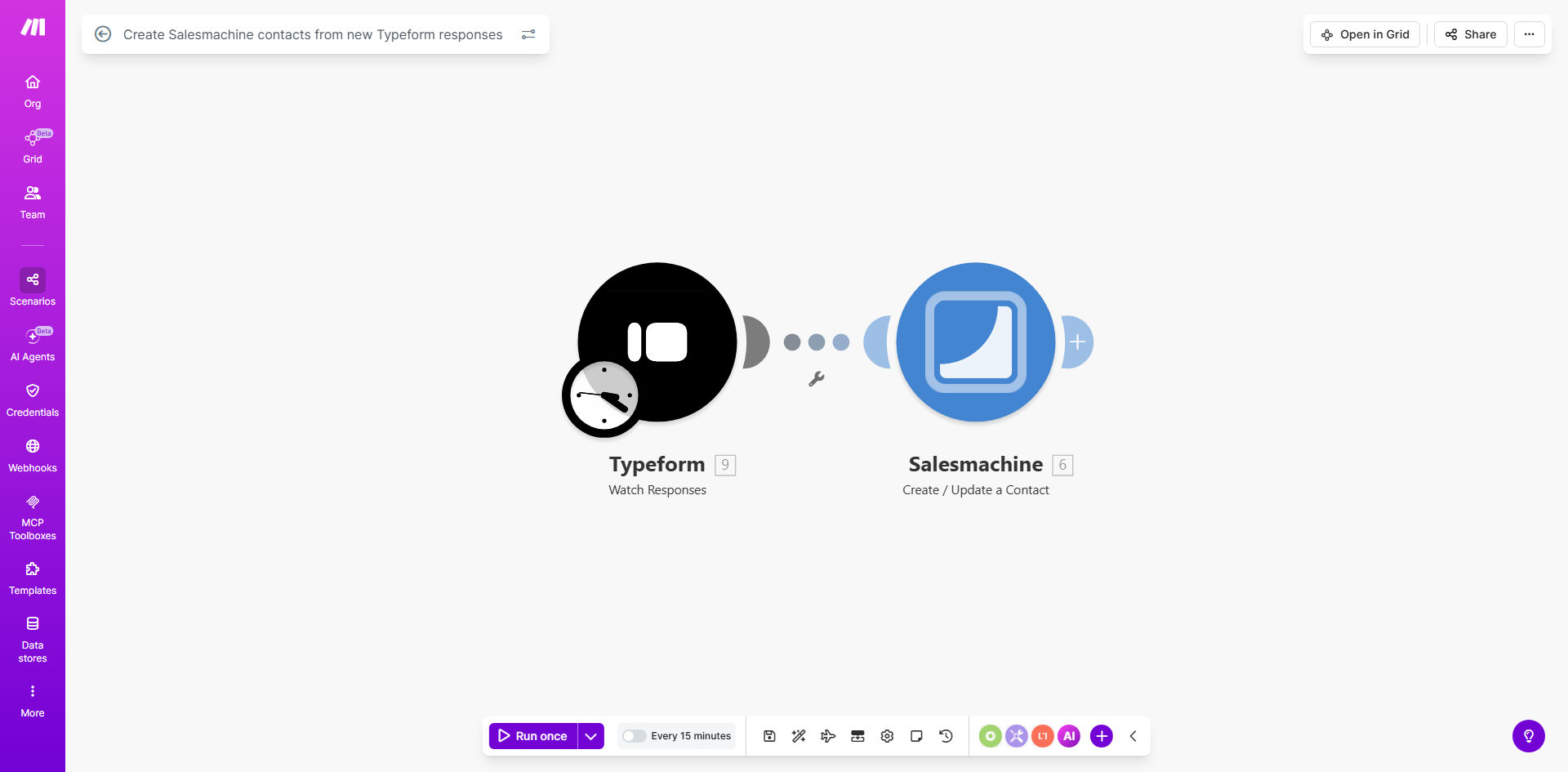
What This Workflow Does
Every minute counts in sales. When a potential customer fills out your Typeform—whether it's a contact form, demo request, or survey—that information is gold. But if it sits in a spreadsheet or an email inbox, its value decays rapidly as your competition reaches out first. This workflow solves that critical delay by creating an instant, automated bridge between your lead capture forms and your sales engagement platform.
It watches for new Typeform responses and, as soon as one is submitted, it packages the data—like name, email, company, and any custom answers—and creates a corresponding contact in Salesmachine. This means your sales team sees a new, fully-formed lead in their system within moments of submission, equipped with all the context they need to start a personalized conversation immediately.
The business value is clear: faster lead response times directly correlate with higher conversion rates. By automating this data transfer, you're not just saving an admin 15 minutes per lead; you're giving your sales team a decisive time advantage and ensuring no lead falls through the cracks due to manual process errors.
How It Works
The automation acts as a smart, reliable courier between Typeform and Salesmachine, operating on a simple trigger-action principle.
Step 1: Monitoring for New Responses
The workflow is set to check your Typeform account at regular, configurable intervals (e.g., every 5 minutes). When it detects a new form submission, it immediately captures the entire response payload, including hidden fields and calculated scores.
Step 2: Parsing and Structuring the Data
It then extracts the specific information needed to create a Salesmachine contact. This typically includes the respondent's email address (as the unique identifier), first and last name, company, phone number, and any other custom fields you've mapped from your Typeform questions.
Step 3: Creating the Salesmachine Contact
Using the structured data, the automation calls the Salesmachine API to create a new contact. The contact is instantly added to your specified Salesmachine list or workspace, often with tags or custom attributes populated based on the Typeform answers, making the lead immediately actionable for sales outreach.
Pro tip: Enhance this workflow by adding a step to send a personalized "Thank You" email via your email service provider (like Gmail or SendGrid) immediately after the contact is created, improving the prospect's experience from the very first touchpoint.
Who This Is For
This automation is ideal for any business using Typeform for lead generation and Salesmachine for sales engagement. It's particularly powerful for:
- B2B Sales Teams: Who rely on demo request or contact forms to generate qualified leads and need to act on them instantly.
- Marketing Agencies: That run client campaigns through Typeform and need to deliver hot leads directly to the client's sales team in Salesmachine.
- SaaS Companies: Using Typeform for product sign-ups or feedback, wanting to automatically onboard respondents into a sales nurture sequence.
- Consultants & Freelancers: Who use Typeform for project inquiries and want to automatically add potential clients to their Salesmachine pipeline for follow-up.
What You'll Need
To set up this automated connection, you will need the following accounts and access:
- A Typeform account with an active form that collects contact information.
- A Salesmachine account with administrative or API access to create contacts.
- A Make.com account (free tier is sufficient to start).
- The API keys or OAuth credentials for both Typeform and Salesmachine (Make.com will guide you through connecting these securely).
- A clear mapping of which Typeform question fields correspond to which Salesmachine contact properties (e.g., "Email" field to "email").
Quick Setup Guide
You can have this automation running in under 30 minutes by following these steps:
- Get the Template: Click the "Get This Workflow" button above to open the pre-built template in your Make.com account.
- Connect Your Apps: In Make.com, authorize the connections to your Typeform and Salesmachine accounts. This is a secure, one-time process.
- Select Your Typeform: Choose the specific Typeform you want to monitor from the dropdown list in the first module.
- Map Your Data: In the Salesmachine "Create a Contact" module, map the data from the Typeform response to the correct Salesmachine fields (e.g., map `answers.email` to `email`).
- Test & Activate: Use the "Run once" feature to test the workflow with a recent or test Typeform submission. Verify the contact appears correctly in Salesmachine, then turn the scenario on.
Key Benefits
Cut lead response time from hours to seconds. The moment a prospect submits a form, they become a contact in your sales tool. This speed dramatically increases the likelihood of engagement and conversion, as you contact them while your service is top of mind.
Eliminate 100% of manual data entry errors. Automated data transfer ensures information is copied perfectly every time. No more typos in email addresses, missed fields, or leads assigned to the wrong sales rep due to spreadsheet mistakes.
Improve sales team productivity by 5-10 hours per week. Reps no longer waste time importing CSV files or copying data from notifications. They can focus purely on high-value activities like calling, emailing, and closing deals.
Gain richer lead context automatically. Beyond basic contact info, you can map any Typeform answer (like "biggest challenge" or "budget range") to custom fields in Salesmachine. This gives your team powerful talking points before they even make the first call.
Ensure no lead is ever forgotten. With automated, 24/7 syncing, every submission is processed, even those that come in after hours or on weekends. Your lead pipeline is always complete and up-to-date.