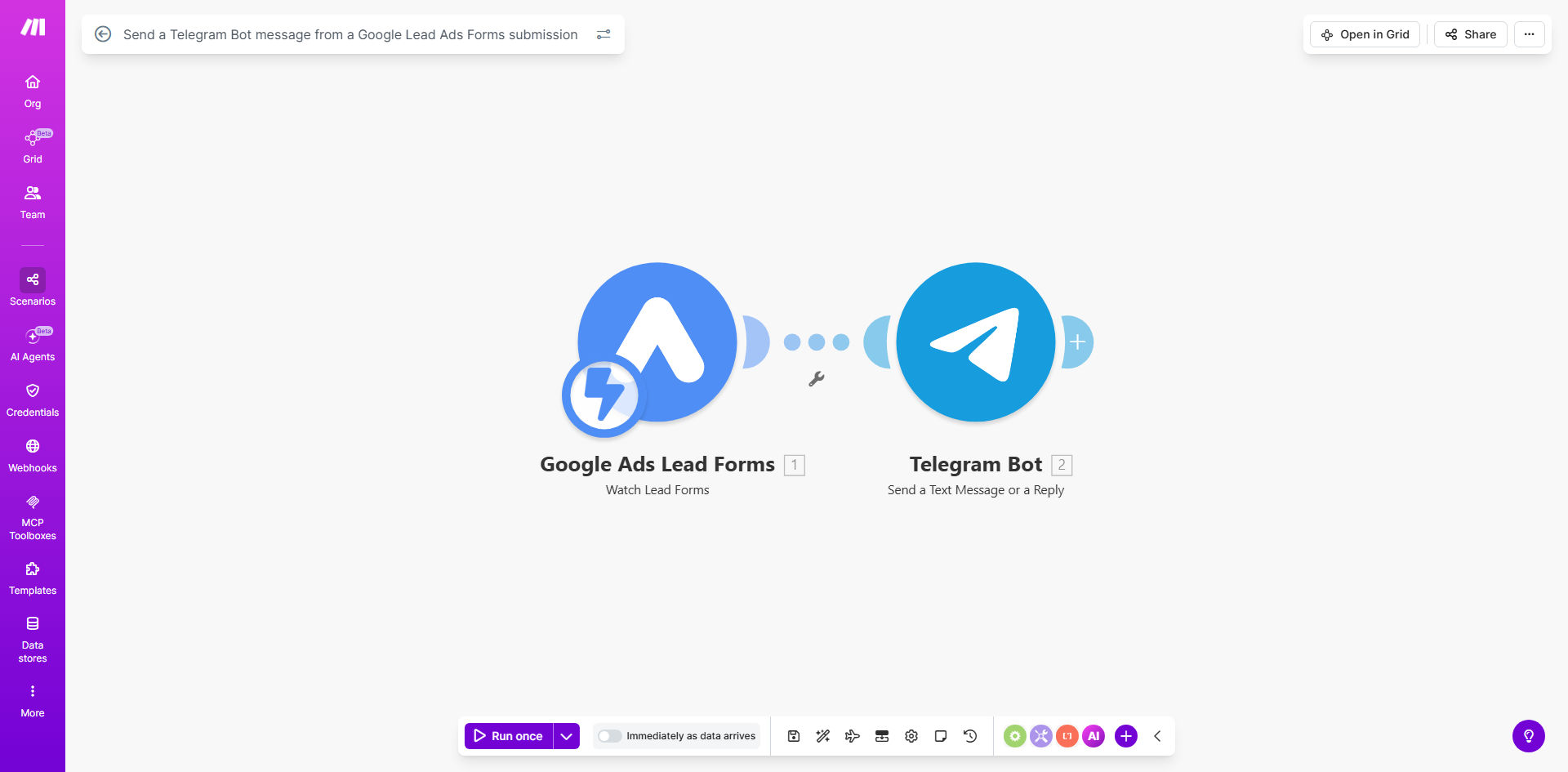
What This Workflow Does
In today's fast-paced digital market, the first brand to contact a new lead has a massive advantage. Studies show that contacting a lead within 5 minutes makes you 9 times more likely to convert them. However, most businesses rely on manual email checks or sporadic dashboard reviews, causing critical delays.
This automation solves that problem by creating a direct, real-time bridge between your Google Lead Ads forms and your team's communication hub on Telegram. Every time a potential customer submits their information through your Google ad, this workflow instantly captures that data and sends a formatted alert to a designated Telegram group or channel. This means your sales or support team is notified the moment a lead comes in, enabling immediate follow-up.
The workflow transforms a passive lead capture system into an active engagement engine. Instead of leads sitting in a spreadsheet until someone checks it, they trigger an immediate action, putting the human connection at the forefront of your customer acquisition process.
How It Works
The automation is a simple yet powerful sequence that operates silently in the background, ensuring no lead falls through the cracks.
Step 1: A Lead Submits a Google Ads Form
The trigger is a new form submission from your Google Lead Ads campaign. This could be from a search ad, display ad, or YouTube ad. Make.com watches for this event via a secure webhook connection to your Google Ads account.
Step 2: Make.com Captures the Lead Data
Once triggered, the workflow instantly receives all the form data. This typically includes the lead's name, email, phone number, and any other custom fields you've set up, like "Company" or "Project Budget."
Step 3: Data is Formatted for Telegram
The raw lead data is then structured into a clear, readable message. You can customize this message to include the most critical information first, such as "🔥 NEW LEAD: [Full Name] from [Company]".
Step 4: Instant Alert Sent to Telegram
Finally, the workflow uses the Telegram Bot API to send the formatted message directly to a pre-defined Telegram chat, group, or channel. Your team sees the alert pop up alongside their regular conversations, prompting immediate action.
Pro tip: Add a filter after the trigger to only send alerts for high-value leads. For example, you could set a rule to only notify the team if the lead's "Estimated Budget" field is above a certain threshold, ensuring you prioritize your efforts.
Who This Is For
This automation is a game-changer for any business investing in Google Ads to generate leads. It's particularly valuable for:
- Sales Teams & Agencies: Who need to contact leads within minutes to win deals. Real-time alerts prevent leads from going cold.
- Small Business Owners & Solopreneurs: Who wear many hats and can't constantly monitor ad platforms. Get a ping on your phone when a potential client comes in.
- Service-Based Businesses: Like consultants, lawyers, or marketers, where prompt consultation booking is key to conversion.
- High-Volume Lead Generators: Companies running large-scale campaigns can ensure their SDRs are always working on the freshest leads.
- Remote & Distributed Teams: Keeps everyone in the loop instantly, regardless of location, creating a unified response system.
What You'll Need
To set up this workflow, you will need the following accounts and assets ready:
- A Make.com account (free tier is sufficient to start).
- A Google Ads account with active Lead Form extensions set up.
- A Telegram account and a Telegram Bot created via @BotFather.
- The Chat ID of the Telegram group or channel where you want to receive notifications.
- Your Google Lead Form should be configured to collect at least a "Full Name" field for personalization.
Quick Setup Guide
You can have this automation live in under 15 minutes by following these steps:
- Clone the Template: Click the "Get This Workflow" button above to open the template in your Make.com account and create a copy.
- Connect Google Ads: In the first module, authorize Make.com to access your Google Ads account and select the specific Lead Form you want to monitor.
- Configure Telegram: In the Telegram Bot module, input the API token from your BotFather and the destination Chat ID.
- Customize the Message: Edit the message template to include the lead data fields that are most important to your team (e.g., Name, Phone, Email, Notes).
- Test & Activate: Use the "Run once" feature to test the workflow with a dummy form submission. Once you confirm a test message arrives in Telegram, turn the scenario on.
Key Benefits
Reduce Response Time from Hours to Seconds: Eliminate the lag between lead submission and team awareness. Get notified instantly on a platform your team already uses daily, enabling contact within the critical 5-minute window.
Increase Lead Conversion Rates by up to 9x: Faster response times directly correlate with higher conversion rates. By being the first to engage, you significantly improve your chances of closing the deal.
Eliminate Manual Data Checking & Entry: Free your team from the tedious task of constantly logging into Google Ads to download CSV reports or check for new leads. The automation does the monitoring and reporting for you.
Improve Team Collaboration & Accountability: With alerts going to a shared Telegram group, the entire team sees incoming leads simultaneously. This creates transparency and allows for quick coordination on who will follow up.
Create a Scalable Lead Management Foundation: This workflow is a perfect starting point. You can easily extend it to add leads to your CRM, send a welcome email, or create a task in your project management tool, building a complete automated funnel.