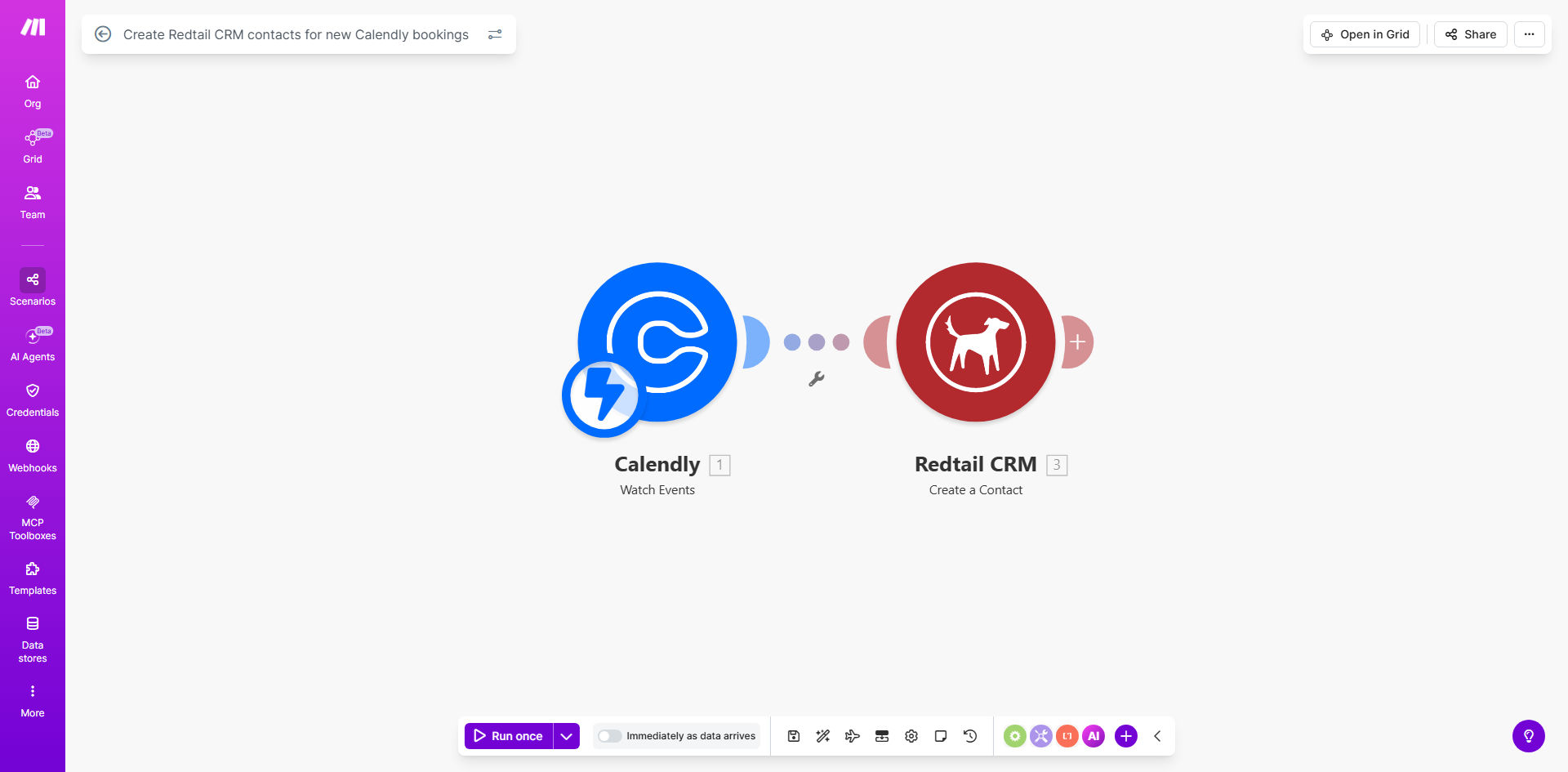
What This Workflow Does
For financial advisors, planners, and service-based businesses using Calendly for scheduling and Redtail CRM for client management, a critical gap often exists between booking and data entry. When a new client schedules a meeting, their information sits in Calendly until someone manually copies it into the CRM. This process is time-consuming, prone to errors, and delays follow-up.
This automated workflow bridges that gap seamlessly. It acts as a real-time connector between Calendly and Redtail CRM. Every time a new booking is created in Calendly—whether it's a consultation, discovery call, or follow-up meeting—the workflow automatically triggers. It captures the invitee's details, such as name, email, phone, and meeting notes, and creates a corresponding contact record in Redtail CRM without any human intervention.
The result is a perfectly synchronized system. Your CRM is always current with your latest prospects, your team saves hours on administrative tasks each week, and you can initiate timely, personalized follow-up immediately after a booking, enhancing client experience and conversion rates.
How It Works
Step 1: Calendly Triggers the Workflow
The workflow is initiated by a "New Event" trigger in Calendly. Whenever someone books an appointment through your Calendly scheduling link, Calendly sends the event data—including all the invitee's answers and scheduling details—to Make.com instantly.
Pro tip: Configure your Calendly event types and questions to gather all the information you need for a complete CRM contact, such as company name or service interest.
Step 2: Data is Parsed and Prepared
Make.com receives the raw booking data and maps it to the appropriate fields required by Redtail CRM. The workflow extracts key values like first name, last name, email address, phone number, and any custom answers from the booking form. It can also add contextual data, like tagging the contact based on the type of meeting booked.
Step 3: Contact is Created in Redtail CRM
The prepared data is sent to Redtail CRM via its API. The workflow executes the "Create a Contact" module, populating the new contact record with the mapped information from Calendly. The contact is instantly added to your Redtail database, ready for your team to view and action.
Step 4: Optional Follow-Up Actions
After the contact is created, the workflow can be extended to trigger additional actions. For example, it could add the contact to a specific list, send a welcome email via another integrated system, or create a task for a team member to review the new lead, creating a complete automated onboarding sequence.
Who This Is For
This automation is ideal for professionals and businesses that rely on scheduled meetings for client acquisition and use a CRM to manage relationships.
- Financial Advisors & Planners: Those using Redtail CRM who book client consultations via Calendly.
- Service-Based Consultants: Coaches, marketers, or consultants who need immediate CRM entry after a booking.
- Sales Teams: Teams that use Calendly for prospect demos and need those leads instantly in their CRM.
- Small Business Owners: Anyone tired of manually transferring client details from scheduling tools to their customer database.
If you spend even 15 minutes a day copying client information from bookings into your CRM, this workflow will save you over 60 hours a year, while improving data accuracy and client response time.
What You'll Need
- A Make.com account (free or paid plan) to host and run the automation.
- A Calendly account with active scheduling events and admin access to configure webhooks.
- A Redtail CRM account with API access enabled (check your Redtail settings or contact support).
- The API credentials or connection keys for both Calendly and Redtail CRM to authenticate the workflow in Make.com.
- Basic understanding of your Calendly event data structure and the desired field mapping in Redtail CRM.
Quick Setup Guide
Follow these steps to deploy this automation using the provided Make.com template.
- Clone the Template: Use the "Get This Workflow" button above to open the template on Make.com. Click "Clone" to copy it into your own Make.com scenario.
- Connect Your Calendly: In the first module of your cloned scenario, replace the template's Calendly connection with your own. Authorize Make.com to access your Calendly account and select the specific event type you want to trigger the workflow.
- Connect Your Redtail CRM: In the "Create a Contact" module, replace the Redtail CRM connection with your own. Enter your Redtail API credentials to establish the link.
- Map the Data Fields: Review the data mapping between Calendly outputs and Redtail CRM contact fields. Adjust the mapping to match your Calendly form questions and your preferred Redtail contact field structure.
- Test the Workflow: Schedule a test meeting in your Calendly. Watch the workflow run in Make.com and verify that a test contact appears correctly in your Redtail CRM.
- Activate and Monitor: Turn on the scenario. It will now run automatically for every new booking. Set up a simple notification to alert you if any errors occur, ensuring long-term reliability.
Key Benefits
Eliminate Manual Data Entry & Save Time: This workflow completely removes the need for you or your team to manually create CRM contacts from bookings. It saves several hours per week, allowing staff to focus on higher-value tasks like client service and sales strategy.
Ensure CRM Accuracy & Timeliness: Contacts are created instantly and accurately, with data pulled directly from the booking form. This eliminates transcription errors and ensures your CRM reflects your latest pipeline immediately, leading to more reliable reporting and faster follow-up.
Improve Client Onboarding Experience: By having the client's details instantly in your system, you can trigger personalized follow-up emails or tasks immediately after their booking. This creates a professional, responsive first impression that increases conversion and satisfaction.
Scale Your Scheduling Operations: As your booking volume grows, manual data transfer becomes unsustainable. This automation scales effortlessly with your business, handling hundreds of bookings without any additional administrative burden or cost.
Create a Foundation for Advanced Automation: This contact creation workflow is a core building block. Once established, you can easily extend it to automate subsequent steps like adding contacts to campaigns, assigning tasks to team members, or syncing data with other tools, creating a comprehensive automated client journey.