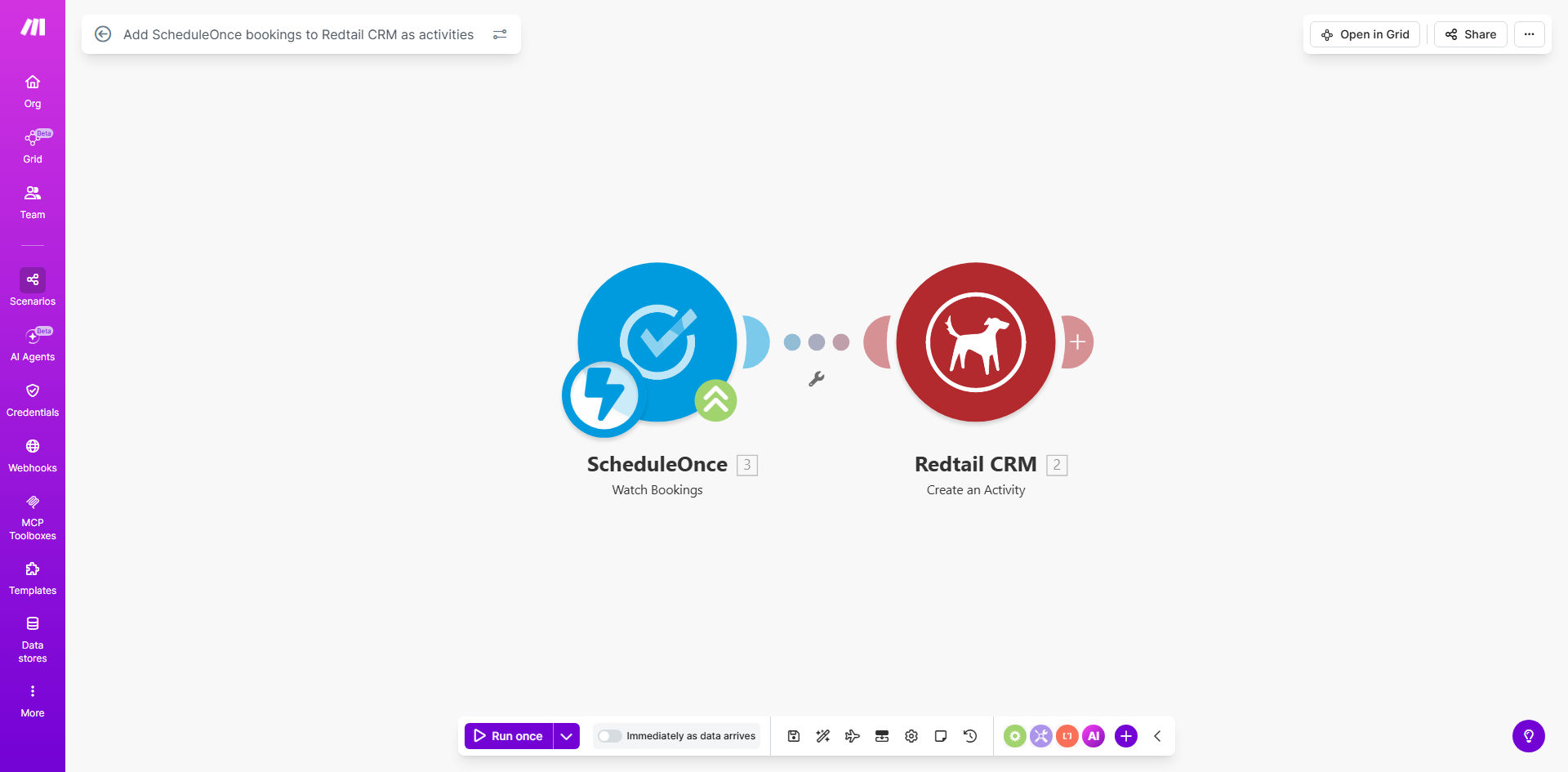
What This Workflow Does
For financial advisors, insurance agents, and service-based businesses, every client interaction is a critical piece of data that needs to be recorded. The manual process of copying details from a scheduling tool like ScheduleOnce into your CRM (Redtail) is not only tedious but prone to errors and delays. This creates gaps in your client history, leads to missed follow-ups, and wastes valuable time that could be spent on revenue-generating activities.
This automated workflow solves that problem instantly. Every time a new booking is confirmed in your ScheduleOnce calendar, this Make.com scenario triggers. It captures all the relevant meeting details—client name, email, scheduled time, service type, and any custom questions—and automatically creates a corresponding activity record in Redtail CRM. The result is a seamless, accurate, and instantaneous log of all client engagements, directly where your team needs it.
How It Works
The automation acts as a intelligent bridge between your public-facing scheduling page and your internal client management system.
Step 1: Monitor for New Bookings
The workflow uses ScheduleOnce's "New Booking" trigger. It constantly watches your connected ScheduleOnce account. The moment a client completes the booking process for a meeting, consultation, or demo, the automation is notified and receives the complete booking payload.
Step 2: Parse and Structure the Data
Make.com processes the incoming data, extracting key fields. It maps the client's first and last name, email address, the chosen meeting date and time, the duration, and the specific event type they booked (e.g., "Initial Financial Consultation"). Any notes or answers from the booking form are also captured for context.
Pro tip: Use Make's data transformation tools to format the date/time to match Redtail's expected format and to combine first and last names into a single "Contact" field for easier matching in the CRM.
Step 3: Create the Activity in Redtail CRM
The workflow then uses the Redtail CRM "Create an Activity" module. It sends the structured data to your Redtail account, creating a new activity record. This activity is typically logged against the corresponding contact (if they exist in Redtail) and includes all the meeting details as the activity description, ensuring a complete audit trail.
Who This Is For
This automation is a game-changer for any professional or team that relies on scheduled appointments and maintains client records in a CRM.
- Financial Advisors & Planners: Automatically log discovery calls and review meetings, ensuring every client touchpoint is recorded for compliance and service excellence.
- Insurance Agencies: Track quote appointments and policy reviews directly in the CRM, enabling better follow-up and pipeline management.
- Coaches & Consultants: Keep a perfect history of all client sessions without any administrative overhead.
- Small Business Sales Teams: Ensure demos and sales calls booked online are instantly visible to the entire team in the central CRM.
What You'll Need
- A Make.com account (free or paid plan).
- An active ScheduleOnce account with admin or API access.
- A Redtail CRM account with API credentials enabled (you may need to generate an API key from your Redtail settings).
- The specific ScheduleOnce event types you want to track (e.g., "Intro Call," "Strategy Session").
Quick Setup Guide
You can have this automation running in under 15 minutes.
- Import the Template: Click the "Get This Workflow" button above to open the template in your Make.com account and clone it.
- Connect ScheduleOnce: In the first module, authorize Make.com to access your ScheduleOnce account. Select the specific calendar you want to monitor.
- Connect Redtail CRM: In the "Create an Activity" module, authorize the connection to your Redtail CRM using your API credentials.
- Map the Data Fields: Review the data mapping. Ensure the client name, email, date, and notes from ScheduleOnce are correctly pointed to the corresponding fields in the Redtail activity module.
- Test & Activate: Create a test booking in ScheduleOnce or use an existing one. Run the scenario once to ensure it creates the activity correctly in Redtail. Then, turn on the schedule to run automatically.
Key Benefits
Eliminate 100% of manual data entry for scheduled meetings. This reclaims 30-60 minutes per week per team member that was previously spent on copy-pasting information between apps.
Guarantee a 100% accurate client interaction history. With automation, there is zero risk of forgetting to log a meeting or making a typo in critical details like the meeting time or client notes.
Improve team responsiveness and collaboration. When an activity is instantly created in Redtail, the entire team has visibility. Managers can see booked demos, and support can prepare with context before a client call.
Enhance client service with timely follow-ups. With the meeting already logged as a completed activity, setting the next task or sending a follow-up email becomes a seamless next step in your workflow.
Maintain strict compliance for regulated industries. For financial services, having an automated, tamper-proof log of all client meetings is essential for audit trails and regulatory compliance.