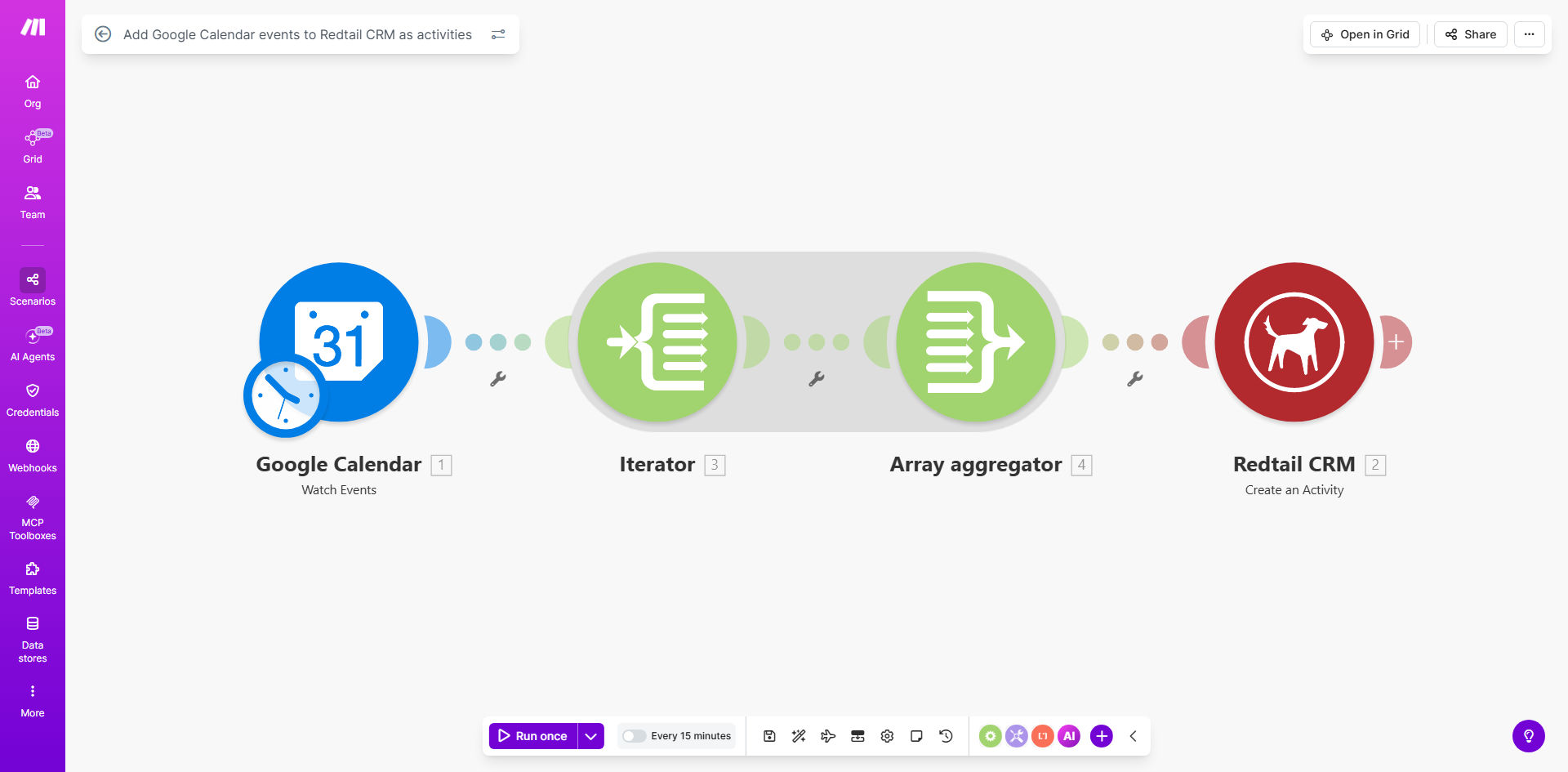
What This Workflow Does
For financial advisors, realtors, and service-based businesses using Redtail CRM, manually logging every client meeting, call, or appointment from Google Calendar is a repetitive, error-prone task. It wastes valuable time that could be spent with clients and often leads to incomplete CRM records, making it hard to track client interactions accurately.
This automation solves that problem by creating a live, one-way sync from your calendar to your CRM. Whenever a new event is added to a specified Google Calendar, this Make.com workflow instantly captures the details—like title, time, description, and attendees—and creates a corresponding "Activity" within Redtail CRM. This ensures your client history is always up-to-date, provides a clear audit trail for compliance, and frees your team from tedious data entry.
Pro tip: Use a dedicated Google Calendar (e.g., "Client Meetings") for this automation to maintain control. This prevents personal or internal events from being synced to your CRM.
How It Works
The workflow runs on a simple trigger-and-action principle, orchestrated by Make.com. It acts as a smart bridge between Google Calendar and Redtail CRM.
Step 1: Monitoring Google Calendar
The scenario is triggered at a regular interval (e.g., every 15 minutes) to check your designated Google Calendar for any new events that have been created since the last check. It captures the full event payload.
Step 2: Processing Event Data
Make.com parses the incoming event data. You can set up filters here—for example, only processing events with specific keywords in the title or from certain calendars. The workflow extracts key fields like the event summary (title), start/end time, description, and attendee email addresses.
Step 3: Creating the Redtail CRM Activity
The workflow then uses the Redtail CRM module to create a new "Activity." It maps the extracted calendar data to the relevant CRM fields: the event title becomes the activity subject, the date/time sets the due date, and the description populates the notes. The result is a complete activity log attached to your CRM's timeline.
Who This Is For
This template is ideal for any professional who uses Redtail CRM to manage client relationships and Google Calendar for scheduling. It's a perfect fit for:
- Financial Advisors & Planners: Automatically log client review meetings, prospecting calls, and compliance-related appointments.
- Insurance Agents: Track policy reviews, client consultations, and follow-up calls directly in the client's record.
- Real Estate Agents: Record property showings, buyer consultations, and contract signing appointments as CRM activities.
- Small Business Coaches & Consultants: Maintain a history of all strategy sessions and check-in calls with clients.
- Any Team Using Redtail CRM: Improve internal accountability by having all client-facing meetings automatically documented for the entire team to see.
What You'll Need
- A Make.com account (free tier available).
- A Google account with a Calendar containing events you wish to sync.
- An active Redtail CRM account with API access enabled (check your Redtail settings or contact support).
- The API credentials (client ID and secret) for both Google Calendar and Redtail CRM to authorize the connection in Make.com.
- Basic understanding of which calendar and what type of events you want to synchronize.
Quick Setup Guide
You can have this automation running in under 30 minutes. Follow these steps after clicking "Get This Workflow."
- Clone the Template: Click the link to open the template on Make.com. Press the "Copy" button to clone it into your own Make workspace.
- Authorize Connections: In your new scenario, click on the Google Calendar and Redtail CRM modules. Follow the prompts to log in and authorize Make.com to access your accounts. This is a secure, standard OAuth process.
- Configure the Trigger: In the Google Calendar "Watch Events" module, select the specific calendar you want to monitor (e.g., "Primary" or a shared "Business" calendar).
- Map the Data Fields: In the Redtail "Create an Activity" module, review how the calendar data is mapped. Ensure fields like Subject, Due Date, and Notes are pulling from the correct data points from the Google Event. You can customize this mapping.
- Test and Activate: Run the scenario once manually to test. Create a test event in your Google Calendar and see if it appears as an activity in Redtail. Once confirmed, turn on the scheduler to run automatically.
Key Benefits
Eliminate 2–5 hours of manual data entry per week per team member. This time can be redirected to revenue-generating activities or client service, directly impacting your bottom line.
Achieve 100% accuracy in your client interaction logs. Automated sync removes human error from double-entry, ensuring your CRM is a reliable source of truth for compliance and client history.
Improve team visibility and accountability. When every meeting is automatically logged, managers and team members have full visibility into client touchpoints, enabling better collaboration and follow-up.
Enhance client service with timely follow-ups. With activities automatically created and dated in Redtail, you can set up subsequent workflows to trigger follow-up tasks or reminders based on completed meetings, never letting a ball drop.
Scalable foundation for advanced automation. This sync is a core building block. Once in place, you can easily extend it to trigger email summaries, update deal stages, or notify team members in Slack.