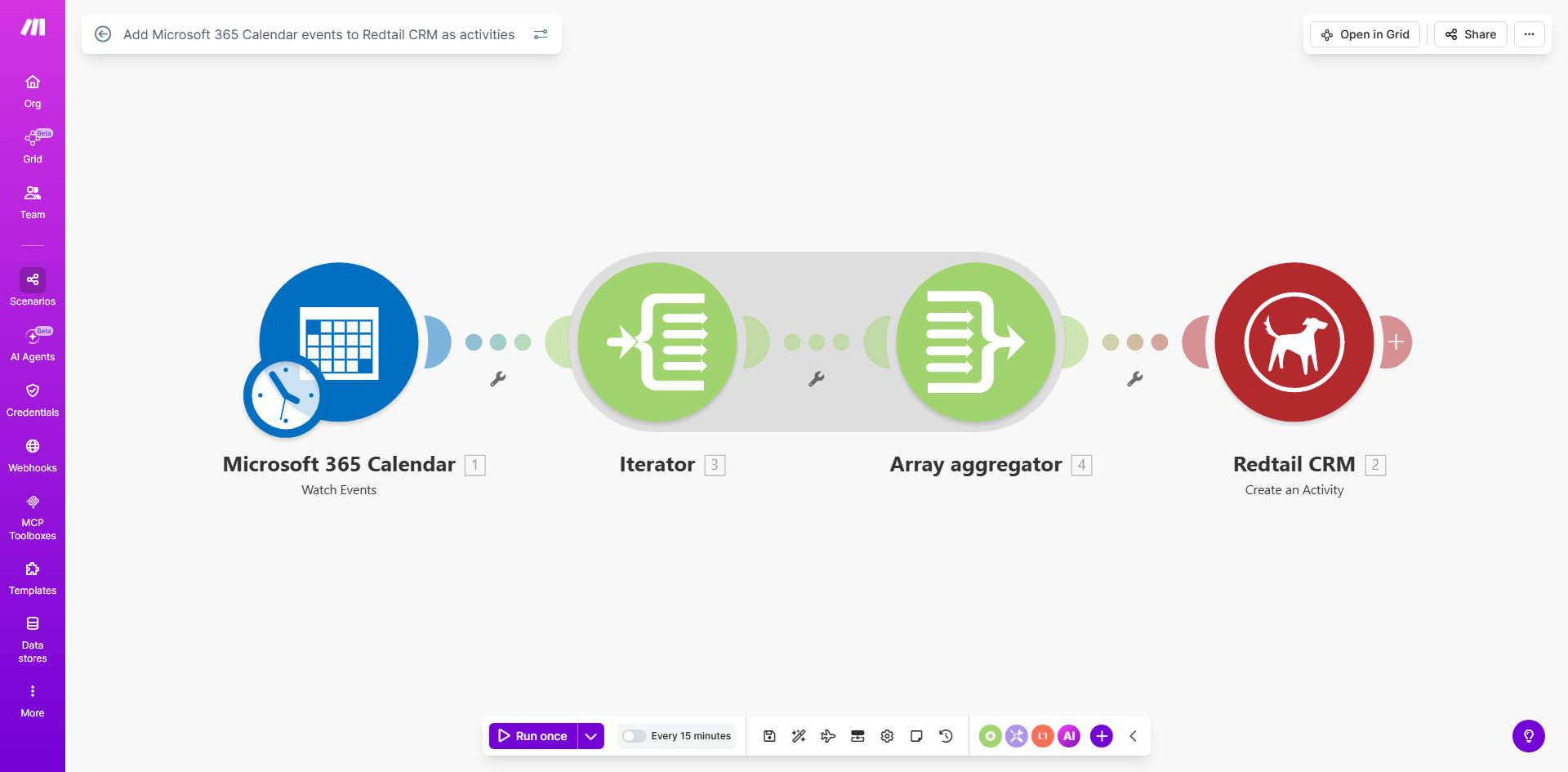
What This Workflow Does
For financial advisors, wealth managers, and any client-focused professional, the gap between your calendar and your CRM is where critical details get lost. You schedule a client meeting in Microsoft 365, but then you must manually open Redtail CRM, find the client, and log the activity. This double data entry is a repetitive, time-consuming task that often gets postponed or forgotten, leading to incomplete client records.
This automation solves that problem completely. It acts as a silent bridge between your Microsoft 365 Calendar and Redtail CRM. Every time a new event is created in your specified calendar—be it a client review, a prospect call, or a compliance meeting—the workflow automatically triggers. It captures the event details and creates a corresponding activity in the correct client's record within Redtail. This ensures your CRM always reflects your real-world schedule, providing a single source of truth for all client interactions.
Pro tip: Use this automation not just for client meetings, but also for logging internal compliance trainings or important follow-up reminders. By having everything in Redtail, you build a comprehensive audit trail effortlessly.
How It Works
The workflow runs on a simple but powerful trigger-action principle, requiring no manual intervention once set up.
Step 1: Monitor the Calendar
The Make.com scenario starts by watching a specific Microsoft 365 Calendar. You can choose your primary calendar or a dedicated "Client Meetings" calendar. The trigger is set to "Watch Events," which means it instantly detects any new event as soon as it's saved.
Step 2: Process Event Data
When a new event is detected, the workflow captures all relevant data: the event subject, start and end time, location, description/notes, and the attendees. This data is parsed and formatted to fit the structure Redtail CRM expects for an activity.
Step 3: Create the CRM Activity
The formatted data is then sent to Redtail CRM via its API. The workflow searches for the client contact based on the attendee's email address or name and creates a new "Activity" under their record. The calendar event's subject becomes the activity description, the time is logged, and any notes are added for context.
Who This Is For
This template is ideal for any business that uses Redtail CRM for client relationship management and Microsoft 365 for scheduling. It's particularly valuable for:
- Financial Advisors & RIAs: To log every client interaction for compliance and ensure follow-ups are never missed.
- Wealth Management Teams: To synchronize activities across multiple advisors into a central, firm-wide CRM.
- Insurance Agencies: To track policy reviews, client calls, and prospect meetings automatically.
- Any Client-Service Business: That needs a reliable audit trail of meetings and calls without manual data entry.
What You'll Need
- A Make.com account (free tier is sufficient to start).
- A Microsoft 365 account with calendar access and permissions to create an app connection (API access).
- A Redtail CRM account with administrative access to generate API credentials.
- The specific calendar you want to monitor identified within your Microsoft 365 setup.
Quick Setup Guide
- Clone the Template: Click "Get This Workflow" to copy the template into your Make.com account.
- Connect Microsoft 365: In the first module, authorize Make.com to access your Microsoft 365 account and select the calendar to watch.
- Connect Redtail CRM: In the second module, add your Redtail CRM API credentials to establish the connection.
- Test the Flow: Create a test event in your chosen Microsoft calendar. The workflow should run and create a corresponding test activity in Redtail.
- Activate: Turn the scenario on. It will now run automatically, syncing new events in real-time.
Key Benefits
Eliminate 2-5 hours of manual data entry per week, per advisor. The time spent switching apps and copying information is completely saved, allowing your team to focus on higher-value client work.
Guarantee 100% accurate and timely client records. Since the sync happens instantly and automatically, there is no lag, no forgetfulness, and no typing errors corrupting your CRM data.
Strengthen compliance with a perfect audit trail. Every scheduled interaction is logged immutably in Redtail, providing clear evidence of client communication for regulatory reviews.
Improve team visibility and accountability. Managers and associates can see a real-time feed of scheduled client activities directly in the CRM, fostering transparency.
Scale your practice without adding administrative overhead. As you add more clients and meetings, the automation handles the increased logging load effortlessly.