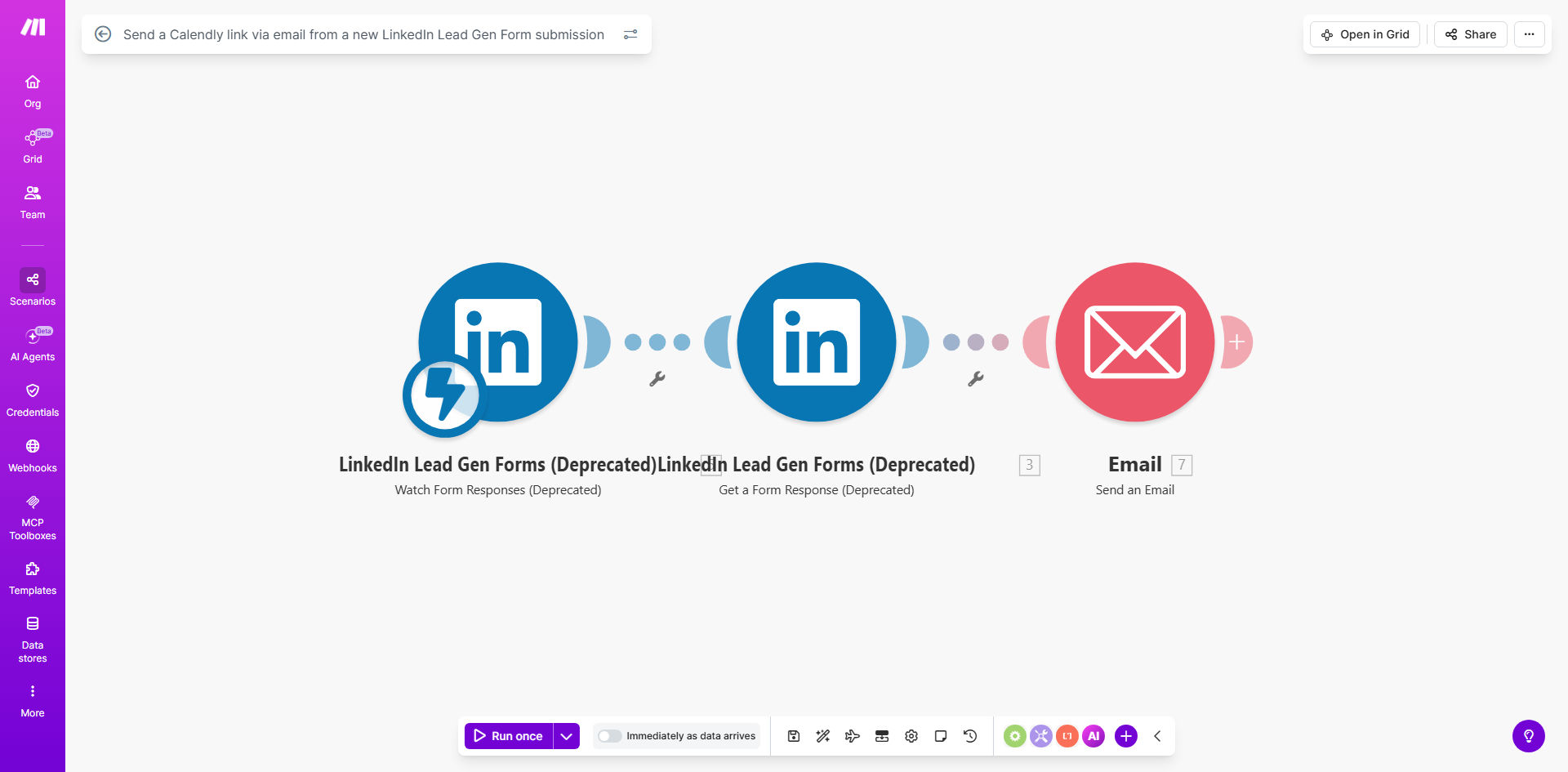
What This Workflow Does
For businesses using LinkedIn advertising, capturing leads is only half the battle. The real challenge is converting those leads into conversations before they go cold. Manual follow-up is slow, error-prone, and often results in missed opportunities.
This automation solves that problem by creating an instant connection between your LinkedIn Lead Gen Form and your calendar. Every time a prospect submits their information, they immediately receive a personalized email with your Calendly booking link. This transforms a form submission into a scheduled meeting in minutes, not days, dramatically increasing your conversion rates and ensuring no lead slips through the cracks.
The workflow acts as your 24/7 sales assistant, ensuring timely, professional, and consistent follow-up. It bridges the gap between lead capture and sales engagement, allowing you to focus on having great conversations instead of administrative tasks.
How It Works
The automation follows a simple but powerful sequence, triggered the moment a new lead appears.
Step 1: LinkedIn Trigger
The workflow is activated whenever a new submission comes through your LinkedIn Lead Gen Form. Make.com watches for this new data in real-time, capturing key details like the lead's first name, email address, and any other information your form collects.
Step 2: Data Processing
The captured lead data is formatted and prepared for the next step. This is where personalization happens. The lead's first name is extracted to be used in the email greeting, ensuring the message feels tailored and human.
Step 3: Email Composition & Sending
Using an email service (like Gmail, Outlook, or an SMTP server), the workflow generates a personalized email. It inserts the lead's name into the subject line and body, includes your pre-written message, and—most importantly—embeds your unique Calendly scheduling link. This email is then sent instantly to the lead's provided email address.
Pro tip: Use a dedicated email-sending service like SendGrid or Mailgun for better deliverability and tracking. These services provide analytics on open and click rates, giving you valuable insight into how leads are engaging with your automated follow-up.
Who This Is For
This template is ideal for B2B sales teams, consultants, agency owners, recruiters, and anyone who uses LinkedIn Ads to generate qualified leads. If your business model relies on booking discovery calls, consultations, or demos, this automation is for you.
It's particularly valuable for solopreneurs and small teams who lack a dedicated sales operations person. It automates the most repetitive part of the lead response process, giving you back hours each week. Marketing agencies running LinkedIn campaigns for clients can also deploy this to demonstrate immediate, measurable value through faster lead response times.
What You'll Need
- A LinkedIn Campaign Manager account with an active Lead Gen Form.
- A Make.com account (free tier is sufficient to start).
- A Calendly account with a public booking link for your desired event type (e.g., "15-minute discovery call").
- Access to an email-sending service. This could be a connected Gmail/Outlook account in Make.com or a transactional email service like SendGrid.
- Your LinkedIn form must collect the lead's first name and email address at a minimum for personalization to work.
Quick Setup Guide
You can have this automation running in under 30 minutes by following these steps.
- Clone the Template: Click the "Get This Workflow" button above to open the template in your Make.com account and create a copy.
- Connect LinkedIn: In the first module, authorize Make.com to access your LinkedIn ad account and select the specific Lead Gen Form you want to monitor.
- Connect Your Email Service: In the email module, connect your Gmail, Outlook, or SMTP service. This is the account that will send the automated emails.
- Configure the Email: Draft your email subject and body. Use the mapping tool to insert the lead's `First Name` from the LinkedIn form. Paste your Calendly link in the body.
- Test and Activate: Use Make.com's "Run once" feature to test the workflow with a dummy submission. Verify you receive the email correctly, then turn the scenario ON to start automating.
Key Benefits
Cut Response Time from Hours to Seconds: The average salesperson takes over 8 hours to contact a new lead. This automation responds in under 60 seconds, capitalizing on the lead's peak interest and dramatically increasing the chance of a booking.
Eliminate Manual Data Entry & Follow-up: Free up 5-10 hours per week per salesperson by automating the initial outreach. This time can be reinvested into higher-value activities like conducting demos or refining strategy.
Improve Lead Conversion Rates by 20-30%: Immediate, personalized follow-up significantly outperforms delayed, generic responses. By providing a clear next step (a booking link), you guide the lead directly into your sales funnel.
Ensure 100% Follow-up Consistency: Never miss a lead again. The system works 24/7, including weekends and holidays, guaranteeing every single form submission receives a professional, timely response.
Professionalize Your Lead Capture Process: An instant, personalized email with a booking link creates a seamless "click-to-call" experience that impresses prospects and positions your business as modern and efficient.