Make.com CRM Sync Teamleader Brevo Marketing Automation

Automatically Sync Teamleader Contacts to Brevo

Eliminate manual data entry. Every new contact in your Teamleader CRM is instantly created in Brevo for seamless email marketing.

Get This Workflow → Make.com · CRM Sync · Free Template
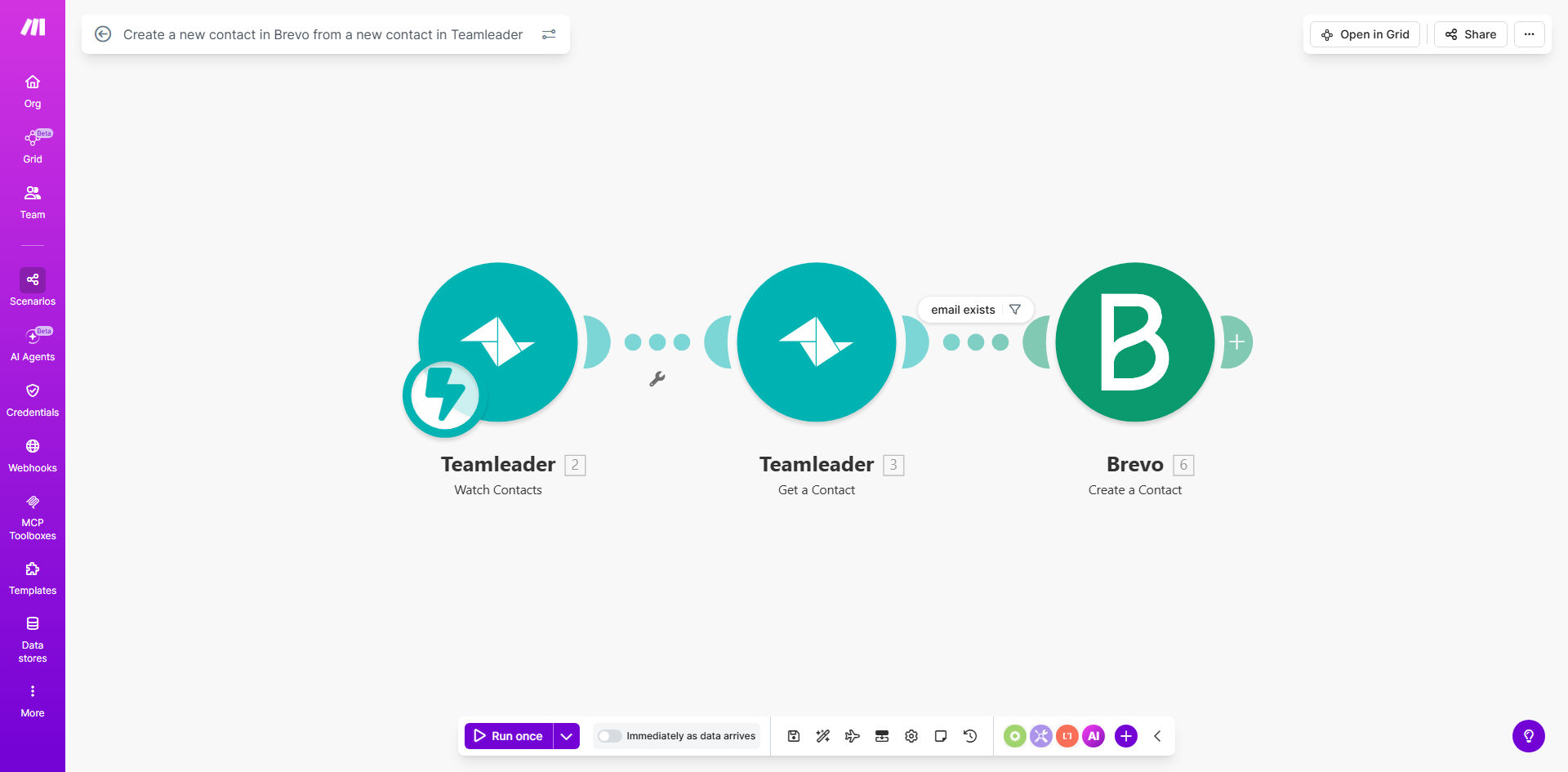
Visual diagram showing data flow from Teamleader to Brevo for contact syncing

What This Workflow Does

For businesses using Teamleader for CRM and sales management alongside Brevo (formerly Sendinblue) for email marketing, a major operational headache is keeping contact lists synchronized. Sales teams add new leads and clients into Teamleader, but marketing campaigns run on a separate list in Brevo. Manually exporting and importing contacts is time-consuming, error-prone, and causes delays in engaging new leads.

This automated workflow solves that problem completely. It acts as a real-time bridge between your two critical systems. Whenever a sales representative creates a new contact record in Teamleader, this automation instantly detects the event and creates a corresponding, enriched contact in your Brevo account. This ensures your marketing team has immediate access to new leads for onboarding sequences, newsletters, or targeted campaigns, without a single manual step.

Pro tip: Ensure the email field is mandatory for new contacts in your Teamleader setup. This automation uses the email as the primary identifier, so having it populated is essential for a successful sync.

How It Works

The automation follows a simple but powerful "trigger-action" sequence on the Make.com platform, ensuring reliability and speed.

Step 1: The Trigger in Teamleader

The workflow is initiated by the "Watch Contacts" module in Teamleader. It constantly monitors your Teamleader account for the specific event of a new contact being created. The moment this happens, it captures the entire contact record—including name, email, company, phone number, and any custom fields or tags.

Step 2: Data Processing & Mapping

Make.com receives the contact data and prepares it for Brevo. This step often involves routing and filtering. For instance, you could add logic to only sync contacts tagged as "Marketing Qualified" or from a specific company. The data is then mapped from Teamleader's field structure to the expected field structure in Brevo.

Step 3: The Action in Brevo

The final module is the "Create a Contact" action in Brevo. Using the mapped data, it sends an API call to your Brevo account to create a new contact. You can configure it to add the contact to specific lists, update attributes, and assign tags based on the data from Teamleader, enabling immediate segmentation for marketing campaigns.

Who This Is For

This template is ideal for small to medium-sized businesses, sales teams, and marketing agencies that rely on Teamleader for managing sales pipelines and Brevo for executing email marketing. It's perfect for:

  • Sales-Driven Companies: Where the sales team is the primary source of new lead data that needs to be marketed to.
  • Marketing Teams: Who need immediate access to new contacts to trigger welcome drips, lead nurturing, or promotional campaigns.
  • Agencies Managing Client CRMs: That need to keep their clients' sales and marketing tools in perfect sync without manual oversight.
  • Businesses Scaling Operations: Where manual data transfer between systems is becoming a bottleneck and a source of errors.

What You'll Need

  1. A Make.com Account: A free or paid plan to build and run the automation.
  2. Teamleader Account: With API access enabled. You'll need administrator credentials to generate an API key for Make.com to connect.
  3. Brevo Account: An active Brevo (Sendinblue) account with an API key available in the settings.
  4. Contacts with Email Addresses: As noted, the workflow is designed to use the email field from Teamleader as a key identifier for creating the Brevo contact.

Quick Setup Guide

You can have this automation live in under 30 minutes by following these steps:

  1. Clone the Template: Click the "Get This Workflow" button to open the template on Make.com and create a copy in your own account.
  2. Connect Your Apps: In the Make.com scenario editor, click on the Teamleader module and authenticate your account using your API key. Repeat the process for the Brevo module.
  3. Test the Connection: Use the "Run once" function to test the trigger. Create a test contact in Teamleader and see if the workflow executes and creates the contact in Brevo.
  4. Activate the Scenario: Once testing is successful, schedule the scenario to run automatically (e.g., "immediately" or every few minutes) and turn it on. Your sync is now live.

Key Benefits

Eliminate 2–5 hours of manual data entry per week. This automation completely removes the need for anyone to export CSV files from Teamleader and import them into Brevo, freeing up your team for higher-value tasks.

Improve lead engagement speed by 90%. New leads can be added to a marketing nurture sequence within seconds of being entered into the CRM, dramatically increasing the chance of conversion by contacting them while their interest is highest.

Ensure 100% data accuracy and consistency. Automated transfers eliminate human typos and omissions, guaranteeing that the contact information in your marketing platform is always an exact match of your CRM data.

Enhance sales and marketing alignment. By creating a single, automated handoff point, both teams work from the same real-time data, improving communication, lead follow-up strategies, and overall revenue operations.

Scale your processes without adding overhead. As your business grows and you add dozens or hundreds of new contacts weekly, this workflow scales effortlessly without requiring additional staff or creating data backlogs.

Frequently Asked Questions

Common questions about CRM and marketing automation integration

Syncing contacts is crucial for maintaining a single source of truth across sales and marketing. It ensures that every new lead captured by your sales team in Teamleader is immediately available for email nurturing campaigns in Brevo. This eliminates data silos, prevents missed opportunities, and ensures consistent messaging, which directly improves lead conversion rates and customer experience.

Without synchronization, marketing campaigns target outdated lists, sales teams lack insight into marketing engagement, and leads fall through the cracks. Automation turns these two systems into one cohesive growth engine.

Automating this sync saves significant manual effort, reduces human error, and accelerates lead engagement. The moment a sales rep adds a contact, they can be added to a welcome or onboarding sequence in Brevo within seconds. This speed increases the likelihood of conversion, as leads are contacted while their interest is highest.

Beyond speed, it provides operational consistency and scalability. Your process remains flawless whether you add ten contacts or a thousand in a week, without requiring additional staff time for data management.

  • Eliminates repetitive manual data entry tasks.
  • Ensures real-time data availability for marketing campaigns.
  • Creates a reliable, error-free system that works 24/7.

Yes, a well-configured automation can map and transfer multiple data points. Beyond email, you can sync the contact's name, company, phone number, custom fields, and tags from Teamleader to corresponding fields in Brevo.

This enriched data allows for highly personalized and segmented email marketing campaigns, improving open rates and engagement by delivering more relevant content to each subscriber. For example, you can segment your Brevo list by "Company Size" or "Industry" if those fields are captured in Teamleader.

A robust automation should include logic to check for duplicates before creating a new contact. The workflow can search Brevo using the email address as a unique identifier. If a match is found, it can update the existing contact's information with the latest data from Teamleader instead of creating a duplicate.

This prevents list bloat, maintains data hygiene, and ensures your contact records are always up-to-date. You can configure the automation to either silently update the record or notify an admin if a duplicate is detected for review.

This automation creates a seamless handoff between sales and marketing. When sales adds a qualified lead to Teamleader, marketing is instantly notified and can begin targeted nurturing. It provides visibility for marketing into the sales pipeline and ensures sales knows which leads are being engaged via email.

This closed-loop process fosters collaboration, improves lead scoring, and ultimately drives more revenue by treating leads as a shared responsibility. It breaks down departmental silos and creates a unified customer journey from first contact to closed deal.

Common pitfalls include not mapping all necessary data fields, failing to handle duplicates, and not setting up proper error handling for failed syncs. Ensure you have required fields like email populated in your source system. Test the automation with various data scenarios.

Also, consider data privacy regulations (like GDPR) and ensure your automation respects unsubscribe statuses and consent settings when moving contacts between platforms. Always start with a small test group of contacts before rolling out the automation to your entire database.

  • Thoroughly test data mapping with edge cases.
  • Implement error notifications for failed sync attempts.
  • Document the process for future team members.

Absolutely. This is where automation becomes powerful. You can design your workflow to inspect the new Teamleader contact's tags, custom fields, or deal stage. Based on this information, you can trigger specific actions in Brevo, like adding the contact to a particular list, triggering a targeted automation workflow, or even sending a one-off email.

For example, a contact tagged as "High Priority" in Teamleader could be added to a "VIP Nurture" list in Brevo, while a contact with a "Prospect" status might enter a general educational email sequence. This allows for dynamic, behavior-driven marketing that responds to sales activity.

Yes, GrowwStacks specializes in building custom automation systems that connect your unique tech stack. We can design a solution that not only syncs Teamleader and Brevo but also integrates other tools like your website, calendar, or helpdesk.

Our team handles the complex logic, error-proofing, and ongoing optimization, so you get a reliable system tailored to your specific sales process and marketing goals, saving you time and increasing revenue. We start with a free consultation to understand your needs and propose the most effective automation architecture.

  • End-to-end design, build, and testing.
  • Integration with multiple apps beyond Teamleader and Brevo.
  • Ongoing support and optimization services.

Need a Custom CRM & Marketing Automation?

This free template is a starting point. Our team builds fully tailored automation systems for your specific business needs.