What This Workflow Does
Managing Google Ads campaigns requires constant vigilance, especially when it comes to cost-per-click (CPC) fluctuations. A sudden, unexplained spike in CPC can quickly drain your advertising budget without delivering additional value, while a significant drop might indicate new optimization opportunities you don't want to miss. Manually checking these metrics daily is time-consuming and prone to oversight.
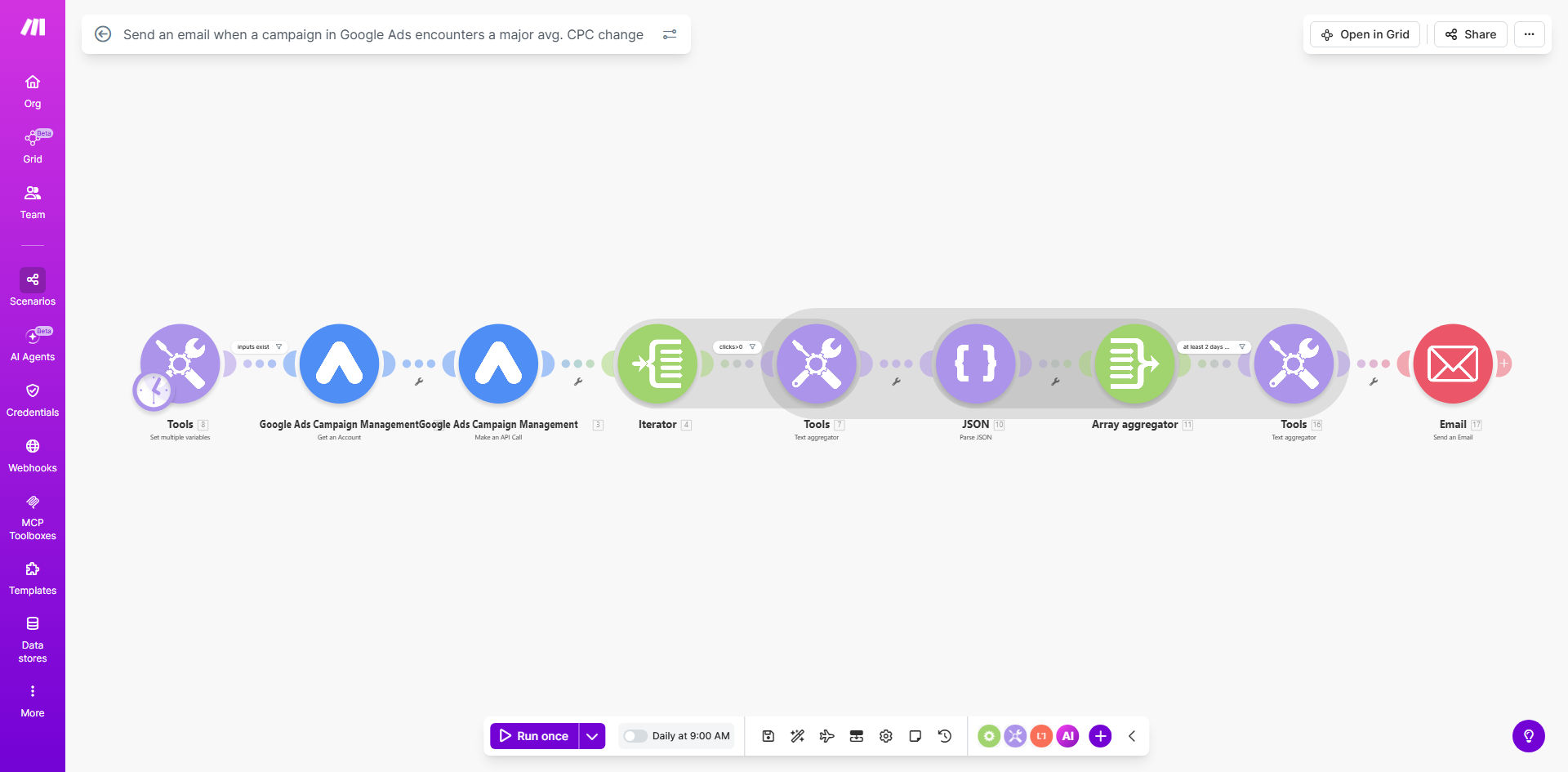
This automated workflow solves that problem by continuously monitoring your Google Ads campaigns for major average CPC changes. It runs daily, analyzes the last 7 days of performance data for each campaign, and compares the most recent two days that meet a minimum click threshold. When it detects a percentage change that exceeds your configured threshold, it automatically sends a detailed email alert with campaign performance details, giving you immediate visibility into budget-impacting changes.
The automation transforms reactive campaign management into proactive optimization. Instead of discovering budget overruns in your weekly report, you receive real-time notifications that enable immediate investigation and action. This approach not only protects your advertising investment but also helps identify positive trends you can capitalize on before competitors do.
How It Works
The workflow operates on a scheduled, automated basis to provide consistent monitoring without manual intervention.
Step 1: Scheduled Data Retrieval
Every day at 9 AM (configurable), the workflow automatically connects to your Google Ads account via the Make.com Google Ads module. It retrieves performance data for all your campaigns over the previous 7 days, focusing specifically on average CPC metrics and click counts for each day.
Step 2: Intelligent Data Filtering
The system filters this data to identify the last two days within the 7-day period that meet your minimum click threshold. This ensures the comparison is based on statistically significant data rather than days with minimal activity that could produce misleading percentage changes.
Pro tip: Set your minimum click threshold based on your typical campaign volume. For smaller campaigns, 10-15 clicks might be sufficient, while larger campaigns might require 50+ clicks for reliable comparison.
Step 3: Percentage Change Calculation
For each campaign meeting the criteria, the workflow calculates the percentage change in average CPC between the two identified days. It then compares this change against your predefined threshold (for example, a 20% increase or decrease).
Step 4: Alert Generation and Delivery
When a campaign exceeds your threshold, the workflow compiles a detailed email containing the campaign name, the specific CPC values, the percentage change, and relevant performance context. This email is sent immediately to your designated recipients, enabling prompt investigation and action.
Who This Is For
This automation is ideal for digital marketers, PPC managers, small business owners, and agencies who run Google Ads campaigns. It's particularly valuable for businesses with limited time for daily campaign monitoring, those with fixed advertising budgets that need protection from unexpected cost increases, or teams managing multiple accounts who need centralized alerting.
E-commerce stores running shopping campaigns, local service businesses using search ads, and B2B companies with lead generation campaigns all benefit from this proactive monitoring. The workflow scales from solo entrepreneurs monitoring a single campaign to agencies overseeing dozens of client accounts with different alert thresholds and notification preferences.
What You'll Need
- A Make.com account (free or paid plan) to host and run the automation.
- A Google Ads account with active campaigns and appropriate API access permissions.
- A Google Cloud Platform project with the Google Ads API enabled and proper OAuth credentials configured in Make.com.
- An email service (like Gmail, Outlook, or SMTP) connected to Make.com for sending alerts.
- Basic understanding of your campaign's normal CPC ranges to set appropriate percentage change thresholds.
Quick Setup Guide
Follow these steps to implement this automation for your Google Ads account:
- Import the template: Click "Get This Workflow" above to open the template in your Make.com account and create a copy.
- Connect Google Ads: In the first module, authenticate your Google Ads account using OAuth. Ensure you grant access to the appropriate manager account or client accounts.
- Configure monitoring parameters: Set your percentage change threshold (e.g., 20% for significant changes) and minimum click requirement (e.g., 15 clicks per day for reliable data).
- Set up email notifications: Connect your email service (Gmail, SMTP, etc.) and specify recipient email addresses. Customize the alert message with your preferred formatting and details.
- Test and activate: Run the scenario once to ensure connections work and alerts are generated correctly. Then activate the schedule to run daily at your preferred time.
Pro tip: Start with a conservative threshold (like 25-30%) to avoid alert fatigue. Once you understand your campaign's normal fluctuation patterns, you can adjust the threshold to catch smaller but still meaningful changes.
Key Benefits
Protect your advertising budget from unexpected overruns. Immediate notification of CPC spikes allows you to investigate and adjust bids before significant budget is wasted, potentially saving hundreds or thousands of dollars monthly depending on your ad spend.
Save 2-3 hours weekly on manual campaign monitoring. Eliminate the need for daily manual checks of each campaign's performance metrics, freeing up time for strategic optimization tasks rather than administrative monitoring.
Identify optimization opportunities faster than competitors. Receive alerts about CPC decreases that might indicate reduced competition or improved quality scores, enabling you to capitalize on these changes before market conditions shift again.
Create an audit trail of significant campaign events. The email alerts serve as a documented history of major CPC fluctuations, useful for performance analysis, client reporting, and identifying seasonal patterns in your advertising costs.
Scale campaign management across multiple accounts effortlessly. Once configured, the same automation can monitor dozens of campaigns or accounts with consistent reliability, eliminating the scalability limitations of manual oversight.