What This Workflow Does
For digital marketers and business owners running Google Ads, manually compiling performance reports is a tedious, time-consuming chore. You have to log into the platform, export data, format it in a spreadsheet, and then email it to your team or clients. This process can eat up 2-5 hours every week—time that should be spent optimizing campaigns and strategy.
This automated workflow solves that problem entirely. It acts as your personal reporting assistant, connecting directly to your Google Ads account on a daily schedule. It pulls the latest campaign performance statistics—like impressions, clicks, cost, conversions, and return on ad spend (ROAS)—and automatically compiles them into a clean, readable email. The report is then sent to your specified recipients at 9 AM every day (or any time you choose), ensuring everyone starts their morning with the latest insights.
The true business value lies in consistency and speed. You eliminate human error from manual data entry, ensure stakeholders are always informed with up-to-date numbers, and free up significant time for higher-value marketing activities. This automation turns a reactive reporting task into a proactive strategic asset.
How It Works
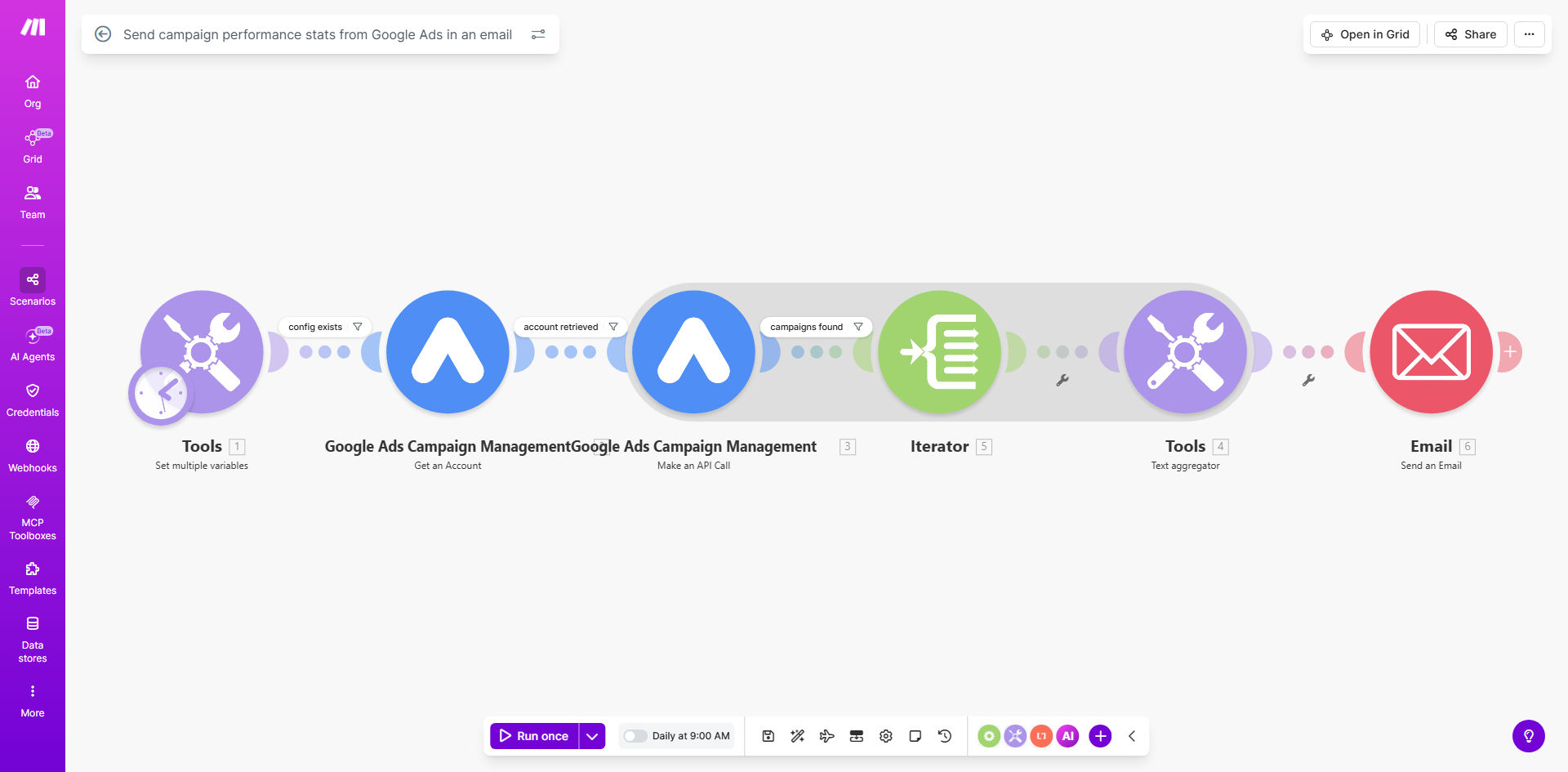
The workflow is built on Make.com and follows a logical sequence to gather, process, and deliver your data.
Step 1: Scheduled Trigger
The automation begins with a Schedule module set to run daily at 9 AM. This acts as the consistent starting point, ensuring your report is generated and sent like clockwork without any manual initiation.
Step 2: Connect to Google Ads
Once triggered, the workflow authenticates with your Google Ads account using a secure connection. You only need to authorize this once during setup. The system then prepares to query your account for the specific data you want to report on.
Step 3: Fetch Campaign Performance Data
This is the core data-fetching step. The workflow executes a GAQL (Google Ads Query Language) query against your account. The default template fetches essential columns like campaign name, clicks, impressions, cost, and conversions. A major advantage is that this query is fully customizable—you can edit it to pull any metric available in Google Ads to match your specific KPIs.
Step 4: Aggregate and Format the Data
The raw data from Google Ads is processed through a Text Aggregator module. This step structures the data into rows and columns, transforming it from an API response into a format suitable for an email table. If you added new columns in the query, you would update this aggregator to include them.
Step 5: Send the Email Report
Finally, the formatted data is passed to an Email module (like Gmail or SMTP2GO). The workflow populates a pre-designed email body, inserting the performance table with proper headers. The email is then sent to your designated recipients, delivering a professional, at-a-glance report directly to their inbox.
Pro tip: Use this template as a foundation. You can easily modify it to send weekly summaries instead of daily reports, or to segment data by campaign type (Search vs. Display) for more targeted analysis.
Who This Is For
This automation is a perfect fit for several key roles:
PPC Managers & Digital Marketing Agencies: Professionals managing multiple client accounts can use this to provide transparent, automated reporting, building trust and saving hours per client each month.
E-commerce & SaaS Business Owners: Founders who run their own ads need quick visibility into daily spend and return without diving deep into the Google Ads interface. This delivers the essential numbers first thing in the morning.
Marketing Teams: Teams that need to align sales, leadership, and marketing with consistent performance data. Automated reports ensure everyone is looking at the same numbers, fostering data-driven discussions.
Freelancers & Consultants: Individuals who bill for strategy time, not administrative work. Automating reporting demonstrates professionalism and allows them to focus on delivering actionable insights rather than compiling data.
What You'll Need
To set up this workflow, you will need the following accounts and permissions:
- A Make.com account (free tier is sufficient to run this template).
- A Google Ads account with active campaigns and admin/standard access to generate reports.
- Access to an email sending service. This could be a Gmail/Google Workspace account or a transactional email service like SMTP2GO, SendGrid, or your company's SMTP server.
- Basic understanding of the key performance indicators (KPIs) you wish to track in your reports.
Quick Setup Guide
You can have this automation running in under 30 minutes by following these steps:
- Clone the Template: Click the "Get This Workflow" button to copy the template into your own Make.com account.
- Authorize Connections: In the workflow editor, click on the Google Ads module and connect your account by following Make.com's OAuth process. Repeat this for your chosen email service module (e.g., Gmail).
- Customize the Query (Optional): Review the GAQL query in the third module. If you need different metrics (e.g., adding "Conversion Value"), edit the query accordingly. Remember to also update the Text Aggregator and email table headers to match.
- Set Your Recipients: In the final Email module, enter the email addresses of everyone who should receive the report. You can add multiple addresses.
- Adjust the Schedule: Click the clock icon on the first module to change the report frequency or time. You might set it to run every weekday at 8 AM, for example.
- Test and Activate: Run a single execution to test. Check your inbox to ensure the email arrives with the correct data format. Once satisfied, turn the scenario ON to let it run automatically.
Key Benefits
Save 2-5 Hours Per Week on Manual Reporting: Eliminate the daily or weekly grind of logging in, exporting CSVs, and building summary emails. This time is better spent on campaign optimization and strategy.
Improve Decision Speed with Timely Data: By receiving performance stats automatically first thing in the morning, you can identify and react to issues—like a sudden spike in cost-per-click—hours or even days faster than with manual reporting cycles.
Ensure Reporting Consistency and Accuracy: Automated systems pull data the same way every time, removing human error from manual copying and pasting. This builds trust with clients and internal stakeholders who rely on accurate numbers.
Enhance Team Alignment and Transparency: When managers, clients, and team members all receive the same report simultaneously, it creates a single source of truth. This alignment streamlines meetings and focuses discussions on action items rather than data discrepancies.
Scalable Foundation for Advanced Automation: This template is a gateway. Once running, you can easily extend it to trigger alerts for low budgets, sync conversion data to your CRM, or create summarized slides for weekly presentations—all without starting from scratch.