What This Workflow Does
For sales, marketing, and business development teams using Cloze CRM, keeping a centralized, updated contact list across all platforms is a constant challenge. Valuable relationship insights and updated contact details captured in Cloze often remain siloed, forcing team members to manually copy information into Google Contacts for use in Gmail, Calendar, and other Workspace apps. This manual process is not only time-consuming but also prone to errors and delays, leading to missed opportunities and fragmented customer data.
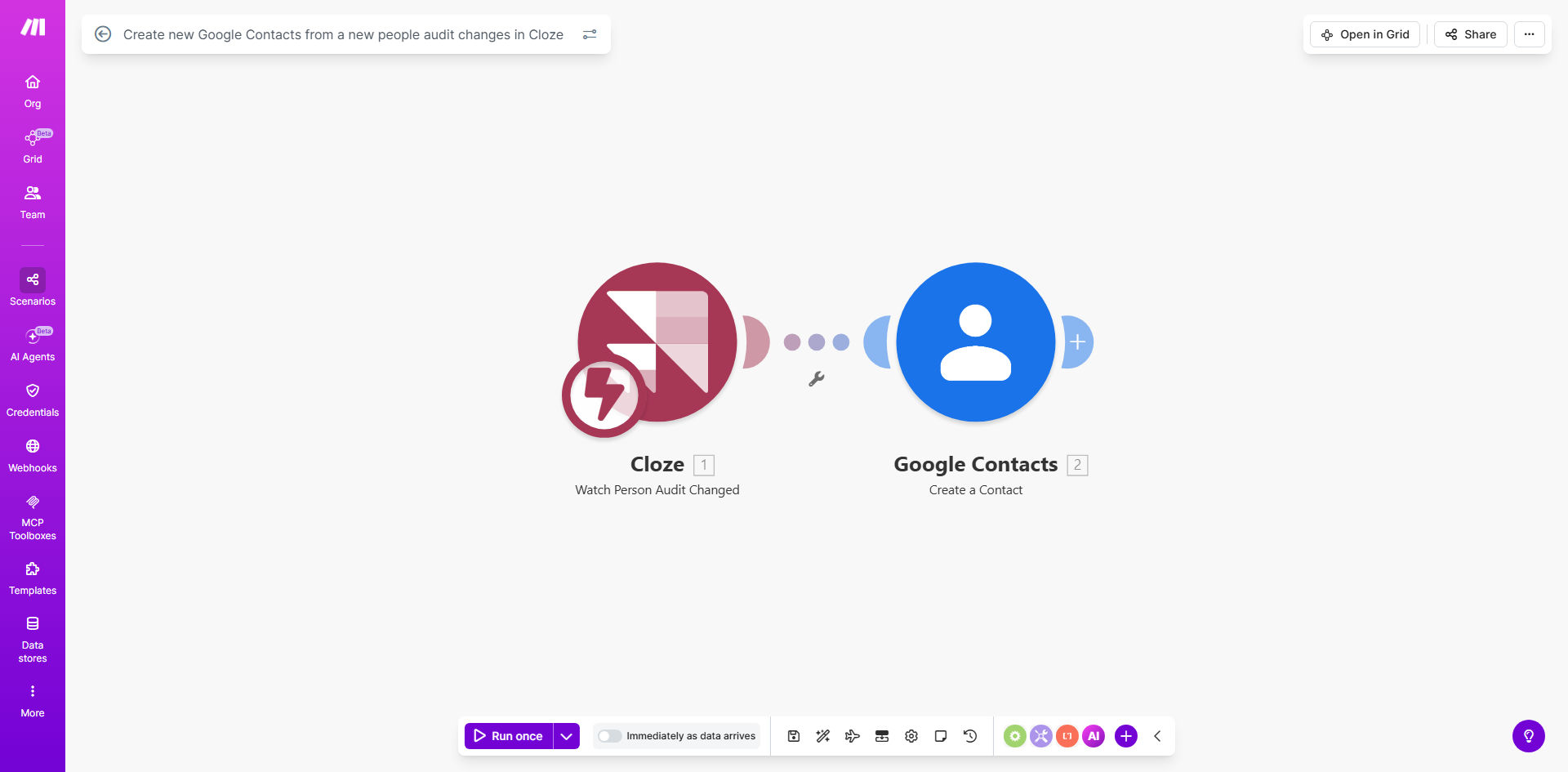
This automation workflow solves that problem by creating a seamless, real-time bridge between Cloze and Google Contacts. Every time a "people audit"—Cloze's term for a contact record review or update—is changed or created, this Make.com scenario triggers automatically. It captures the new or updated contact data and creates a corresponding entry in your Google Contacts. The result is a single source of truth for contact information that is instantly available across your entire Google Workspace ecosystem.
The business value is clear: it turns a reactive, manual administrative task into a proactive, automated system. Your team's focus shifts from data entry to relationship building, while ensuring every tool they use has the latest and most complete contact information.
How It Works
The workflow operates on a simple trigger-action principle, orchestrated within the Make.com visual automation platform.
Step 1: Monitoring Cloze for Changes
The scenario starts by watching your Cloze account for any new or modified "People Audit" events. Make.com uses Cloze's API to poll for these changes at regular intervals. When a change is detected—such as a new contact being added, a phone number being updated, or notes being appended—the workflow captures the entire data packet associated with that audit.
Step 2: Processing the Contact Data
Once triggered, the workflow routes the data through a "router" module. This step can be configured to filter contacts based on specific criteria. For instance, you might only want to sync contacts tagged as "Client" or from a specific company. The data is then formatted to match the structure expected by the Google Contacts API, mapping fields like name, email, phone, company, and job title.
Step 3: Creating the Google Contact
The formatted data is sent to the Google Contacts module within Make.com. This module authenticates with your Google account and creates a new contact entry with all the provided details. The workflow can be set to check for duplicates first, updating an existing contact if found, or simply creating a new one. A success log is recorded, and the process is complete—often in less than a minute from the change in Cloze.
Who This Is For
This template is ideal for any business or professional that relies on both Cloze for CRM intelligence and Google Workspace for daily communication and scheduling.
- Sales Teams & SDRs: Automatically add new qualified leads from Cloze to your Google Contacts for immediate email and call outreach.
- Real Estate Agents & Brokers: Keep client and prospect details from Cloze synchronized with your Google ecosystem for seamless scheduling and follow-up.
- Consultants & Freelancers: Ensure client information updated during project audits in Cloze is instantly available in Google Contacts for invoicing and communication.
- Small Business Owners: Maintain a unified contact list without manual work, saving precious administrative time.
- Marketing Agencies: Sync new contact details captured from campaign tracking in Cloze directly into Google Contacts for list building and email marketing segmentation.
What You'll Need
- A Make.com account (free tier available).
- An active Cloze account with contacts and people audit data.
- A Google account with Google Contacts enabled (part of any Google Workspace or standard Gmail account).
- API connection credentials (handled easily within Make.com's interface for both Cloze and Google).
- Basic understanding of the contact fields you wish to sync (e.g., name, email, phone, company).
Quick Setup Guide
You can have this automation running in under 15 minutes.
- Get the Template: Click the "Get This Workflow" button above to clone the scenario into your Make.com account.
- Connect Cloze: In the first module, authorize Make.com to access your Cloze account. You'll be prompted to log in and grant permissions.
- Connect Google Contacts: Similarly, authorize the Google Contacts module with the Google account where you want the contacts to appear.
- Map Your Fields: Review the data mapping between Cloze and Google Contacts. The template provides standard mappings, but you can customize them—for example, map "Cloze Company" to "Organization" in Google.
- Set Filters (Optional): Use the router module to add conditions. You might set it to only run for audits where the "Contact Type" field equals "Lead".
- Test & Activate: Use the "Run once" button to test with an existing Cloze audit. Check your Google Contacts to confirm the new entry appears. Then, toggle the scenario to "On" to run automatically.
Pro tip: Start by syncing only a few test contacts to verify field mapping. Once confirmed, you can confidently activate the automation for all future audits.
Key Benefits
Eliminate 2–5 hours of manual data entry per week. This workflow completely removes the need for your team to manually export from Cloze and import into Google Contacts, reclaiming valuable time for revenue-generating activities.
Ensure 100% data accuracy and consistency. Automated transfers eliminate human typos and omissions. The contact information in Google Contacts will always be an exact replica of what's in your Cloze CRM, providing reliable data across all platforms.
Accelerate sales and outreach cycles. New leads or updated contact information become instantly available in Google Contacts. This means your sales team can initiate emails or calls within moments of the data being logged in Cloze, significantly improving response times.
Create a unified customer view. By centralizing contact data from your CRM (Cloze) into your communication hub (Google Workspace), you empower every team member with a complete, contextual view of the contact, improving the quality of every interaction.
Scale your processes without adding overhead. Whether you add 10 contacts or 1000 contacts per month, this automation handles the volume effortlessly. It grows with your business, ensuring your contact management never becomes a bottleneck.