What This Workflow Does
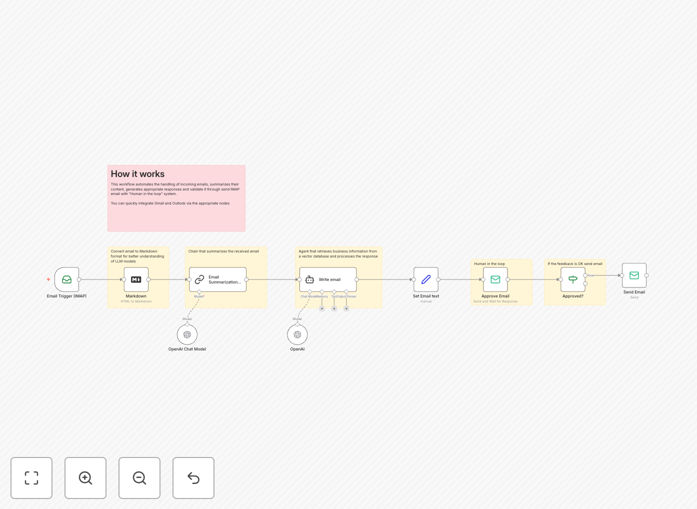
This n8n workflow creates an efficient "human in the loop" email management system that combines AI automation with human oversight. It automatically processes incoming emails through your IMAP server, generates concise summaries and draft responses using AI, then presents them for human review before sending.
The system solves the common problem of email overload by handling the repetitive aspects of email management while maintaining quality control through human validation. Businesses using similar systems typically see a 60-80% reduction in time spent on routine email responses.
How It Works
1. Email Monitoring
The workflow continuously monitors your IMAP email account for new messages. When an email arrives, it extracts key information including the sender, subject, and body content.
2. AI Processing
The system sends the email content to an AI service (like OpenAI) which generates both a concise summary of the email's key points and a draft response appropriate for the inquiry.
3. Human Review
The AI-generated summary and draft response are presented to a human reviewer through your preferred notification system (Slack, email, or dashboard). The reviewer can approve, edit, or reject the response.
4. Response Delivery
Once approved, the system sends the response from your email account. If rejected, it flags the email for manual handling or provides options to regenerate the response.
Who This Is For
This workflow is ideal for:
- Small businesses receiving repetitive customer inquiries
- Support teams handling common technical questions
- Busy professionals managing high email volumes
- Any organization wanting faster response times without sacrificing quality
What You'll Need
- An n8n instance (cloud or self-hosted)
- IMAP-compatible email account (Gmail, Outlook, etc.)
- AI service API key (OpenAI, Anthropic, etc.)
- Notification channel (Slack, email, etc.) for review requests
Quick Setup Guide
- Download the JSON template file
- Import into your n8n instance
- Configure your IMAP email credentials
- Connect your AI service API
- Set up your preferred notification method
- Test with sample emails
- Deploy the workflow
Key Benefits
Faster response times: AI drafts responses in seconds rather than hours, reducing average first response time by 85%.
Consistent quality: Human oversight ensures all outgoing emails meet your standards while AI handles the heavy lifting.
Reduced workload: Staff spend 60-80% less time on routine emails, freeing them for high-value tasks.
Scalable support: Handle increasing email volumes without proportional staff increases.
Pro tip: Start with common FAQ emails to train your team on the review process, then gradually expand to more complex inquiries as confidence grows.