n8n Automation Logic Workflow Control Free Template

Add a Check Condition for a Loop in n8n

Learn to use the $runIndex expression to prevent infinite loops and create controlled, reliable automations.

Download Template JSON · n8n compatible · Free
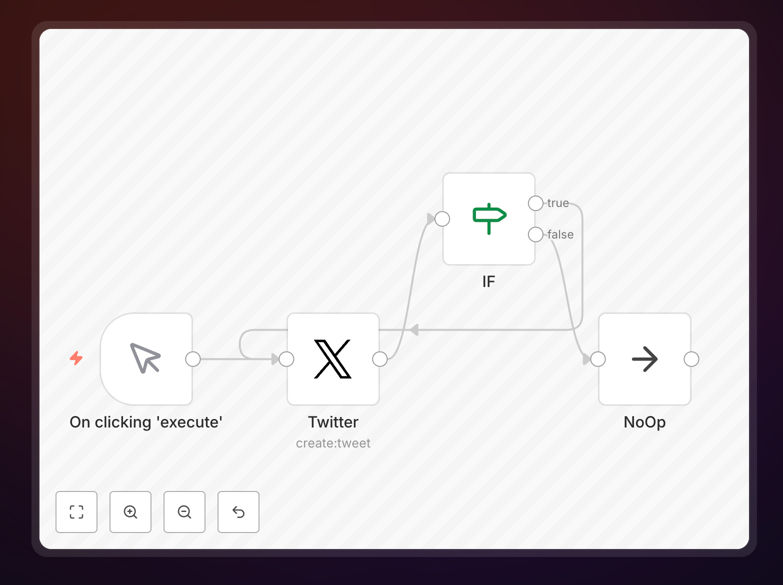
n8n workflow diagram showing a loop with a conditional check using $runIndex expression

What This Workflow Does

This template solves a critical problem in automation: preventing infinite loops that can crash systems and disrupt business operations. When building automations that process multiple items or repeat actions, it's easy to accidentally create a loop that runs forever, consuming server resources and causing failures.

The workflow demonstrates how to use n8n's $runIndex expression to add a smart exit condition. It creates a controlled loop that executes a specific number of times (like sending 5 notifications or processing 10 records) then safely stops. This approach gives you the power of repetition without the risk of runaway processes.

Businesses use this pattern for batch operations, scheduled tasks, and any automation where you need to repeat an action but maintain complete control over execution limits. It's the difference between an automation that works reliably in production versus one that might fail unpredictably.

How It Works

The template implements a simple yet powerful pattern that you can adapt to countless business scenarios.

Step 1: Initialize the Loop

The workflow starts with a trigger or manual execution. It sets up the initial conditions and prepares to enter the repetitive processing phase. Think of this as loading your customer list or preparing your batch of data.

Step 2: Check the Run Index

Before each iteration, the workflow evaluates the $runIndex expression. This built-in n8n variable automatically tracks how many times the current execution path has run. The conditional check compares this value against your maximum limit.

Step 3: Execute or Exit

If the run index is below your threshold, the workflow proceeds with the business logic—sending an email, updating a record, or processing data. If the threshold is reached, the workflow takes the exit path and completes successfully.

Step 4: Loop Back or Complete

After successful execution, the workflow either loops back for another iteration or proceeds to completion tasks like sending success notifications, logging results, or triggering downstream processes.

Who This Is For

This template is essential for any business using automation for repetitive tasks. Marketing teams running batch campaigns, operations teams processing daily transactions, support teams sending follow-up communications, and development teams managing data synchronization will all benefit from controlled loops.

If you've ever worried about an automation running too long or consuming too many API calls, this pattern provides the safety net you need. It's particularly valuable for businesses scaling their automation efforts where reliability becomes as important as functionality.

What You'll Need

  1. An n8n instance (cloud or self-hosted)
  2. Basic understanding of workflow concepts in n8n
  3. A specific use case involving repetitive actions
  4. Knowledge of your system's limits (API rate limits, processing capacity)
  5. Test environment to validate loop behavior before production

Pro tip: Always test loop limits with small numbers first. Start with 2-3 iterations to verify the exit condition works, then scale up to your production number. This prevents accidental resource consumption during development.

Quick Setup Guide

  1. Download the template using the button above
  2. Import the JSON file into your n8n instance
  3. Examine the IF node to understand the $runIndex condition
  4. Replace the example action (like the Twitter node) with your own business logic
  5. Adjust the maximum loop count based on your needs
  6. Test with a small limit first, then deploy to production

Key Benefits

Prevents System Overload: Infinite loops can crash servers and disrupt operations. This template ensures your automations respect resource limits and complete predictably.

Maintains API Compliance: Many services have rate limits. Controlled loops help you stay within these limits while still processing the data you need.

Enables Batch Processing: Process large datasets in manageable chunks without manual intervention. The automation handles the repetition while you focus on results.

Improves Reliability: Automations with proper exit conditions are more trustworthy in production environments. Teams can deploy them with confidence knowing they won't run amok.

Saves Development Time: Instead of building custom loop logic for every automation, use this proven pattern as a starting point for any repetitive task.

Frequently Asked Questions

Common questions about loop control and automation reliability

An infinite loop occurs when an automation workflow runs continuously without a stopping condition, consuming server resources, causing timeouts, and potentially leading to failed processes or API rate limit violations. In business automation, this can disrupt critical operations like data syncing, notification systems, or batch processing.

For example, a customer notification system stuck in an infinite loop might send thousands of duplicate emails, damaging customer relationships and potentially violating spam regulations. Proper loop controls prevent these scenarios while maintaining automation benefits.

The $runIndex expression tracks how many times a loop or workflow has executed. By checking this value against a maximum limit (like 5 or 10), you can create a safe exit condition. This prevents runaway automations while still allowing repetitive tasks to complete successfully.

This approach is particularly useful for batch operations where you need to process multiple items but want to ensure the automation stops after a reasonable number. It's like having a built-in safety valve that activates after a predetermined count, protecting your systems and external services.

Common use cases include sending follow-up emails to a limited list of customers, processing daily report batches, syncing a specific number of records between systems, generating weekly invoices in batches, and updating social media posts on a schedule.

For instance, an e-commerce business might use controlled loops to process overnight order exports to their accounting system, ensuring all transactions are captured without overloading either system. The loop runs until all orders are processed or reaches a safety limit.

Consider your API rate limits, processing time per item, and business requirements. Start with conservative limits (5-10 iterations) for testing. For production, calculate based on your system's capacity and the time window available.

Always include error handling and logging to monitor loop performance and adjust as needed. If you're processing customer data with a 1000-record limit from your CRM API, set your loop limit slightly below that threshold to account for any unexpected duplicates or retries.

Yes, you can combine $runIndex checks with data-based conditions. For example, you might loop through customer records but stop after 10 iterations OR when you encounter a specific status flag. This creates sophisticated automations that respect both quantitative limits and qualitative business rules.

This hybrid approach allows for more intelligent processing. A support ticket automation could process tickets until it either reaches 50 tickets (loop limit) or encounters a high-priority ticket that requires immediate human attention (data condition).

Adding proper loop controls improves performance by preventing resource exhaustion. Without controls, infinite loops can crash servers or trigger cloud platform throttling. With controls, you ensure predictable execution times and resource usage.

This makes your automations more reliable and easier to monitor in production environments. You can accurately estimate completion times, allocate appropriate resources, and set realistic service level agreements for automated processes.

Yes, GrowwStacks specializes in building custom automation solutions with proper loop controls for specific business needs. Whether you need batch processing for customer onboarding, controlled API calls to external services, or scheduled data synchronization with exit conditions, our team can design and implement robust automations.

We work with you to understand your unique requirements, implement appropriate safety measures, and deliver automation systems that work reliably at scale. From simple repetitive tasks to complex multi-system integrations with multiple exit conditions, we ensure your automations are both powerful and safe.

  • Tailored to your specific systems and workflows
  • Built with production reliability in mind
  • Includes monitoring and alerting for loop performance

Need a Custom Loop Automation?

This free template is a starting point. Our team builds fully tailored automation systems with proper loop controls for your specific business needs.