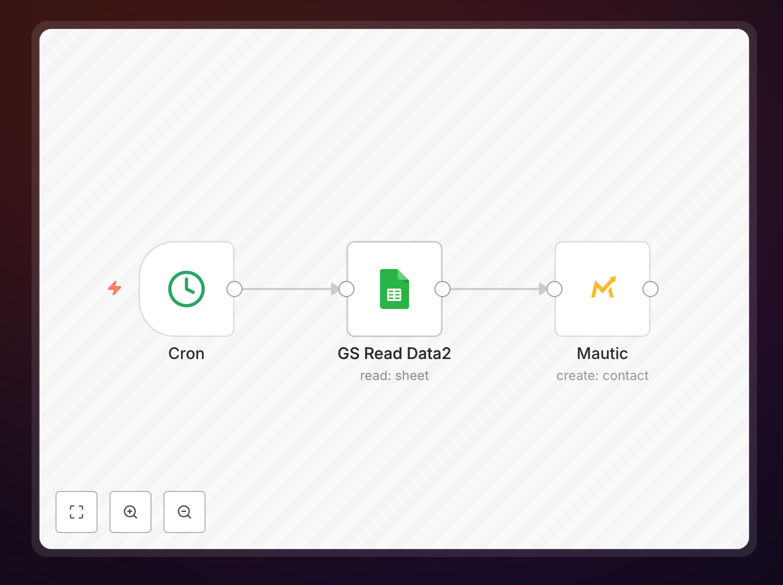
What This Workflow Does
This automation solves the common problem of manually transferring lead information from Google Sheets to your Mautic marketing automation platform. Every time a new lead is added to your Google Sheet (from forms, imports, or manual entries), this workflow automatically creates or updates the corresponding contact in Mautic.
The solution eliminates copy-paste work and ensures your marketing automation system always has the latest lead data. It's particularly valuable for businesses collecting leads through multiple channels that need centralized contact management in Mautic for email campaigns, lead scoring, and marketing automation.
How It Works
1. Trigger: New row in Google Sheet
The workflow monitors your specified Google Sheet for new rows containing lead information. It can be configured to watch specific columns for name, email, and other contact details.
2. Data processing
The workflow extracts the relevant contact information from the sheet row and formats it appropriately for Mautic's API requirements. This includes proper field mapping between your sheet columns and Mautic contact fields.
3. Create/update Mautic contact
The workflow checks if the contact already exists in Mautic (based on email address) and either updates the existing record or creates a new one. This prevents duplicate contacts while ensuring all information stays current.
Who This Is For
This automation is ideal for marketing teams, sales teams, and business owners who:
- Collect leads through Google Forms or other sources that feed into Sheets
- Use Mautic for marketing automation and email campaigns
- Want to eliminate manual data entry between systems
- Need real-time contact updates in their marketing platform
What You'll Need
- A Google Sheet with lead data (minimum columns: name and email)
- Mautic account with API access enabled
- n8n account or self-hosted instance
- Google service account credentials for API access
Quick Setup Guide
- Download the template file
- Import into your n8n instance
- Connect your Google Sheets account
- Configure your sheet ID and tab name
- Connect your Mautic account
- Map sheet columns to Mautic contact fields
- Test with sample data
- Activate the workflow
Key Benefits
Eliminate manual data entry - Save 5-15 minutes per lead by automatically syncing information instead of copying and pasting between systems.
Reduce human error - Automated transfers prevent typos and missed entries that commonly occur with manual processes.
Real-time contact updates - Leads enter your marketing automation system immediately, allowing faster follow-up and nurturing.
Centralized contact management - All leads flow into Mautic regardless of their original source, giving you a single customer view.